

Key Trading Keypads: Best Picks for Active Traders
For active U.S. traders who need fast, reliable physical order entry, the Key-Trade Professional Trading Keyboard is the top pick. It pairs programmable hotkeys with platform-grade integrations across TradingView, MetaTrader 4 & 5, cTrader, NinjaTrader, Thinkorswim, Tradovate, and SierraChart, ships worldwide with U.S. support, and requires no technical background to set up.
Quick shortlist for U.S. buyers:
- Key-Trade Professional Trading Keyboard — Best for active retail traders, prop desks, and multi-platform traders who need low-latency hardware with comprehensive platform coverage and U.S. shipping.
- Magic Keys V3 — Best for traders who want a handheld device with an on-device lot-size calculator and automatic protective triggers, without committing to a full desktop keypad.
Table of Contents
- How do the top trading keypads compare?
- Magic Keys V3 and other notable devices
- Deep dive: Key-Trade Professional Trading Keyboard
- How do you choose the right trading keypad for your setup?
- How do you connect a trading keypad to TradingView, MT4/5, and other platforms?
- Key Takeaways
- What most traders get wrong about trading hardware
- The Key-Trade keyboard is ready to ship to U.S. traders
- Useful sources
- FAQ
How do the top trading keypads compare?
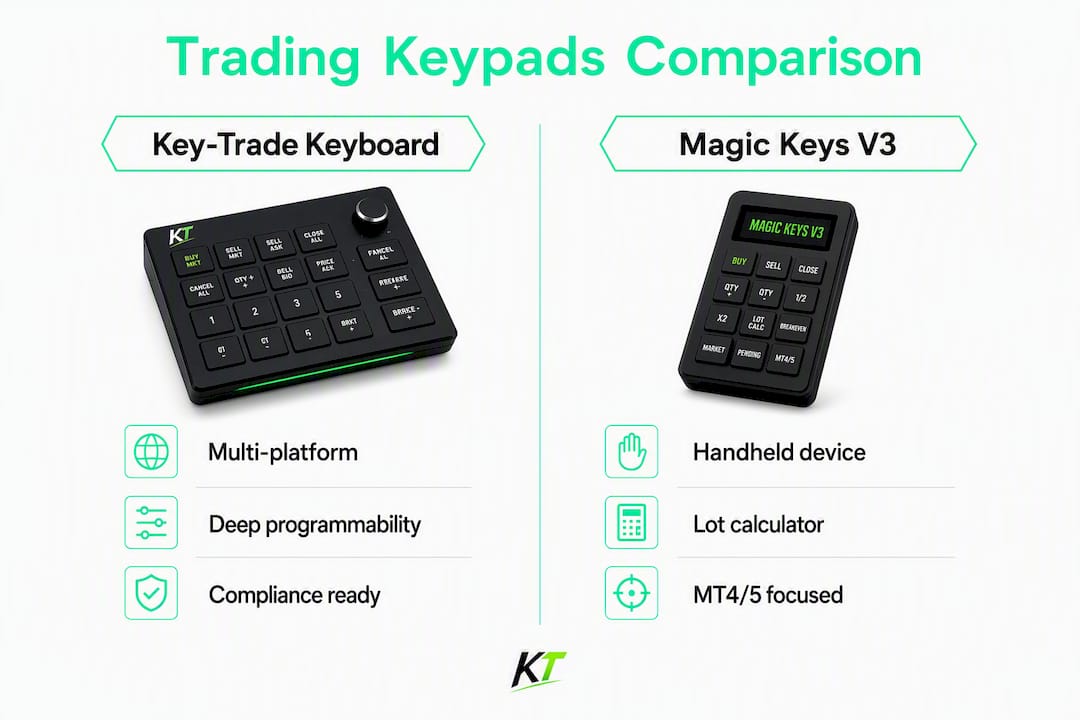
The two dimensions that actually change a buying decision are platform compatibility and programmability depth. A device that works on TradingView but not NinjaTrader is useless to a multi-platform trader. One that supports hotkeys but not partial-close macros leaves a scalper clicking through menus mid-trade.
| Feature | Key-Trade Professional Trading Keyboard | Magic Keys V3 |
|---|---|---|
| Best for | Multi-platform active traders, prop desks, scalpers | Handheld lot-sizing and quick protective triggers |
| Form factor | Desktop keypad (pro build) | Handheld mini device |
| Platform compatibility | TradingView, MT4/5, cTrader, NinjaTrader, Thinkorswim, Tradovate, SierraChart | MT4/5 (primary); check vendor for others |
| Programmability / macros | Full programmable buttons: partial close, lot presets, break-even stop, SL/TP mod, order reversal, scaling | Lot-size calculator, automatic triggers |
| Extras | Bundled software add-ons, customizable settings | On-device lot-size automation |
| Support, warranty & US shipping | Worldwide shipping, setup guides, technical support | Check vendor site for US shipping details |
Platform compatibility is the decisive column here. If you trade across more than one platform, the Key-Trade keyboard’s breadth of integrations covers scenarios the Magic Keys V3 simply wasn’t designed for. Magic Keys V3 earns its place for traders whose primary need is fast, handheld lot-sizing on MT4/5, not full-desk order routing.
Magic Keys V3 and other notable devices
Magic Keys V3
Magic Keys V3 is a handheld device built around one specific problem: getting your lot size right, fast, without opening a calculator or switching windows. Its on-device lot-size calculator computes position size automatically, and its automatic trigger feature can set protective stops the moment a trade is placed.
Strengths:
- On-device lot-size calculation with no external software required
- Automatic trigger for trade protection (stops, targets)
- Compact, handheld form factor suited to traders who prefer a secondary device alongside their main setup
Limitations:
- Platform compatibility is narrower than a full desktop keypad
- No documented partial-close macro depth or multi-step order management sequences
- Shipping and warranty details for U.S. buyers are not prominently listed on the product page
Who should consider it: Traders on MT4/5 who want a dedicated handheld tool for position sizing and quick protective triggers. It works as a complement to a primary setup, not a replacement for a full trading keyboard.

Deep dive: Key-Trade Professional Trading Keyboard
The Key-Trade Professional Trading Keyboard was built for traders who lose money not because their analysis is wrong, but because their execution is slow. Every button on the device maps to a specific trading action, and the bundled software add-ons handle the platform-side communication so you don’t need to write scripts or configure APIs.

What the programmable buttons actually do
The keyboard’s programmability goes well beyond basic hotkeys. You can assign:
- Partial close at a defined percentage of your position with one button press
- Lot-size presets so you never manually type a size during a live trade
- Break-even stop that moves your stop-loss to entry the moment you press it
- SL/TP modification to adjust risk parameters without opening a dialog box
- Order reversal to flip a position instantly
- Scaling out across multiple price levels with pre-mapped buttons
For a scalper running 20-second trades on NinjaTrader or cTrader, the difference between clicking through a menu and pressing one button is the difference between a clean exit and a slipped fill.
Platform integrations in practice
The keyboard integrates with TradingView, MetaTrader 4 and 5, cTrader, NinjaTrader, Thinkorswim, Tradovate, and SierraChart. Each integration uses the platform’s native order-entry layer, which means the keypad behaves like a fast keyboard shortcut rather than a third-party overlay. On TradingView, you can map a button to execute a bracket order at your preset risk. On MT5, partial-close and lot-preset buttons work with the platform’s standard order types. For a deeper look at MT5 keypad integration, Key-Trade’s own guide covers the setup sequence in detail.
Pro Tip: Map your most-used partial-close percentage to the button closest to your dominant hand. In fast markets, muscle memory beats conscious thought every time.
Warranty, shipping, and setup support
Key-Trade ships worldwide, including to U.S. buyers. The product pages include setup guides and technical support access, so you’re not troubleshooting alone if something doesn’t map correctly on first install. Returns and warranty terms are listed on the product page; check the U.S. product listing for current shipping timelines and return policy details before purchasing.
Who should buy it:
- Prop desk traders who need consistent, repeatable execution across multiple accounts
- Active retail scalpers running tight risk parameters on TradingView or MT4/5
- Multi-platform traders who switch between NinjaTrader, cTrader, and Thinkorswim and need one device that works across all of them
How do you choose the right trading keypad for your setup?
The wrong keypad doesn’t just waste money. It slows you down at the exact moment speed matters most. Work through this checklist before committing.
Evaluation criteria (in order of importance)
- Platform compatibility — Confirm the device works with every platform you actively trade on, not just the one you use most. Ask for a documented compatibility list, not a marketing claim.
- Macro depth — Can you program partial closes, lot presets, and multi-step sequences? Basic hotkeys are table stakes; partial-close and break-even macros separate professional tools from accessories.
- Input latency — The device should register button presses in milliseconds. USB wired connections are more reliable than wireless for order entry; avoid Bluetooth-only devices for live trading.
- Build quality and durability — A keypad used dozens of times per session needs physical switches rated for high-cycle use. Ask about switch type and rated lifespan.
- Software update cadence — Platforms update their APIs. A keypad whose software hasn’t been updated in 18 months may break the next time TradingView or NinjaTrader pushes a change.
- Support and warranty — What happens if a button stops registering? Is there a replacement policy? Is support reachable before and after purchase?
- U.S. shipping timeline — If you’re buying from an international vendor, confirm estimated delivery to your state and whether duties are included in the listed price.
- Return policy — A 30-day return window is the minimum reasonable standard for hardware you need to test in a live environment.
Questions to ask before you buy
- What platforms are officially supported, and do you have documentation for each?
- What is the firmware update policy, and how are updates delivered?
- What is the return window, and does it cover hardware defects separately from buyer’s remorse?
- What are the estimated shipping times to the U.S., and are import duties included?
- Is there a demo mode or trial period to test macro behavior before committing?
Red flags to avoid
- No documented platform integration list (marketing copy only)
- Warranty terms that exclude software or firmware issues
- No stated update or support policy after purchase
- Vague return policy (“contact us for returns”) with no defined window
- Wireless-only connectivity for a device marketed for live order execution
For traders optimizing their full platform workflow, the cTrader platform efficiency checklist is worth reviewing alongside any hardware purchase decision.
How do you connect a trading keypad to TradingView, MT4/5, and other platforms?
Setup is straightforward on every major platform, but each one has a slightly different integration path. Here’s what to expect.
TradingView
TradingView’s order panel supports keyboard shortcuts natively. After installing the Key-Trade software add-on, you map each physical button to a TradingView hotkey. Bracket orders, partial closes, and position flips all work through the platform’s standard shortcut layer. For a full breakdown of available TradingView trade management tools, Key-Trade’s guide covers every mappable action.
MetaTrader 4 and MetaTrader 5
MT4 and MT5 both support external input devices through their scripting layer. The Key-Trade add-on installs as a script or EA component that listens for button signals and translates them into MT4/5 order commands. Lot-size presets and partial-close macros work through this layer without requiring custom MQL code.
cTrader
cTrader’s cAlgo framework allows external device inputs to trigger order actions. The Key-Trade integration maps buttons to cTrader’s native trade management functions, including partial close and SL/TP modification. The cTrader trade management guide covers the full feature set available through this integration.
NinjaTrader
NinjaTrader supports external hardware through its ATM (Advanced Trade Management) strategy layer. Button presses trigger ATM actions, which means your partial-close sequences and bracket orders execute through NinjaTrader’s native risk controls rather than a third-party overlay.
Thinkorswim and Tradovate
Both platforms support hotkey-based order entry. The Key-Trade keyboard maps to each platform’s shortcut system; setup involves assigning the physical buttons in the Key-Trade software, then confirming the corresponding hotkeys are active in the platform’s settings panel.
Pro Tip: After mapping your buttons, run a full test sequence on a paper trading or demo account before going live. Test every macro, including partial close and break-even stop, under simulated market conditions.
For U.S. traders concerned about compliant execution setups, Key-Trade’s compliance-friendly trade execution guide covers the relevant considerations.
Key Takeaways
The Key-Trade Professional Trading Keyboard is the strongest choice for active U.S. traders who need multi-platform coverage, programmable macros, and reliable hardware with documented support and U.S. shipping.
| Point | Details |
|---|---|
| Platform compatibility is non-negotiable | Confirm your exact platforms are officially supported before purchasing any trading keypad. |
| Macro depth separates tools from accessories | Partial-close, break-even stop, and lot-preset macros are what distinguish professional keypads from basic hotkey devices. |
| USB wired beats wireless for live trading | Wired connections deliver more consistent low-latency input than Bluetooth for order execution. |
| Verify warranty and U.S. shipping terms | Check return windows, duty inclusion, and estimated delivery to your state before checkout. |
| Key-trade leads on multi-platform coverage | The Key-Trade Professional Trading Keyboard supports TradingView, MT4/5, cTrader, NinjaTrader, Thinkorswim, Tradovate, and SierraChart in one device. |
What most traders get wrong about trading hardware
Most traders who dismiss physical trading keypads have never used one in a live scalping session. They assume the speed difference is marginal, that a keyboard shortcut or mouse click is fast enough. It isn’t, and the reason isn’t reflexes. It’s cognitive load.
When you’re managing a position in a fast market, every decision you make competes for the same mental bandwidth. Clicking through a menu to execute a partial close isn’t just slow in milliseconds. It forces a context switch at exactly the moment your attention should be on price action. A physical button mapped to a single action removes that switch entirely.
The other thing traders underestimate is consistency. A macro that executes a partial close at exactly 50% of your position, every time, with one button press, is more reliable than a manual calculation under pressure. Hardware doesn’t get nervous. It doesn’t mistype a lot size at 2 AM during a volatile session.
The argument against hardware keypads usually comes down to cost. That’s a legitimate consideration, but it’s worth framing correctly: a single bad partial-close execution, or a mistyped lot size on a live trade, can cost more than the device itself. The question isn’t whether the hardware is worth the price. It’s whether your current execution method is costing you more than you realize.
The Key-Trade keyboard is ready to ship to U.S. traders

If you’ve worked through this guide and your setup involves TradingView, MT4/5, cTrader, NinjaTrader, Thinkorswim, or Tradovate, the Key-Trade Professional Trading Keyboard covers all of them from one device. No custom scripting, no developer required. Plug it in, install the add-on, map your buttons, and you’re live.
Key-trade ships worldwide, including to U.S. buyers, with setup guides and technical support included. The product page lists current pricing, shipping timelines to the U.S., and return terms. For prop desk purchases or custom configurations, the support team handles pre-sale questions directly; consider also professional FX services for managing currency risk effectively to optimize your overall trading workflow.
Visit the Key-Trade trading keyboard product page to check availability, review full specs, and complete your purchase.
Useful sources
The claims in this article about product features, platform compatibility, and shipping are drawn from the following primary sources.
| Source | What it verifies |
|---|---|
| Key-Trade Trading Keyboard (EN) | Product specs, platform compatibility list, U.S. shipping info, support documentation |
| Key-Trade Professional Trading Keyboard | Alternate product page; programmable features, warranty, and checkout flow |
| Magic Keys V3 | Magic Keys product description: lot-size calculator, automatic triggers, form factor |
| Key-trade MagicKeys alternatives guide | Hardware and software alternatives to Magic Keys; supports comparison section |
| Diffie–Hellman key exchange — Wikipedia | Clarifies that “key exchange” in cryptography is unrelated to trading hardware |
| TF2 Key Trading — Stash.TF | Clarifies that virtual “key trading” in gaming markets is unrelated to physical trading keypads |
Verification note: Product feature claims (programmable buttons, partial close, lot presets, platform integrations) are sourced from Key-Trade’s own product pages. Magic Keys V3 feature claims are sourced from the Magic Keys product page. Disambiguation notes in the FAQ draw on the Wikipedia and Stash.TF sources above.
FAQ
What is key trading in the context of financial markets?
In financial trading, “key trading” most commonly refers to using a physical trading keypad or keyboard device to execute orders faster and with greater precision. The term can also appear in unrelated contexts: virtual key trading in gaming markets (like TF2 Mann Co. keys), automotive businesses, and cryptographic key exchange protocols, none of which involve financial order execution hardware.
What are Magic Keys for trading?
Magic Keys V3 is a handheld trading device with an on-device lot-size calculator and automatic trigger features for trade protection. It’s designed for traders who want quick position-sizing automation on MT4/5 without a full desktop keypad setup.
What platforms does the Key-Trade keyboard support?
The Key-Trade Professional Trading Keyboard supports TradingView, MetaTrader 4 and 5, cTrader, NinjaTrader, Thinkorswim, Tradovate, and SierraChart, with more platforms in development.
Is “key exchange” the same as trading keypads?
No. Key exchange (KEX) is a cryptographic method for securely sharing encryption keys between parties. It has no connection to physical trading keypads or financial order execution.
How long does Key-Trade take to ship to the U.S.?
Key-trade ships worldwide, including to U.S. buyers. Exact delivery timelines and any applicable shipping costs are listed on the product page at checkout; check there for current estimates before ordering.
Recommended
- External Trading Keypads for MT5: Speed and Accuracy – Key-Trade Trading Keyboards
- Best magickeys.trade Alternatives for Forex Traders in 2026 – Key-Trade Trading Keyboards
- Top 6 tradekey.com Alternatives for 2026 – Key-Trade Trading Keyboards
- Trading Input Devices for Active Traders: A Full Guide – Key-Trade Trading Keyboards