

Trading Input Devices for Active Traders: A Full Guide
TL;DR:
- Trading input devices are purpose-built hardware that enable traders to execute orders faster and more accurately than standard peripherals. They help reduce errors and improve response times during volatile markets by providing tactile, reliable controls mapped directly to trading commands.
A trading input device is specialized hardware that lets traders execute orders, manage positions, and control charts faster and more accurately than standard keyboards or mice allow. The industry term for this category is “trading peripheral,” though traders and hardware vendors use both terms interchangeably. The core function is the same: reduce the time and effort between a trading decision and its execution. Traders using mechanical keyboards achieve approximately 15% faster response times compared to membrane keyboards and traditional mouse setups. That speed gap comes from custom hotkeys that eliminate multi-step menu navigation for actions like buy, sell, and stop-loss adjustment. Key-trade builds its entire product line around this principle, designing physical keypads that connect directly to platforms like TradingView, MetaTrader 4 and 5, cTrader, NinjaTrader, and Tradovate.
What is a trading input device and why does it matter?
A trading input device is any hardware tool mapped specifically to trading commands, replacing generic computer peripherals with purpose-built controls. Standard keyboards and mice were designed for office productivity. Trading demands something different: instant, repeatable, error-free execution under pressure.
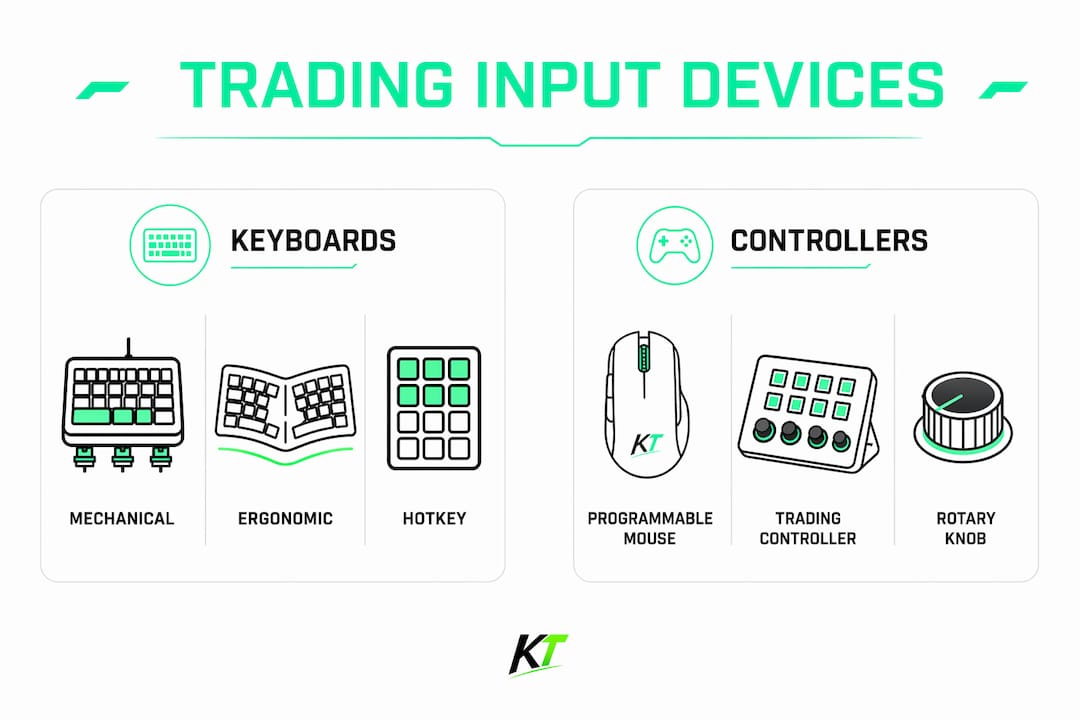
The category covers three main device types. Mechanical keyboards give traders tactile, reliable key actuation for hotkey-driven order entry. Programmable mice add side buttons for quick command execution across multiple monitors. Dedicated trading controllers, like compact keypads with programmable buttons and rotary dials, handle specific trading functions without touching a keyboard at all.
Mapping trades to physical keys preserves market focus. When your hands know exactly where the “close position” button is, your eyes stay on the price chart. That single benefit explains why professional prop trading firms invest in specialized hardware rather than relying on off-the-shelf peripherals.
The trading equipment overview for a professional desk almost always includes at least one specialized input device. The difference between a generic setup and a purpose-built one shows up most clearly during fast markets, where every second of hesitation has a dollar cost.
What are the main types of trading input devices?
Trading peripherals fall into three categories, each serving a distinct role in the trading workflow.
Mechanical keyboards
Mechanical keyboards use individual switches under each key, rated for 50+ million actuations, which matters because active traders log tens of thousands of keystrokes monthly. That durability prevents intermittent failures during critical market events. Traders typically assign hotkeys for buy, sell, flatten, and bracket orders directly to keyboard shortcuts, cutting order entry to a single keystroke.

Programmable trading mice
Professional-grade trading mice feature 8–12 programmable buttons with onboard memory and DPI settings built for multi-monitor setups. Sub-2ms wireless latency or wired connections give instantaneous command registration. The mouse is not a secondary tool. It is the direct interface between a trader’s decision and the platform, and eliminating friction there accelerates execution in ways that software alone cannot replicate.
Dedicated trading controllers
Dedicated controllers take specialization further. These compact devices combine programmable mechanical keys with rotary dials mapped to specific trading actions: instant market buys, chart switching, position sizing, and risk management controls. They integrate with major platforms and let traders execute complex sequences without touching a standard keyboard or mouse. Key-trade’s trading keypads operate on this principle, connecting physical buttons directly to platform commands across live and prop trading accounts.
Pro Tip: Start with one dedicated controller for your most frequent actions, such as entry and exit, before adding more devices. Overloading your setup with too many peripherals at once creates confusion rather than speed.
| Device type | Primary function | Best for |
|---|---|---|
| Mechanical keyboard | Hotkey order entry and chart control | All trading styles |
| Programmable mouse | Quick command execution, multi-monitor navigation | Swing and day traders |
| Dedicated trading controller | Mapped trading actions, risk management | Active and prop traders |
How do trading input devices improve speed and accuracy?
Speed and accuracy in trading are not just about reaction time. They are about removing every unnecessary step between a decision and its execution.
Effective input device setup reduces cognitive load during volatile sessions, which directly lowers the chance of costly execution errors. When a trader has to navigate a software menu to close a position, attention splits between the chart and the interface. A dedicated button eliminates that split entirely.
The specific improvements traders gain from specialized peripherals include:
- Latency reduction. Wired connections and onboard processing keep command registration under 2ms, which matters during news events and fast-moving markets.
- Error prevention. Tactile feedback from mechanical switches builds muscle memory. Traders learn the feel of each key and stop looking at their hands.
- Focus preservation. Physical keys mapped to trade commands mean eyes stay on price action and depth-of-market windows, not on software menus.
- Consistent execution. Onboard memory stores key mappings on the device itself, so hotkeys work identically whether a trader is on their main workstation or a remote VPS.
The “fat-finger” error, placing the wrong order size or hitting the wrong direction, is one of the most expensive mistakes in active trading. Linear mechanical switches reduce this risk because they have no tactile bump that might catch a key halfway during a rapid sequence. The key either registers fully or it does not.
Well-designed hotkey maps also support faster decision-making under stress. When the physical layout matches the mental model of a trading workflow, execution becomes automatic. That automaticity is what separates traders who freeze in volatile markets from those who act with confidence.
What features should traders look for when choosing a trading input device?
Selecting a trading peripheral should focus on reducing execution errors and cognitive load, not on personal preference for feel alone. The right device for a scalper differs from the right device for a swing trader.
-
Switch type. Linear mechanical switches suit traders who execute rapid sequences. They register cleanly without the tactile bump that can cause accidental triggers during fast order entry. Tactile switches work better for traders who want physical confirmation of each keystroke.
-
Programmable buttons with onboard memory. Onboard memory stores hotkey configurations directly on the device. This means key mappings survive software reinstalls, machine changes, and VPS sessions without reconfiguration.
-
Button count and layout. Most traders effectively use 3–6 programmable buttons beyond standard clicks under stress. Excess buttons create confusion rather than speed. Tactile differentiation between buttons, through shape, texture, or spacing, prevents misclicks during high-pressure moments.
-
Durability. Switches rated for 50+ million actuations handle the volume of keystrokes that active trading generates. Cheap switches fail at the worst possible moment.
-
Platform compatibility. The device must integrate with the platforms a trader actually uses. Key-trade’s keypads support TradingView, MetaTrader 4 and 5, cTrader, NinjaTrader, SierraChart, Thinkorswim, and Tradovate, covering the most common professional environments.
-
Ergonomics and desk layout. Compact tenkeyless keyboards save desk space. Many professional traders add an external numpad to retain rapid price targeting without a full-size keyboard footprint.
Pro Tip: Test your hotkey layout during a paper trading session before going live. Muscle memory takes repetition to build, and discovering a layout flaw during a real trade is expensive.
How to integrate trading input devices into your setup effectively
Getting the hardware right is only half the job. Configuration and positioning determine whether a device actually improves performance or just adds clutter to a desk.
The most effective integration follows a clear sequence. First, identify the five to ten trading actions you perform most frequently: entry, exit, stop-loss adjustment, break-even move, partial close, and chart timeframe switching are common starting points. Map those actions to physical keys before assigning anything else.
Key configuration practices that experienced traders rely on include:
- Group related functions spatially. Place entry and exit buttons next to each other. Put risk management controls, like stop-loss and break-even, in a separate cluster. Physical grouping reinforces muscle memory.
- Use vendor or open-source software for initial mapping, then save to onboard memory. Open-source programmable controllers allow full customization of keys and dials, including integration with AI-assisted trading workflows. Once mapped, saving to onboard memory removes software dependency during live sessions.
- Position devices for zero-reach access. The controller or keypad should sit within natural hand reach without requiring a trader to shift posture. Awkward positioning slows execution and causes fatigue during long sessions.
- Combine devices for complete coverage. A compact keyboard paired with a dedicated trading controller covers both general platform navigation and specific trade execution. Many traders add an external numpad for rapid numerical input without a full-size keyboard.
- Schedule firmware updates outside market hours. Updates can temporarily interrupt device function. Running them during off-hours prevents disruption during volatile sessions.
The goal of integration is a setup where execution feels automatic. When a trader can close a position or move a stop without conscious thought about which button to press, the hardware is doing its job.
Key Takeaways
A trading input device is the most direct hardware upgrade a trader can make to reduce execution errors and improve response speed in live markets.
| Point | Details |
|---|---|
| Definition matters | A trading input device is purpose-built hardware that maps physical controls to trading commands. |
| Speed advantage | Mechanical setups deliver approximately 15% faster response times than standard membrane keyboards. |
| Switch selection | Linear switches reduce accidental triggers during rapid order sequences better than tactile switches. |
| Button discipline | Most traders perform best with 3–6 programmable buttons; more creates confusion under stress. |
| Onboard memory | Storing key maps on the device itself preserves hotkey function across machines and VPS sessions. |
The hardware edge most traders overlook
Traders spend hours refining entry signals and risk models, then execute those decisions on a $20 keyboard. That disconnect is the most common and most expensive mistake I see in active trading setups.
The argument against specialized hardware usually sounds like this: “My strategy is what matters, not my keyboard.” That logic holds until a fast market forces a rapid exit and a menu click costs two seconds and $300. Hardware does not replace skill. It removes the friction that prevents skill from expressing itself cleanly.
What I have found working with traders across different styles is that the biggest gains from better input devices come not from raw speed but from confidence. When a trader knows their exit button works every time, they hold positions with more discipline. They do not exit early out of anxiety about execution. That psychological benefit is real and it compounds over time.
The next wave of trading peripherals will include modular controllers where individual button clusters can be swapped for different trading sessions, and tighter integration with AI-assisted order management. The physical button is not going away. If anything, as platforms grow more complex, the case for dedicated hardware controls gets stronger.
My recommendation: start with one well-configured device, master it completely, then expand. A single keypad mapped to your ten most critical actions will outperform a cluttered desk full of half-configured peripherals every time.
— Key-trade
Key-trade trading keyboards for serious traders
Traders who want to move from generic peripherals to purpose-built hardware have a direct path with Key-trade.

Key-trade’s professional trading keyboard uses fast mechanical switches and an ergonomic layout built for the demands of active trading sessions. Every key maps directly to trading commands across TradingView, MetaTrader 4 and 5, cTrader, NinjaTrader, SierraChart, Thinkorswim, and Tradovate. No technical knowledge is required to configure the device. Key-trade ships worldwide and supports both live and prop trading accounts. Traders looking to cut execution time and reduce costly errors can explore the full product lineup and find the setup that fits their trading style.
FAQ
What is a trading input device?
A trading input device is specialized hardware, such as a mechanical keyboard, programmable mouse, or dedicated trading controller, designed to execute trading commands faster and more accurately than standard peripherals. It maps physical buttons directly to platform actions like buy, sell, and stop-loss adjustment.
How do trading input devices reduce execution errors?
Tactile mechanical switches build muscle memory, so traders stop looking at their hands during order entry. Dedicated buttons eliminate multi-step software navigation, which removes the most common source of fat-finger errors during fast markets.
What switch type is best for active trading?
Linear mechanical switches are the preferred choice for active traders because they register cleanly without a tactile bump that can catch a key mid-press during rapid order sequences.
How many programmable buttons does a trader actually need?
Most traders perform best with 3–6 programmable buttons beyond standard mouse clicks. More buttons than that create confusion under stress and increase the risk of misclicks during volatile sessions.
Do trading input devices work with major trading platforms?
Yes. Purpose-built trading keypads and keyboards, including Key-trade’s devices, integrate with TradingView, MetaTrader 4 and 5, cTrader, NinjaTrader, SierraChart, Thinkorswim, and Tradovate, covering the most widely used professional trading environments.
Recommended
- 5 Hardware Trading Alternatives 2026 – Key-Trade Trading Keyboards
- cTrader Trade Management Features: Complete 2026 Guide – Key-Trade Trading Keyboards
- NinjaTrader Chart Trader: A Complete Guide for Traders – Key-Trade Trading Keyboards
- Top 6 tradekey.com Alternatives for 2026 – Key-Trade Trading Keyboards