

Best Lexx-Trade.com Alternatives for Pro Traders
TL;DR:
- Key-trade offers purpose-built trading keypads with platform-specific software add-ons, making it ideal for professional traders. Alternatives include high-button-count HID keypads, visual Stream Deck controllers, rugged industrial control pads, and compact macro hybrids, each suited to different trading needs. Choosing the right device depends on platform compatibility, ergonomic design, and reliability to reduce execution errors during high-pressure trading.
Key-trade is the top alternative for professional traders who need a low-latency, programmable hardware keypad with broad platform support across TradingView, MetaTrader 4/5, cTrader, NinjaTrader, SierraChart, Thinkorswim, and Tradovate. If you’re searching for lexx-trade.com alternatives, here is the short answer:
- Key-trade (recommended): purpose-built trading keypad with per-platform software add-ons, programmable buttons, and worldwide shipping including the US.
- Programmable HID keypads (X-keys–style): high button counts, onboard memory, durable build — strong for futures desks.
- Macro-pad / Stream Deck–style controllers: visual state display and folder pages work well as complements to a primary keypad, not replacements.
- Industrial control pads (Genovation ControlPad–style): rugged, tactile-differentiated keys, built for sustained heavy use.
- Compact numpad+macro hybrids (Koolertron-style): portable and affordable, but limited for manual quantity entry.
NexusFi’s workstation guidance makes the case plainly: correct hardware mapping and ergonomic layout reduce execution hesitation and error rates during sustained trading sessions. The device you choose matters less than how it maps your most critical safety actions.
Table of Contents
- What are the best lexx-trade.com alternatives for pro traders?
- How these alternatives were evaluated
- Key-trade and the practical alternatives, compared
- How to choose the right trading keypad for your desk
- Platform integration and setup for major trading platforms
- Price, US availability, shipping, and warranty
- Pro trader configuration tips to reduce execution errors
- Final recommendation and next steps
- Key Takeaways
- What the hardware market gets wrong about trading keypads
- Key-trade: built for traders who can’t afford a missed keypress
- FAQ
What are the best lexx-trade.com alternatives for pro traders?
| Best for | Platform compatibility | Button count & customizability | Latency / connection | Software integration | Price range (US) | US availability | Support & firmware |
|---|---|---|---|---|---|---|---|
| Key-trade — prop desks, active retail | TradingView, MT4/5, cTrader, NinjaTrader, SierraChart, Thinkorswim, Tradovate | Programmable per-platform; numpad options | USB wired; low-latency HID | Proprietary add-ons per platform; setup guides included | Mid–high | Ships worldwide, including US | Active support; firmware updates |
| Programmable HID keypads (X-keys–style) | Any platform accepting hotkeys | 24 keys; onboard memory | USB wired; HID standard | P.I. Engineering MacroWorks 3; AutoHotkey compatible | $150–$400 | US retail and direct | Driver updates; manufacturer support |
| Macro-pad / Stream Deck–style | Any platform; visual state via plugin | — | USB wired or wireless | Elgato Stream Deck software; plugin ecosystem | $50–$250 | Wide US retail | Active plugin community |
| Industrial control pads (Genovation ControlPad–style) | Any platform accepting hotkeys | 24–48 keys; fully programmable | USB wired | Genovation ControlPad Manager | $100–$300 | US direct and reseller | Firmware updates; US support |
| Compact numpad+macro hybrids (Koolertron-style) | Any platform accepting hotkeys | 24–48 keys; per-key macro | USB wired | Koolertron software; AutoHotkey compatible | $40–$120 | Wide US retail | Community support; limited firmware |
Strongest differentiators by category:
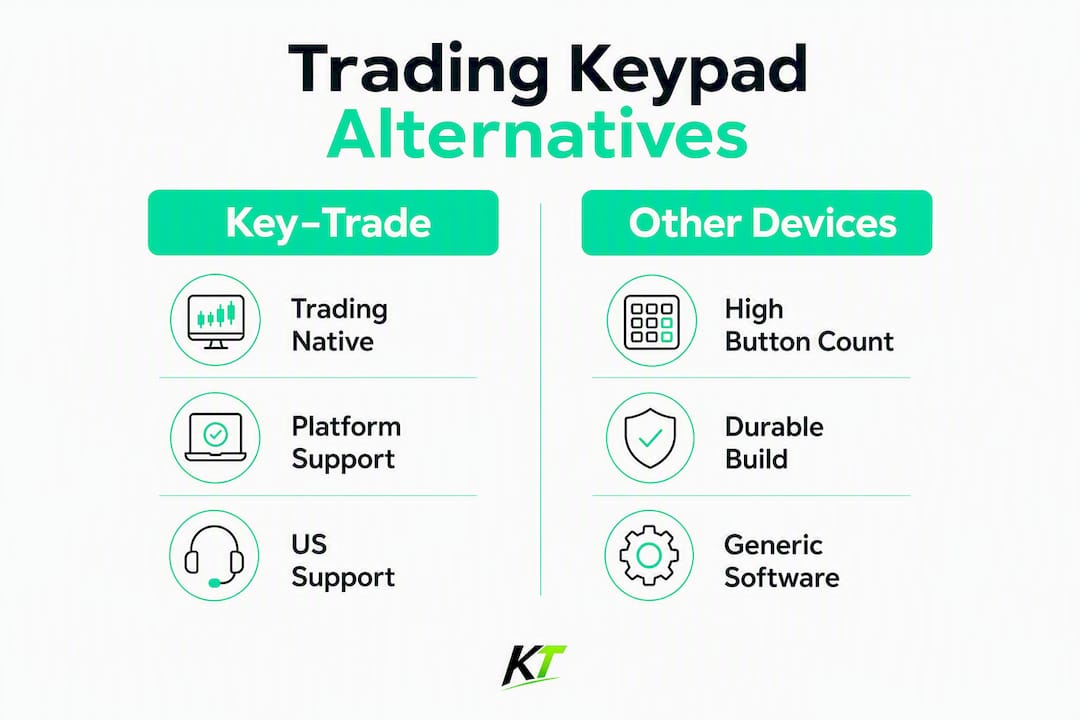
- Key-trade: the only option with platform-specific software add-ons built for trading workflows (not generic macro software).
- X-keys–style HID keypads: highest raw button count and onboard memory — no PC software required once programmed.
- Stream Deck–style: visual LCD per-key state is genuinely useful for multi-strategy setups; best as a secondary device.
- Genovation ControlPad: industrial-grade build quality; preferred where physical durability under heavy daily use is the priority.
- Koolertron-style hybrids: lowest entry price, but the compact layout limits manual lot-size entry speed.
How these alternatives were evaluated
The evaluation criteria, in priority order:
- Platform compatibility — verified support for TradingView, MT4/5, cTrader, NinjaTrader, SierraChart, Thinkorswim, and Tradovate.
- Hardware reliability and latency — USB wired connection preferred; HID-class devices register without driver overhead.
- Programmability and software maturity — quality of the mapping software, AutoHotkey compatibility, and onboard memory availability.
- Ergonomics and switch type — linear switches for rapid hotkeys, tactile options for differentiation on safety keys.
- Numpad availability — critical for traders who enter quantities manually rather than through hotkeys.
- Price, warranty, and US availability — devices must be purchasable and supportable in the US without import friction.
Sources used: Key-trade product documentation and platform integration guides, NexusFi infrastructure guidance, and platform-specific setup notes from Key-trade’s blog. Where traders rely on algorithmic overlays or no-code automation, QuantGenie’s no-code platform illustrates how API-driven workflows can change whether a trader needs hotkey mapping or deeper programmatic integration.
Pro Tip: Real-world button feel under stress matters more than spec-sheet actuation force. If possible, test the device for at least 30 minutes in a live SIM session before committing to a full desk rollout.
Key-trade and the practical alternatives, compared
Key-trade (recommended)
Key-trade is built specifically for traders, not repurposed from gaming or office hardware. Every device ships with platform-specific software add-ons covering TradingView, MT4/5, cTrader, NinjaTrader, SierraChart, Thinkorswim, and Tradovate. Buttons map directly to order actions: flatten, partial close, SL/TP modification, break-even, and order reversal. Setup guides are included, and the team provides technical support. Worldwide shipping covers US buyers, and the one-time purchase model means no subscription overhead.
Pros: Trading-native software; broad platform coverage; prop-desk ready; US shipping and support. Cons: Higher price point than generic alternatives; proprietary ecosystem. Typical US price: Mid-to-high range; check the Key-trade product page for current pricing.
Programmable HID keypads (X-keys–style, e.g., P.I. Engineering XBE-24 BEAR)
X-keys devices use standard HID protocol, which means the OS sees them as a keyboard with no latency overhead from custom drivers. The XBE-24 BEAR was co-designed with a professional trader and ships with 24 dedicated keys plus onboard memory. P.I. Engineering’s MacroWorks 3 software handles mapping, and the devices work with AutoHotkey for more complex sequences.

Pros: High button count; onboard memory; no proprietary driver required; durable build. Cons: Generic macro software — you build trading workflows yourself; no trading-specific add-ons. Typical US price: $150–$400 depending on model.
Macro-pad / Stream Deck–style controllers (e.g., Elgato Stream Deck)
The Stream Deck’s per-key LCD display is its real differentiator: you can show live state (position open, flat, risk level) via plugins. That visual feedback helps in multi-strategy setups. The tradeoff is that folder/page navigation adds cognitive load under pressure. Key-trade’s input device guide recommends limiting macro pages to 1–2 levels to avoid mode errors. Use a Stream Deck as a secondary device alongside a primary keypad, not as a standalone execution tool.
Pros: Visual per-key state; wide plugin ecosystem; affordable entry price. Cons: Page navigation creates mode-error risk; wireless variants add latency risk; not trading-native. Typical US price: $50–$250.
Industrial control pads (Genovation ControlPad–style)
Genovation’s CP-series devices are built for industrial environments: heavy-duty keycaps, fully programmable via ControlPad Manager, and available in 24–48 key configurations. The tactile differentiation between key zones is strong, which matters when you need to locate a flatten key without looking. These devices have been in commercial use since before trading macro pads became popular.
Pros: Industrial durability; strong tactile differentiation; US-based manufacturer support. Cons: Older software interface; less trading-specific documentation than Key-trade. Typical US price: $100–$300.
Compact numpad+macro hybrids (Koolertron-style)
Koolertron’s split keypads offer per-key macro programming in a compact form factor. At $40–$120, they’re the lowest-cost entry point. The limitation is practical: NexusFi recommends keeping a numpad for futures traders who type quantities manually, and a compact hybrid’s smaller key spacing slows that entry. Fine for a secondary hotkey layer; less suited as a primary execution device.
Pros: Low cost; portable; per-key macro support. Cons: Small key spacing; limited firmware support; not built for trading workflows. Typical US price: $40–$120.
How to choose the right trading keypad for your desk
- Confirm platform compatibility first. Ask the vendor for a verified compatibility list covering your exact platform version — not just “works with MT5” but which build and which add-on version.
- Decide on numpad or no numpad. If you enter lot sizes manually, keep a numpad. If every quantity is hotkey-driven, a compact layout works.
- Prioritize single-key access for safety actions. Flatten and cancel-all should never require a chorded keypress.
- Check onboard memory availability. If your trading PC locks down software installs (common on prop firm machines), onboard memory is non-negotiable.
- Ask about the firmware update policy. Devices that haven’t received firmware updates in two or more years carry platform-compatibility risk as brokers update their software.
Red flags to avoid:
- Firmware that requires a proprietary cloud connection to register hotkeys.
- Wireless-only devices with no wired fallback — wireless dropout during a live position is a serious risk.
- No per-key backlighting on safety-critical keys.
- Vendor documentation that lists platform compatibility without specifying the platform version tested.
Platform integration and setup for major trading platforms
Setup checklist (run this for every new device):
- Install the device driver or confirm HID-class recognition in Device Manager.
- Map flatten/cancel-all to the most physically accessible key — the one your index finger reaches without looking.
- Configure all remaining safety actions before mapping convenience shortcuts.
- Run a full SIM session for at least one trading day before going live.
- Test hotkey registration under different window-focus scenarios: chart focused, DOM focused, and order ticket open.
Platform-specific notes:
- TradingView: Hotkey registration depends on chart focus. If the browser window loses focus, keys may not register. Key-trade’s TradingView setup guide covers how to handle this reliably.
- MetaTrader 4/5: External keypads work via hotkey pass-through. Key-trade’s MT5 integration guide details recommended settings and EA compatibility.
- NinjaTrader: Window focus rules are strict. Key-trade’s NinjaTrader setup guide addresses the specific focus behaviors that affect key registration.
- cTrader: External hardware helps traders act on risk controls without waiting on broker-side systems. Key-trade’s cTrader hardware guide explains the integration pattern.
- SierraChart, Thinkorswim, Tradovate: All accept standard hotkey input; verify that your device profile sends keystrokes the platform recognizes, not raw HID scan codes.
Pro Tip: Per-key backlighting on your flatten and cancel-all keys is not cosmetic. Under stress, peripheral vision locates a lit key faster than a labeled one. Set safety keys to a distinct color and leave them on at all times.
Price, US availability, shipping, and warranty
| Category | Typical US price | Warranty | US availability | Shipping notes |
|---|---|---|---|---|
| Key-trade | Mid–high (see product page) | Included; contact support for terms | Ships worldwide to US | Direct from key-trade.net |
| X-keys–style HID keypads | $150–$400 | 1–2 years typical | US retail and direct from P.I. Engineering | Ships from US |
| Stream Deck–style | $50–$250 | 2 years (Elgato standard) | Wide US retail (Amazon, Best Buy) | Immediate US stock |
| Genovation ControlPad | $100–$300 | 1 year typical | US direct from Genovation | Ships from US |
| Koolertron-style hybrids | $40–$120 | Limited; varies by seller | Amazon US | Ships from US or China |
For a prop desk buying five or more units, the up-front device cost is a one-time expense. The operational benefit — fewer execution errors and faster response on safety actions — compounds across every session. A single prevented fat-finger trade on a leveraged futures position covers the cost of the hardware many times over.
Pro trader configuration tips to reduce execution errors
NexusFi’s research is direct: execution latency from network routing is outside your control, but human motor response time is not. Mapping critical safety actions to the most accessible physical buttons requires no visual confirmation and materially reduces response time under pressure.
- Map flatten/cancel-all to your index finger’s natural resting position — no reach, no look.
- Use linear switches for rapid-fire hotkeys; reserve tactile switches for safety keys so your fingers know the difference without looking.
- Keep macro pages to 1–2 levels maximum. More layers mean mode errors under stress.
- Maintain consistent physical placement across all workstations on a prop desk. Muscle memory built on one station should transfer immediately to another.
- Use per-key backlighting to distinguish safety keys from convenience shortcuts — different colors, always on.
Pro Tip: Long sessions degrade precision. After four hours, traders make more errors on keys that require visual confirmation. Per-key tactile differentiation and consistent placement are the two configuration choices that hold up across a full trading day.
Final recommendation and next steps
Key-trade is the recommended pick for professional traders, prop desks, and serious retail traders who need a hardware keypad that works out of the box with their platform, not one they need to configure from scratch with generic macro software. The combination of trading-native software add-ons, broad platform coverage, and direct US shipping makes it the strongest option in this category.
Three immediate next steps:
- Verify your platform is on Key-trade’s compatibility list before ordering.
- Map flatten and cancel-all to your most accessible keys and run a full SIM session.
- Order or request warranty and shipping details directly from Key-trade’s product page.
Pro Tip: Request the firmware version and driver documentation before purchase. Any vendor that can’t provide both promptly is a support risk on a live trading desk.
Key Takeaways
For professional traders evaluating hardware keypad alternatives, Key-trade’s trading-native software add-ons and broad platform compatibility make it the strongest single-device solution available for prop desks and active retail traders.
| Point | Details |
|---|---|
| Map safety actions first | Flatten and cancel-all belong on your most accessible keys — single-finger, no chord, no look. |
| Numpad matters for manual entry | Keep a numpad if you type lot sizes; compact layouts only work when all quantities are hotkey-driven. |
| Limit macro pages | Stay at 1–2 folder levels to prevent mode errors under live market pressure. |
| Red flag: wireless-only devices | Any keypad without a wired fallback mode is a reliability risk during open positions. |
| Key-trade for prop desks | Trading-native add-ons, verified platform compatibility, and US shipping make Key-trade the recommended pick. |
What the hardware market gets wrong about trading keypads
Most traders shopping for a keypad focus on button count and price. Both are secondary. The question that actually determines whether a device reduces your error rate is simpler: can you reach your flatten key without looking, under the worst conditions you’ve ever traded in?
Generic macro pads and gaming keypads are built for comfort and customization. That’s fine for streaming or productivity. On a live futures position at 8:30 AM during a data release, “comfortable” is not the same as “reliable.” The devices that hold up are the ones with consistent physical placement, tactile differentiation on safety keys, and software that doesn’t require a cloud connection to register a hotkey.
The other thing the market underestimates is platform-specific behavior. TradingView’s hotkey registration changes with window focus. NinjaTrader has strict DOM-focus rules. A generic keypad sends keystrokes; a trading-native device like Key-trade ships with documentation and add-ons that account for these behaviors. That gap is where execution errors actually live.
Key-trade: built for traders who can’t afford a missed keypress
Prop desks and active traders have a straightforward problem: generic hardware wasn’t designed for the split-second decisions that define a trading session. Key-trade solves that with a purpose-built trading keypad that ships ready to integrate with TradingView, MT4/5, cTrader, NinjaTrader, SierraChart, Thinkorswim, and Tradovate — no macro-building from scratch, no driver workarounds.

Every Key-trade device includes platform-specific software add-ons, setup guides, and direct technical support. US shipping is available, and the one-time purchase covers the hardware and its add-ons. For prop firms equipping multiple desks, that’s a predictable cost with a clear operational payoff.
Check current specs, platform compatibility, and ordering details on the Key-trade trading keyboard page and place your order today.
FAQ
What makes Key-trade different from generic programmable keypads?
Key-trade ships with trading-specific software add-ons for each supported platform, including TradingView, MT4/5, cTrader, NinjaTrader, and others. Generic keypads require traders to build all workflows from scratch using general macro software.
Can I use a Stream Deck as my primary trading keypad?
A Stream Deck works best as a secondary device. Its page-navigation structure creates mode-error risk under pressure, and Key-trade’s input device guide recommends limiting macro layers to 1–2 levels for live trading.
Do these keypads work with prop firm trading accounts?
Yes. Devices that use standard HID or hotkey pass-through work with any platform the prop firm supports. Key-trade explicitly supports prop trading account setups and includes compatibility documentation.
What is the most important configuration step for any trading keypad?
Map your flatten or cancel-all action to the most physically accessible key before mapping anything else. This single step has the largest impact on reducing execution errors during high-pressure market conditions.
Are lexx-trade.com alternatives available with US shipping and warranty?
Key-trade ships worldwide including the US and provides technical support and setup guides. X-keys and Genovation ControlPad devices are also available through US retail and direct channels with standard manufacturer warranties.
Recommended
- Top 6 tradekey.com Alternatives for 2026 – Key-Trade Trading Keyboards
- Best magickeys.trade Alternatives for Forex Traders in 2026 – Key-Trade Trading Keyboards
- 5 Hardware Trading Alternatives 2026 – Key-Trade Trading Keyboards
- TikTok.com Alternatives for Traders: Where to Publish – Key-Trade Trading Keyboards