

Why cTrader Traders Use External Hardware: A Pro Guide
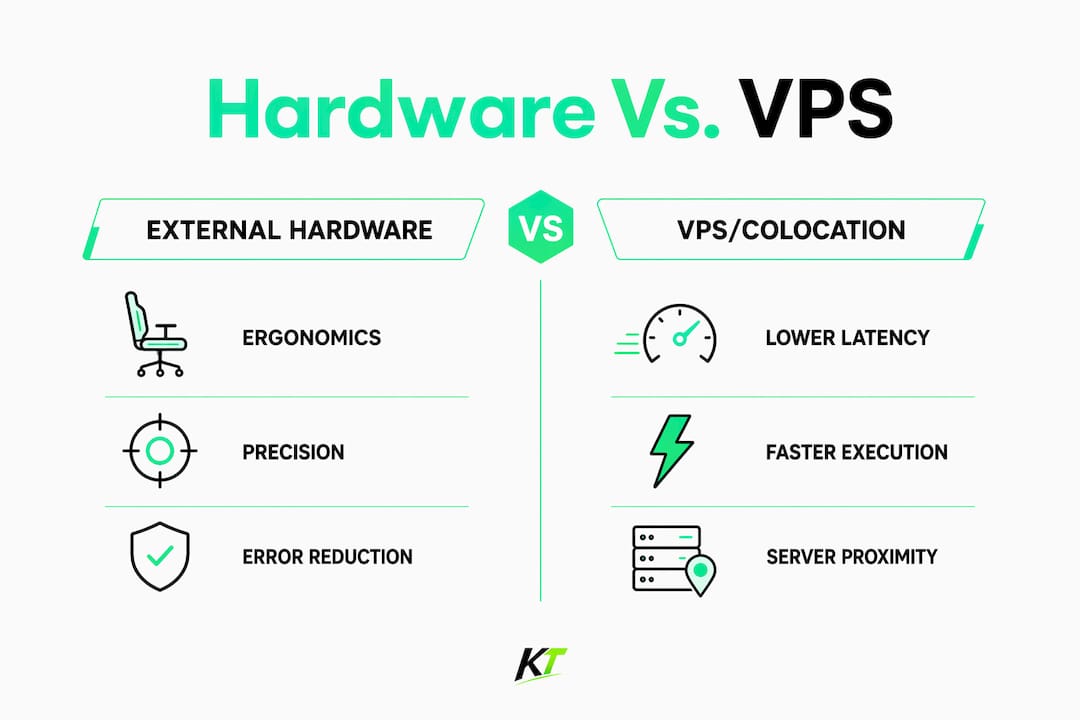
cTrader traders add external hardware because it delivers faster, more consistent trade execution and a professional, low-error workflow — not because it beats colocation on raw network speed.
- Reduced manual errors: A dedicated keypad cuts the mouse clicks between a decision and an executed order, shrinking the window for fat-finger mistakes during volatile moves.
- Programmable precision: Hotkeys mapped to partial closes, SL/TP edits, and break-even adjustments let you act on a trade plan without hunting through menus.
- Ergonomic endurance: A purpose-built control surface reduces physical and cognitive strain across multi-hour sessions, which matters more than most traders admit.
One caveat worth stating upfront: hardware improves your local human execution. The true latency floor — how fast your order actually reaches the broker’s matching engine — is set by geography and your hosting infrastructure, not by how quickly your fingers move.
Table of Contents
- Why external hardware specifically matters for cTrader workflows
- Latency, VPS, and the real limits on execution speed
- Ergonomics, cognitive load, and precision — what cTrader developers report
- What does a professional cTrader setup actually look like?
- When is external hardware worth the investment?
- How Key-trade hardware integrates with cTrader
- Key Takeaways
- The case for hardware is stronger than most traders expect
- Key-trade hardware built for cTrader professionals
- FAQ
- Useful sources and further reading
Why external hardware specifically matters for cTrader workflows
cTrader’s native hotkey system is functional but limited out of the box. A programmable keypad expands that vocabulary dramatically. You can assign a single button to fire a market order at a preset lot size, another to move a stop to break-even, and a third to close 50% of a position — actions that would otherwise require three separate mouse interactions under time pressure.
The use cases split cleanly by strategy:
- Scalpers and intraday traders benefit most. When you’re managing five open positions and a news spike hits, the difference between one keypress and three mouse clicks is real money.
- Partial-close workflows are where hardware earns its keep most consistently. cTrader supports partial position management natively; hardware makes it fast enough to actually use in live conditions.
- SL/TP precision edits — dragging a stop on a chart is imprecise under stress. A mapped key that moves a stop a fixed number of pips is repeatable and exact.
One technical point that trips up new users: hardware doesn’t connect directly to broker servers. The device sends input to a bridge cBot or hotkey plugin running inside cTrader, which then translates that input into platform orders. The bridge cBot is the runtime link — without it, the device is just a local input peripheral.
Latency, VPS, and the real limits on execution speed
Many traders assume a faster local machine solves execution lag. It usually doesn’t. The bottleneck is almost always the round-trip from your platform to the broker’s matching engine, and that’s a geography problem.
| Connection type | Typical round-trip latency | Primary cause |
|---|---|---|
| Home broadband (US average) | 15–40 ms to major brokers, caused by ISP routing and geographic distance | |
| Consumer Wi-Fi | typically 20–50 ms with higher latency from wireless jitter and packet loss | |
| Co-located VPS (same data center as broker) | 1–5 ms, achieved through direct data-center routing | |
| Equinix co-location (NY4, LD4) | under 10 ms (and sometimes sub-millisecond for HFT setups), delivered by cross-connects to liquidity providers |
A home connection averaging 15–40 ms to your broker is structurally slower than a co-located VPS at 1–5 ms — and no amount of CPU speed changes that. Single-thread CPU performance does matter for cTrader’s chart rendering and cBot execution, but it can’t overcome the physics of geographic routing.
Pro Tip: Run a continuous ping test to your broker’s server IP before and after switching to a VPS. The drop in average latency and, more importantly, in jitter (variance) is usually the clearest proof of the infrastructure upgrade.
For automated strategies, containerized cAlgo execution takes this further. A cBot running in a cloud container operates with institutional-grade uptime and automated failover — it keeps running if the host node fails, which a home PC or even a basic VPS cannot guarantee. For human-in-the-loop trading, the right mix is a co-located VPS or cAlgo container for your automation, plus local hardware for the decisions only you can make.
Ergonomics, cognitive load, and precision — what cTrader developers report
The cTrader developer community is explicit about this: external control hardware’s primary value is creating a professional, ergonomic workflow that reduces cognitive and physical strain during rapid manual trade management. The speed benefit is real, but it’s a workflow speed benefit, not a network speed benefit.

In practice, this shows up in three ways. First, muscle memory: when the same physical button always closes half a position, you stop thinking about the mechanics and focus on the market. Second, error reduction: a dedicated key mapped to a specific lot size can’t accidentally submit the wrong size the way a misclick on a dropdown can. Third, session endurance — traders running four-to-six-hour sessions on a keyboard and mouse report more decision fatigue than those using a purpose-built control surface. That’s not anecdote; it’s the same ergonomic principle behind why trading desk efficiency matters for sustained performance.
What does a professional cTrader setup actually look like?
A complete pro setup combines hardware, network infrastructure, and backup systems. Here’s the checklist:
- Trading keypad or keyboard (Key-trade Trading Keypad or Professional Trading Keyboard) — mapped to your most frequent cTrader actions via the bridge cBot or hotkey plugin.
- Second monitor — one screen for chart analysis, one for order management and the bridge cBot interface.
- Co-located VPS — minimum 4 GB RAM for single cBot use, 8 GB for multiple terminals or heavy automation; NVMe SSD storage; high single-core CPU speed; located in the same data center or city as your broker’s server.
- Secondary VPS or cAlgo container — for failover. If your primary VPS goes down, automated strategies need somewhere to continue running.
- Power and ISP redundancy — UPS for your local machine, a mobile hotspot as a backup internet connection.
- Account security — 2FA enabled on your cTrader account, encrypted credential storage, dedicated user profiles on the VPS.
Statistic callout: Co-located trading VPS providers typically guarantee high uptime SLAs, offering significantly more reliable availability than a home PC running cTrader overnight.
Cost ranges vary. A quality trading keypad runs roughly $100–$300. A co-located VPS near a major US financial hub (New York, Chicago) typically costs $30–$80 per month for specs adequate for one to three cBots. Setup and integration testing — installing the bridge cBot, mapping keys, running on demo — takes most traders a weekend.
When is external hardware worth the investment?
| Trader profile | Hardware value | VPS/colocation value |
|---|---|---|
| Scalper (manual, high frequency) | High — every manual action counts | High — latency floor matters |
| Discretionary intraday | High — partial closes, SL edits | Medium — uptime matters more than sub-ms latency |
| Algo-driven (cBot primary) | Low — minimal manual intervention | Very high — uptime and proximity are everything |
| Swing trader (daily/weekly) | Low — few time-critical actions | Low to medium — uptime still useful |
The primary decision triggers: if you manually intervene in trades more than a few times per session, hardware pays off. If your strategy relies on partial closes or frequent SL adjustments, it pays off faster. If you run cBots and rarely touch the platform, invest in VPS infrastructure first and hardware second.
Pro Tip: Before committing to a full hardware setup, test the workflow on a staged VPS with a demo account for one week. Map your three most frequent actions to keypad buttons and count how many times you use them. If the number surprises you, the hardware will too.
How Key-trade hardware integrates with cTrader
Getting the installation order right prevents most integration headaches. The correct sequence is non-negotiable:
- Update cTrader to the latest version before touching anything else.
- Install the bridge cBot or hotkey plugin inside cTrader. Only run one instance — multiple bridge cBot instances cause execution conflicts.
- Install the device driver or utility (Key-trade’s software) after the cBot is confirmed running.
- Map your keys inside the device utility, matching each button to the cTrader action you’ve configured in the bridge cBot.
- If using a VPS: install the device utility on your local machine only; deploy the bridge cBot on the VPS or cAlgo container for cloud execution. Your local hardware sends commands; the VPS executes them.
- Test on a demo account for at least two full trading sessions before going live. Verify each mapped action fires correctly and that no duplicate orders appear.
Pro Tip: Take a screenshot of your final key mapping configuration and save it outside the device utility — in a cloud folder or printed. If you reinstall the software or switch machines, rebuilding from memory takes far longer than it should.
Back up your cBot configuration files from the VPS after setup. A node migration or VPS reinstall without those files means remapping everything from scratch.
Key Takeaways
External hardware improves cTrader execution through ergonomics, workflow precision, and error reduction — not by lowering network latency, which requires a co-located VPS near your broker.
| Point | Details |
|---|---|
| Hardware solves workflow, not latency | Programmable keypads reduce manual errors and speed up partial closes; they don’t shorten the network path to your broker. |
| VPS sets the latency floor | Home connections run 15–40 ms to major brokers; a co-located VPS reduces latency to 1–5 ms. |
| Uptime requires professional hosting | Co-located VPS providers offer 99.9%–99.99% uptime SLAs; a home PC cannot match that for cBot continuity. |
| Installation order prevents conflicts | Update cTrader first, then install the bridge cBot, then install the hardware utility — in that order. |
| Key-trade hardware for cTrader users | The Key-trade Trading Keypad and Professional Trading Keyboard map directly to cTrader’s hotkey and partial-close workflows. |
The case for hardware is stronger than most traders expect
Most traders who skip external hardware do so because they assume the benefit is marginal — a few milliseconds saved locally while the real latency lives on the wire. That framing is half right and half wrong.
The wire latency argument is correct. A keypad doesn’t move your order faster through the internet. But the framing misses what hardware actually changes: the consistency and repeatability of your manual decisions under pressure. A scalper who fat-fingers a lot size during a volatile open doesn’t lose because of network lag. They lose because the interface between their intention and the platform failed them at the worst moment.
The traders who benefit most from hardware aren’t necessarily the fastest. They’re the ones who manage positions actively — scaling out, moving stops, adding to winners — and who do it repeatedly across a session. For them, a programmable keypad isn’t a luxury. It’s the difference between a workflow that holds up under pressure and one that doesn’t.
Key-trade hardware built for cTrader professionals
Scalpers and active intraday traders managing positions in real time need a control surface that keeps up with their decisions. The Key-trade Trading Keyboard and Key-trade Trading Keypad are built specifically for that workflow: programmable keys with durable construction, low-latency USB HID input, and direct compatibility with cTrader via the bridge cBot integration layer.
Both devices map to cTrader’s most time-critical actions — instant market orders, partial closes, SL/TP edits, break-even moves — without requiring any coding knowledge. Setup takes a weekend. Key-trade ships worldwide, and the integration documentation covers cTrader, MetaTrader, NinjaTrader, and several other platforms for traders running multi-platform setups.
Visit the Key-trade product page to see full specifications and choose the right device for your trading style.
FAQ
Why do cTrader traders use external hardware?
External hardware gives cTrader traders programmable hotkeys for faster, more precise manual actions — partial closes, SL/TP edits, instant market orders — reducing errors and cognitive load during active sessions.
Does a trading keypad reduce network latency in cTrader?
No. A keypad speeds up local human input but doesn’t affect the network path to your broker’s matching engine. Latency reduction requires a co-located VPS near your broker’s server.
What VPS specs does cTrader need for cBot automation?
A minimum of 4 GB RAM for single cBot use and 8 GB for multiple terminals, NVMe SSD storage, and high single-core CPU speed — hosted in a data center close to your broker.
How does Key-trade hardware connect to cTrader?
Key-trade devices connect through a bridge cBot or hotkey plugin running inside cTrader. The correct installation order is: update cTrader first, install the bridge cBot second, then install the Key-trade device utility.
Which trader types benefit most from external hardware?
Scalpers and discretionary intraday traders who frequently manage open positions benefit most. Algo-driven traders with minimal manual intervention should prioritize VPS infrastructure over hardware.
Useful sources and further reading
- cTrader VPS Setup: Complete Installation & Configuration Guide — TradingFXVPS’s technical walkthrough covering latency figures, VPS specs, and cBot continuity recommendations.
- Best VPS for cTrader: Low Latency Hosting Guide — Detailed VPS spec recommendations including RAM, storage, and uptime SLA guidance for cTrader automation.
- StreamDeckHotkeys Bot for cTrader — cTrader marketplace page documenting the bridge cBot model and developer ergonomics guidance for external control hardware.
- AlgoVPS Multi-platform Plugin for cTrader — cAlgo container and co-location details, including Equinix data center options and automated failover specs.
- How to Connect Magic Keys to cTrader — Integration documentation covering installation order, firewall permissions, and multi-instance conflict warnings.
- Integrating cTrader With Forex VPS — Practical guide on VPS selection, data center proximity, and security configuration for cTrader users.
Next steps to test: Run a latency check from your current setup to your broker’s server IP, then compare it against a staged VPS in the same city as your broker. Map your three most frequent cTrader actions to a keypad on a demo account for one week before committing to a live setup.
Recommended
- Why MetaTrader Traders Use External Tools in 2026 – Key-Trade Trading Keyboards
- Why Traders Choose cTrader Platform: 2026 Guide – Key-Trade Trading Keyboards
- External Trading Keypads for MT5: Speed and Accuracy – Key-Trade Trading Keyboards
- Trading Input Devices for Active Traders: A Full Guide – Key-Trade Trading Keyboards