

NinjaTrader Risk Management Hardware Setup Guide
TL;DR:
- A NinjaTrader risk management setup relies on high-performance hardware, stable internet, and active risk controls. Proper configuration includes a fast CPU, NVMe storage, multiple monitors, wired internet, and broker-side hard stops to ensure reliable trading execution. Most traders overspend on graphics cards and neglect essential safety systems like UPS and optimized Windows settings.
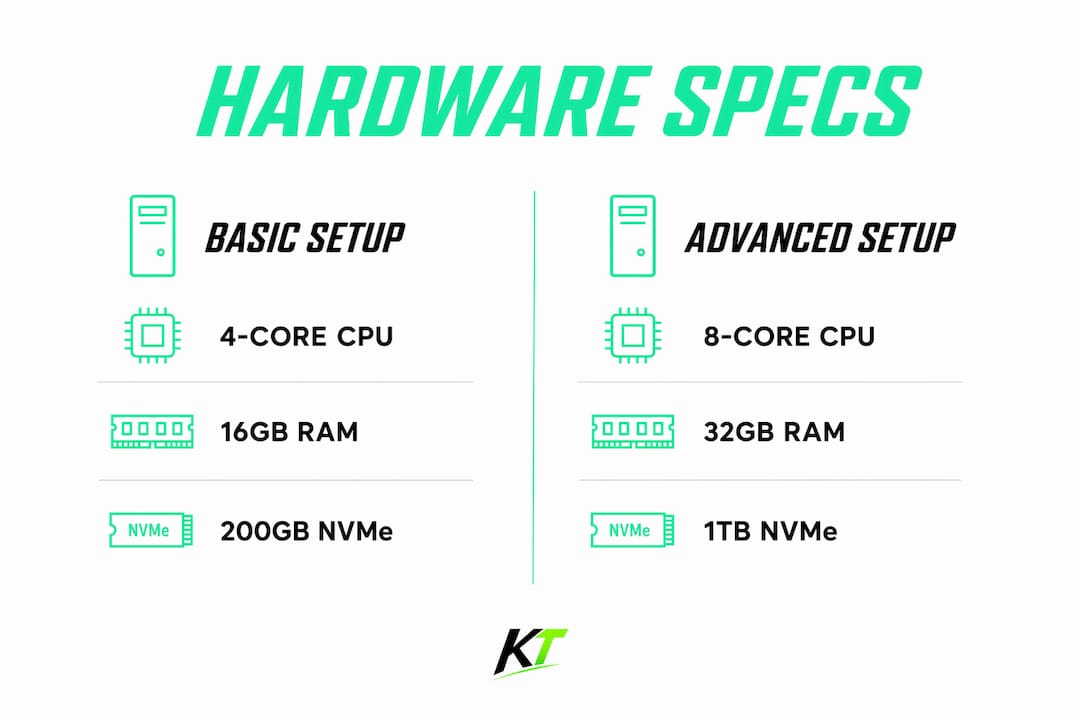
A NinjaTrader risk management hardware setup is a precisely configured workstation or VPS environment built to keep the platform stable, fast, and protected against execution failures. The right setup combines 4–6 CPU cores at 3.5GHz or higher, 16–32GB of RAM, and NVMe SSD storage to handle the IOPS demands NinjaTrader places on your system. Hardware alone is not enough. Broker-side hard stops, wired internet, and a UPS form the safety net that keeps risk controls active even when software or power fails. This guide covers every layer of that setup, from raw specs to peripherals to connectivity, so you can trade with confidence rather than crossed fingers.
What are the optimal hardware specs for a NinjaTrader risk management hardware setup?
CPU selection is the single most important hardware decision for NinjaTrader traders. High single-core clock speed matters far more than core count because NinjaTrader does not scale well across many threads. CPUs in the AMD Ryzen 9 or Intel i9 series deliver the best single-threaded performance for this platform. A gaming GPU adds almost no value here. Spend that budget on CPU and RAM instead.
RAM sizing follows a straightforward formula. Each account consumes roughly 50–150MB of RAM, each chart window adds 100–300MB, and historical data buffers require another 200–500MB. Running 5–10 accounts with multiple charts pushes you toward 16GB at minimum, and 32GB if you run heavy indicators or more than ten accounts simultaneously. Skimping on RAM is the fastest way to introduce lag at the worst possible moment.
Storage speed is where many traders leave real performance on the table. NVMe SSDs deliver 100,000–500,000 IOPS compared to just 100–200 IOPS on spinning hard drives. That gap translates directly into chart load times and tick database responsiveness. Use a minimum 200GB NVMe drive dedicated to NinjaTrader and its data folders.
Pro Tip: Allocate a separate NVMe partition or drive exclusively for NinjaTrader data. This prevents OS read/write activity from competing with platform disk access during high-volatility sessions.
| Accounts | CPU Recommendation | RAM | Storage |
|---|---|---|---|
| 1–3 | 4-core, 3.5GHz+ | 16GB | 200GB NVMe |
| 4–7 | 6-core, 3.8GHz+ | 16–32GB | 500GB NVMe |
| 8–10+ | 8-core, 4.0GHz+ | 32GB | 1TB NVMe |
GPU requirements stay minimal. A basic card with two or more display outputs handles NinjaTrader’s rendering load without issue. The execution speed advantage comes from CPU and storage, not graphics processing.
How to configure your workstation or VPS for NinjaTrader risk management
A clean Windows configuration prevents the silent failures that break risk protocols at the worst times. Follow these steps before you install NinjaTrader on any machine or VPS.
- Disable Windows Search Indexing. Background indexing causes latency spikes during tick database access. Turn it off for all drives used by NinjaTrader.
- Apply Windows Defender exclusions. Add NinjaTrader’s installation folder and data directories to the exclusion list. Real-time antivirus scanning of active trading files introduces unpredictable delays.
- Set the power plan to High Performance. Windows power management throttles CPU clock speeds to save energy. High Performance mode keeps the CPU running at full speed at all times.
- Disable automatic Windows Updates. Configure Windows Group Policy to block automatic updates during trading hours. A forced reboot mid-session is a risk management failure, not just an inconvenience.
- Set a fixed page file size. Dynamic page file resizing causes memory fragmentation over time. Fix the size at 1.5x your installed RAM to keep memory behavior predictable.
- Install required runtimes before NinjaTrader. Missing .NET Framework versions or Visual C++ redistributables cause silent crashes that look like platform bugs. Install all prerequisites first.
- Use Task Scheduler to auto-launch NinjaTrader. Configure a startup delay of 60–90 seconds after reboot so all OS services initialize before the platform loads. This prevents lost executions after an unexpected restart.
For VPS users, location matters as much as specs. Choosing a VPS near the broker’s matching engine, such as CME Aurora in Chicago for futures traders, cuts execution latency significantly. A well-located VPS running at $30–$50 per month delivers more risk management reliability than a powerful local machine with a poor internet connection.
Pro Tip: After any Windows update or reboot, check the Windows Event Viewer for runtime errors before resuming live trading. Silent .NET or C++ runtime failures are the most common cause of unexplained NinjaTrader platform crashes.
What are the best multi-monitor and peripheral setups for risk visibility?
Display setup directly affects how fast you spot and respond to risk events. A minimum of two 27-inch 1440p monitors gives you enough screen space to separate charting from order management without alt-tabbing. Three monitors is the practical sweet spot for most active traders, allowing charts, order flow, and a scanner to run simultaneously in full view.

Beyond four monitors, the returns drop fast. Performance gains and focus both diminish when you spread attention across too many screens. The better investment at that point is higher resolution on fewer displays. A 4K monitor at 32 inches can replace two 1080p screens while keeping your field of view manageable.
Peripherals contribute more to risk management than most traders acknowledge. A missed keystroke or a slow click during a fast-moving market is a real execution risk. The right physical tools reduce that risk measurably.
Peripherals that directly support risk management:
- Wired mechanical keyboard with tactile switches for confident, error-free key presses under pressure
- Wired optical mouse for consistent tracking without wireless latency or battery failure
- Dedicated trading keypad with programmable buttons for one-press stop-loss placement, break-even moves, and partial closes
- Monitor arm or stand that positions screens at eye level to reduce fatigue during long sessions
- USB hub with individual power switches to reset peripherals without rebooting the full system
The NinjaTrader Chart Trader guide covers how display layout choices interact with order entry workflows in more detail. Ergonomics matter too. A trader who is physically uncomfortable makes worse decisions. Position your monitors at arm’s length and keep your keyboard at elbow height.
What connectivity and power backup strategies protect continuous risk management?
Internet reliability is a risk management variable, not just an IT concern. Wired Ethernet with sub-30ms latency and jitter under 5ms is the baseline for active trading. Wi-Fi introduces variable latency that can spike unpredictably during high-traffic periods. Never rely on Wi-Fi as your primary connection for live trading.
A secondary internet source is not optional for serious traders. 5G mobile hotspots or a second ISP provide immediate failover if your primary connection drops. Backup internet allows you to close positions within seconds of a primary failure rather than watching helplessly while the market moves against you.
Power backup follows the same logic. A UPS rated at 1500VA or higher gives a three-monitor desktop workstation 15–20 minutes of runtime during a power outage. That window is enough to close all positions and shut down cleanly. Without a UPS, a brief power flicker can corrupt your NinjaTrader database and leave open positions unmanaged.
| Layer | Recommended Setup | Purpose |
|---|---|---|
| Primary internet | Wired Ethernet, sub-30ms latency | Stable, low-jitter order routing |
| Secondary internet | 5G hotspot or second ISP | Failover for position closing |
| Power backup | 1500VA UPS | Runtime during outages |
| Broker-side hard stops | Always active | Risk cap if all local systems fail |
Broker-side hard stops are the final layer. These stops remain active even if NinjaTrader crashes, the VPS goes offline, or the internet drops entirely. Configure them before every session. They are the one risk control that does not depend on your hardware working correctly.
Pro Tip: Test your UPS and secondary internet connection monthly. Most traders discover their failover systems are misconfigured or depleted only when they actually need them.
Key Takeaways
A reliable NinjaTrader trading workstation requires fast single-core CPU performance, NVMe storage, wired internet, and broker-side hard stops working together as one system.
| Point | Details |
|---|---|
| CPU over GPU | Prioritize high single-core clock speed; AMD Ryzen 9 or Intel i9 series outperform gaming GPUs for NinjaTrader. |
| NVMe storage is non-negotiable | NVMe SSDs deliver up to 500,000 IOPS, eliminating chart lag that HDDs cannot avoid. |
| Three monitors is the sweet spot | Two 27-inch 1440p screens is the minimum; three covers charts, order flow, and scanners without alt-tabbing. |
| Wired internet plus failover | Sub-30ms wired Ethernet with a 5G backup prevents position exposure during connectivity failures. |
| Broker-side hard stops always on | Configure hard stops before every session; they protect you when all local systems fail. |
The hardware mistake most NinjaTrader traders make
After working with traders across different account sizes and trading styles, the pattern is clear. Most traders overspend on GPU and underspend on the things that actually protect their risk management. A $400 graphics card does nothing for NinjaTrader. That same $400 spent on a quality UPS, a second internet connection, and a faster NVMe drive changes how the platform behaves every single session.
The second mistake is ignoring Windows configuration. A freshly installed Windows machine with default settings is actively working against your trading. Background indexing, real-time antivirus scanning, and automatic updates are all running by default. Each one is a potential source of latency or unexpected downtime. Disabling them takes less than an hour and pays off every day.
The third mistake is undervaluing physical peripherals. Traders spend thousands on hardware and then execute trades with a $15 keyboard. A missed keypress or a slow click during a fast market is a real cost. A programmable trading keypad that places stops and moves to break-even in one button press removes that execution risk entirely. The trading desk efficiency guide covers this in more depth, but the short version is this: your physical interface with the market matters as much as your hardware specs.
VPS traders often get this right faster than local machine traders. Running a lean, well-configured VPS near the broker’s matching engine forces you to think about every process running on that machine. That discipline, applied to a local workstation, produces the same results.
— Key-trade
Key-trade trading keyboards for NinjaTrader traders
Configuring the right hardware is only part of the picture. How you physically interact with NinjaTrader during live sessions determines whether your risk controls execute at the speed you need.

Key-trade builds professional trading keypads designed specifically for active traders on platforms including NinjaTrader. Each device features programmable buttons that execute stop-loss placement, break-even moves, partial closes, and SL/TP modifications in a single press. There is no software interface to navigate under pressure. The Key-trade trading keyboard ships worldwide and works with both live and prop trading accounts. For traders who want a complete physical trading setup, the full keyboard and hotkey pad range covers every workflow from scalping to multi-account management.
FAQ
What are the minimum hardware requirements for NinjaTrader?
NinjaTrader requires at minimum a 4-core CPU at 3.5GHz, 16GB of RAM, and an NVMe SSD with at least 200GB of space for stable performance across multiple accounts and chart windows.
Is a VPS better than a local machine for NinjaTrader risk management?
A VPS located near your broker’s matching engine delivers lower and more consistent execution latency than most home internet connections, making it the better choice for automated strategies and multi-account management.
How much RAM does NinjaTrader need per account?
Each NinjaTrader account consumes roughly 50–150MB of RAM, with each chart window adding another 100–300MB. Running ten accounts with multiple charts requires at least 16GB, and 32GB for heavy indicator loads.
Do I need a UPS for trading with NinjaTrader?
A UPS rated at 1500VA or higher gives a desktop trading workstation 15–20 minutes of runtime during a power outage, which is enough time to close all open positions safely.
Why does single-core CPU speed matter more than core count for NinjaTrader?
NinjaTrader does not scale efficiently across many CPU cores. High single-core clock speed, as found in AMD Ryzen 9 and Intel i9 processors, directly reduces platform latency and improves order execution timing.
Recommended
- Why Futures Traders Use NinjaTrader: 2026 Guide – Key-Trade Trading Keyboards
- cTrader Risk Management Tools List for Prop Traders – Key-Trade Trading Keyboards
- NinjaTrader Partial Close Futures Guide for Traders – Key-Trade Trading Keyboards
- NinjaTrader Chart Trader: A Complete Guide for Traders – Key-Trade Trading Keyboards