

Marketmakerofficial.com Alternatives for Pro Traders
TL;DR:
- The Key-Trade professional trading keyboard offers native platform integration, layered macros, and ongoing firmware support. It is ideal for active traders and prop desks needing hardware-level execution speed and risk management controls. Cheaper macro controllers suit low-frequency traders, but do not provide the same platform compatibility and support.
The Key-Trade Professional Trading Keyboard is the practical alternative to marketmakerofficial.com-style trading keypads for professional traders. Three reasons stand out: it integrates natively with TradingView, MT4/5, cTrader, NinjaTrader, SierraChart, Thinkorswim, and Tradovate; it supports layered macro profiles with partial-close, break-even, and SL/TP controls mapped to single keys; and it ships with setup guides, firmware updates, and real technical support. If you trade actively on any of those platforms and need hardware-level execution speed, Key-Trade is the pick. If you are budget-constrained and trade low-frequency setups, a macro-style controller may cover your needs.
Table of Contents
- How do Key-Trade and other trading keypad alternatives compare?
- What features must a professional trading keypad have?
- Which platforms does Key-Trade support, and how long does setup take?
- How do you pick the right alternative for your trading style?
- What should U.S. traders expect for price, delivery, and warranty?
- Quick-start workflow for your first session
- When should you pick Key-Trade vs. another class?
- Key Takeaways
- Why physical hardware keypads give active traders a measurable edge
- Key-Trade: built for the traders who cannot afford a slow exit
- FAQ
How do Key-Trade and other trading keypad alternatives compare?
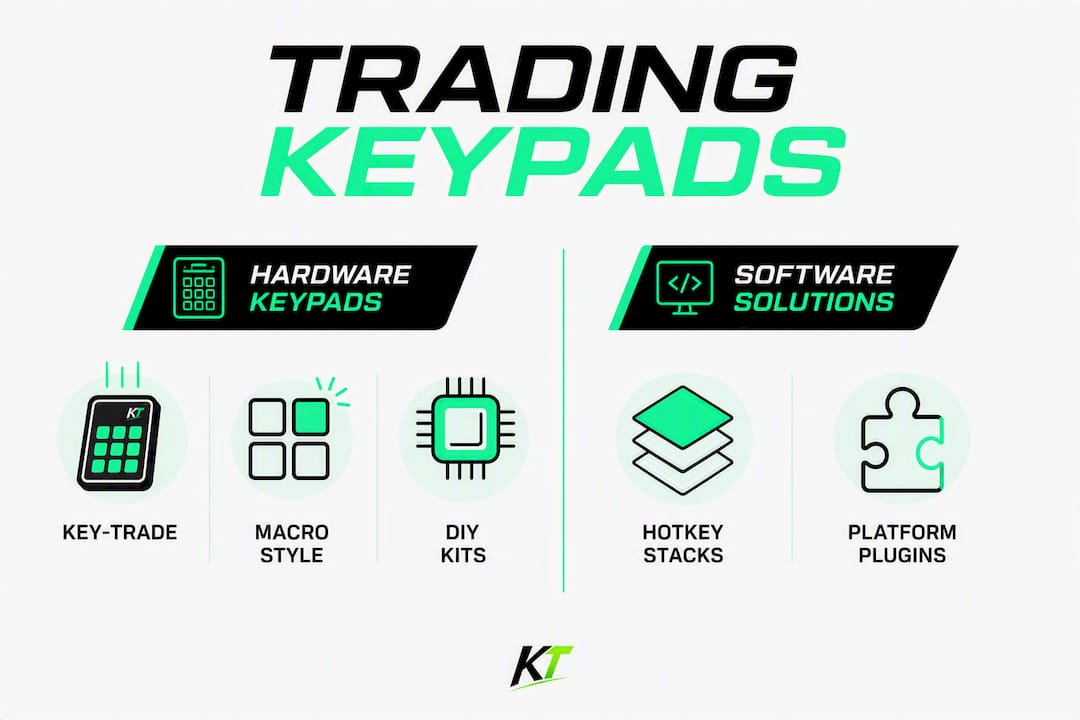
Physical trading keypads fall into four practical categories. The table below maps each against the dimensions that matter most to a professional desk.
| Dimension | Key-Trade | Macro/Stream-Deck Style | DIY Controller Kits | Software Hotkey Stacks |
|---|---|---|---|---|
| Best for | Active traders, prop desks, scalpers | Low-frequency discretionary traders | Tech-savvy builders | Traders testing hotkeys before hardware |
| Platform compatibility | TradingView, MT4/5, cTrader, NinjaTrader, SierraChart, Thinkorswim, Tradovate | Varies; often requires middleware | Platform-dependent; manual mapping | Platform-native; no hardware |
| Programmability & macros | Layered profiles, partial close, SL/TP, break-even, order reversal | Basic macro assignment; limited layers | Fully custom but no out-of-box profiles | Software-defined; no physical layer |
| Latency / hardware responsiveness | Hardware-level, sub-keystroke latency | Moderate; software polling dependent | Variable; depends on build quality | Software latency; OS-dependent |
| Ease of setup | Guided install, setup videos, support team | Plug-and-play for basic use; complex for trading | High effort; no dedicated support | Minimal setup; no hardware needed |
| Build quality & ergonomics | Purpose-built for trading desks | Consumer-grade; not trading-specific | DIY; ergonomics vary | N/A |
| Price & warranty/support | Professional band; warranty + firmware updates | Lower cost; limited or no warranty | Community forums; no trading-specific support | Free to low cost; no hardware warranty |
The buying cue is straightforward: Key-Trade fits any trader who needs documented platform integration and ongoing firmware support. Macro controllers work for traders who run a handful of hotkeys on a single platform and can tolerate manual configuration. DIY kits suit engineers who want full control and accept zero support. Software stacks are a starting point, not a long-term solution for active execution.
What features must a professional trading keypad have?
Hardware keypads turn multi-step mouse workflows into instinctual key presses, but not every device delivers what a professional desk actually needs. Before buying any alternative, verify these:
- Layered programmable profiles. You need at least two layers so one physical button can handle partial close on Layer 1 and break-even on Layer 2 without re-mapping.
- Risk-control key assignments. Mapping partial exits, break-even triggers, and automated lot sizing to dedicated keys is the primary reason to buy hardware. Raw speed is secondary.
- Native platform integration. Look for documented plugins or HID-level drivers for your specific platform. Undocumented middleware adds latency and breaks on platform updates.
- Window-focus independence. Quality trading keypads trigger orders regardless of which application window is active, so you never have to click back into your platform before acting.
- Physical durability. Rated keycaps, not membrane keys. A device that degrades under daily use is a liability on a live desk.
- Firmware updates and warranty. Closed firmware with no update path means you are locked out of new platform integrations the moment your broker or platform changes its API.
- Setup documentation. Video walkthroughs and a reachable support team are not optional for prop desks onboarding multiple traders.
Pro Tip: Before going live, map partial exits, automated lot sizing, and emergency flatten to single keys. Run at least one full session on a paper account using only those keys. If you hesitate during that session, your mapping is wrong — fix it before real capital is at stake.
Which platforms does Key-Trade support, and how long does setup take?
Key-Trade supports TradingView, MetaTrader 4, MetaTrader 5, cTrader, NinjaTrader, SierraChart, Thinkorswim, and Tradovate, with more platforms in development. Integration follows one of two patterns: a native plugin installed directly into the platform, or HID-level driver mapping that the device handles at the OS layer. The MT5-specific setup and cTrader integration each have dedicated guides.
A realistic timeline from unboxing to live trading:
- Unboxing and driver install (15–30 minutes). Download the platform-specific add-on, run the installer, and confirm the device is recognized.
- Profile mapping (30–60 minutes). Assign your critical keys: entry, partial close, break-even, flatten, SL/TP adjust. Name each layer clearly.
- Dry-run testing (1–2 hours). Fire every key in a demo environment. Confirm orders route correctly and the device acts without requiring window focus.
- Paper trading session (1–3 days). Trade your normal plan using only the keypad. Log any hesitation or mis-fires and adjust mapping.
- Live deployment. Go live only after the paper session produces zero mapping errors under simulated pressure.
Common issues and quick fixes:
- Driver conflict on Windows: Run the installer as administrator and disable conflicting HID devices in Device Manager.
- Platform focus issues: Confirm the keypad’s firmware is set to global-action mode, not application-specific mode.
- Keys not registering: Check OS permission settings; some platforms require elevated privileges for external input devices.
Pro-grade workstations running multiple charting tools benefit from a second keypad dedicated to basket execution or a separate asset class. The hardware-level execution advantage compounds when your eyes never leave price action.
How do you pick the right alternative for your trading style?
Start with four diagnostic questions:
- How many trades do you execute per session? More than 20 means hardware latency matters.
- Do you manage partial positions or scale out? If yes, layered profiles are non-negotiable.
- Are you standardizing across a prop desk? Firmware support and identical device configs become the deciding factor.
- Do you trade multiple products simultaneously? Basket-execution mapping requires more buttons and layers than a single-product setup.
Red flags to walk away from: closed firmware with no published update schedule, no documented integration for your platform, absent warranty terms, and no reachable support contact. A device that checks none of those boxes is a consumer peripheral dressed up as a trading tool.
Next steps: request a setup demo or walkthrough before committing, test on a paper account for at least five sessions, and confirm the warranty covers firmware-level defects, not just physical damage.
What should U.S. traders expect for price, delivery, and warranty?
| Device class | Typical U.S. price band | Warranty | Support level |
|---|---|---|---|
| Professional trading keypads (Key-Trade tier) | — | Hardware + firmware warranty | Dedicated setup guides, firmware updates, tech support |
| Macro/stream-deck style controllers | — | Limited hardware warranty | Community forums; no trading-specific support |
| DIY controller kits | — | None | Self-supported |
Domestic U.S. shipping for professional keypads typically runs 3–7 business days. International orders add 7–21 days depending on customs clearance. Factor in 1–3 days for setup and profile mapping before you are fully operational.
The price-to-support trade-off is real: a cheaper device saves money upfront but often means no firmware updates when platforms change their APIs, and no one to call when something breaks mid-session.
Quick-start workflow for your first session
- Map your three most critical risk controls first: partial close, flatten all, and break-even. Everything else is secondary.
- Standardize layer names across every device on your desk. “Layer 1 = entries, Layer 2 = exits” should be universal, not per-device.
- Rehearse emergency flattening in a paper environment until it is a reflex, not a thought.
- Run a micro-test before every live session: press each key once in demo mode and confirm the order type and size are correct.
- Keep your keypad at a fixed angle relative to your dominant hand. Fatigue from awkward wrist positioning compounds over a four-hour session.
Pro Tip: Use a process-oriented trading framework to pre-define which key fires under which market condition. Traders who decide key assignments in real time lose the latency advantage the hardware provides.
A practical time budget: spend the first 30 minutes on mapping, the next 30 on dry-run testing, and the first full day on paper trading. By day three, the keypad should feel like an extension of your hand, not a device you are operating.
When should you pick Key-Trade vs. another class?
- Scalper or high-frequency discretionary trader: Key-Trade. Hardware latency and window-focus independence are the difference between catching and missing a move.
- Prop desk standardizing across multiple traders: Key-Trade. Identical firmware, documented platform integrations, and a support team make onboarding repeatable.
- Multi-product basket trader: Key-Trade with layered profiles. Single-key basket execution requires more programmability than any macro controller offers.
- Discretionary swing trader, low frequency: A macro-style controller may be sufficient if you execute fewer than five trades per session and use a single platform.
Before purchasing, request a demo or setup walkthrough, verify the warranty covers firmware updates, and confirm your platform is on the supported list.
Key Takeaways
Key-Trade is the recommended professional-grade trading keypad for active traders, prop desks, and scalpers who need documented platform integration, layered macros, and ongoing firmware support.
| Point | Details |
|---|---|
| Hardware beats software for active execution | Physical keypads eliminate window-switching and reduce reaction time under pressure. |
| Risk controls are the primary mapping priority | Map partial close, flatten, and break-even before any entry or exit keys. |
| Verify platform integration before buying | Confirm documented support for your platform (TradingView, MT4/5, cTrader, NinjaTrader, SierraChart, Thinkorswim, Tradovate). |
| Price reflects support level | Professional-tier keypads (—) include firmware updates and tech support; cheaper alternatives typically do not. |
| Key-Trade is the recommended pick | Key-Trade covers the full platform list, layered profiles, and comes with setup guides and warranty for U.S. buyers. |
Why physical hardware keypads give active traders a measurable edge
The conventional wisdom says speed is the point of a trading keypad. It is not. Speed is the byproduct. The real advantage is that hardware forces you to pre-commit your risk controls to muscle memory before the market moves. A software hotkey requires your brain to remember the shortcut, find the window, and confirm the action. A physical key mapped to “partial close 50%” requires none of that. Your hand moves while your eyes stay on price.
What prop firms understand, and most retail traders learn too late, is that the keypad is a risk management tool first and an execution tool second. The traders who benefit most are not the fastest typists. They are the ones who mapped their worst-case scenarios to a single key before they ever went live.
Key-Trade: built for the traders who cannot afford a slow exit

The Key-Trade Professional Trading Keyboard gives active traders and prop desks what generic macro controllers cannot: purpose-built hardware with layered programmable profiles, native integrations across TradingView, MT4/5, cTrader, NinjaTrader, SierraChart, Thinkorswim, and Tradovate, and firmware updates that keep pace with platform changes. Every device ships with setup guides and access to technical support. Worldwide shipping covers U.S. buyers with domestic delivery timelines, and the warranty covers both hardware and firmware-level issues.

Visit the Key-Trade product page to review specs, confirm your platform is supported, and place your order.
FAQ
What makes Key-Trade different from a macro controller?
Key-Trade is purpose-built for trading with native platform integrations, layered profiles for partial close and risk controls, and firmware support. Macro controllers are consumer peripherals that require manual configuration and offer no trading-specific support.
Which platforms does Key-Trade support?
Key-Trade integrates with TradingView, MetaTrader 4, MetaTrader 5, cTrader, NinjaTrader, SierraChart, Thinkorswim, and Tradovate, with additional platforms in development.
How long does setup take from unboxing to live trading?
Driver installation takes a short time; profile mapping requires some additional time. Plan a few days of paper trading before going live to confirm all key assignments are correct under pressure.
What price range should U.S. traders expect for a professional trading keypad?
Professional-tier hardware keypads are usually priced within a moderate range in the U.S. market. That range includes firmware updates and dedicated support, which cheaper macro or DIY alternatives do not provide.
Can a trading keypad work without the platform window being in focus?
Yes. Quality trading keypads, including Key-Trade, operate at the hardware or HID level, triggering orders regardless of which application window is currently active on your screen.
Recommended
- TikTok.com Alternatives for Traders: Where to Publish – Key-Trade Trading Keyboards
- 5 Hardware Trading Alternatives 2026 – Key-Trade Trading Keyboards
- Best magickeys.trade Alternatives for Forex Traders in 2026 – Key-Trade Trading Keyboards
- Top 6 tradekey.com Alternatives for 2026 – Key-Trade Trading Keyboards