

How to Calculate a Lot Size for Professional Traders
TL;DR:
- Lot size is calculated by dividing the amount of risk capital by the product of stop-loss pips and pip value, with precise currency conversion when needed. Traders set their stop first based on market structure and then derive lot size to ensure consistent risk management, rounding down to broker-specific increments. Proper automation, discipline, and hardware integration prevent errors, maintain risk limits, and enable efficient trade execution.
Lot size = (Account equity × Risk %) ÷ (Stop-loss pips × pip value per standard lot in account currency). That is the complete formula. The desk rule that governs it: set your stop-loss from market structure first, then solve for lot size. Lot size is always the dependent variable.
- Formula: Lot size = (Account equity × Risk %) ÷ (Stop-loss pips × Pip value per lot in account currency)
- Stop-first rule: Stop placement is a technical decision. Lot size is the arithmetic result.
- Currency conversion: When the instrument’s quote currency differs from your account currency, convert pip value into your account currency before dividing. Skipping this step produces inaccurate risk on every cross pair.
Table of Contents
- How do you calculate lot size step by step?
- How do pips, ticks, and dollar-based instruments change the calculation?
- Three worked calculations with rounding checks
- How do advanced desks adjust sizing for volatility?
- How do you automate lot-size calculation in trading keypads and platforms?
- Pre-execution checklist and the mistakes that blow desk plans
- How do margin requirements constrain feasible lot sizes?
- How do spread and slippage affect your actual risk?
- Key Takeaways
- Why desk discipline and hardware integration matter more than the formula
- A trading keypad that enforces your lot-size discipline
- Useful sources
- FAQ
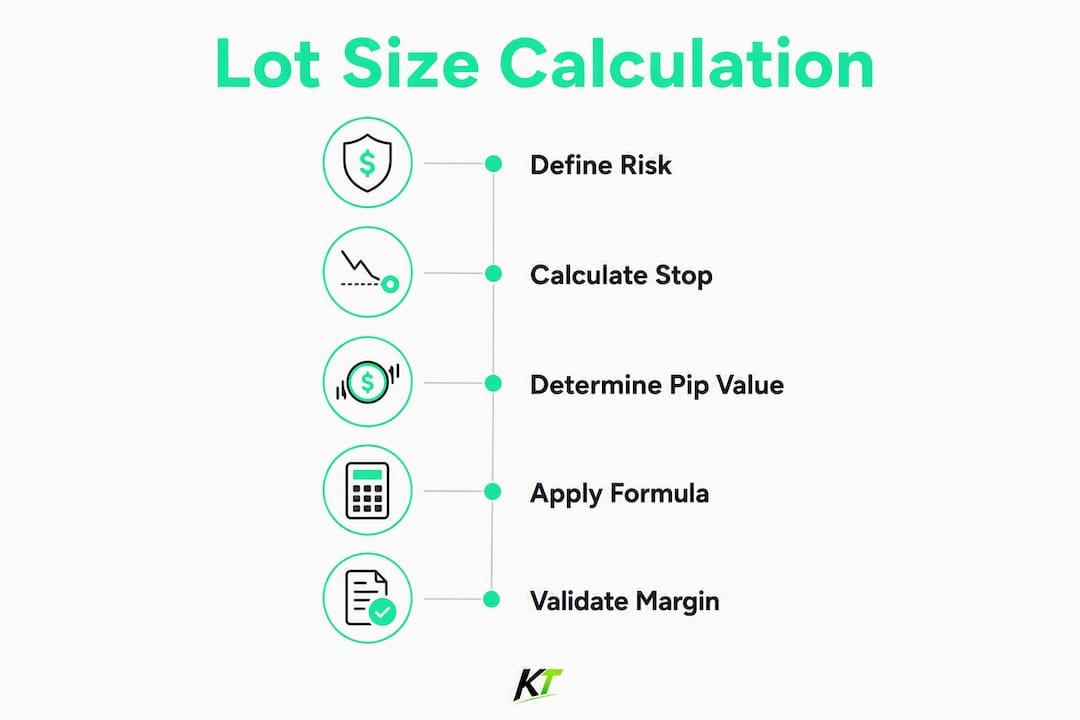
How do you calculate lot size step by step?
Professional desks run this as a pre-trade procedure, not a mental estimate.
- Set cash risk. Multiply account equity by your risk percentage. For example, a fifty-thousand-dollar account at one percent risks five hundred dollars.
- Measure stop-loss distance. Count pips or ticks from your entry to your structural stop. Do not reverse-engineer the stop from a round lot.
- Fetch pip/tick value. For EUR/USD, one standard lot typically equals ten dollars per pip. For other instruments, derive it: pip value = contract size × pip size.
- Convert to account currency. If the P&L currency differs from your account currency, multiply pip value by the current FX rate (read as: 1 unit of P&L currency = N units of account currency, then multiply).
- Compute raw lot size. Raw lot equals cash risk divided by (stop-loss pips multiplied by pip value).
- Round down to broker increment. If the broker’s minimum step is 0.01, round 1.25 down to 1.25 (already clean). If raw lot were 1.237, round to 1.23. Never round up.
- Verify margin and cluster exposure. Confirm free margin covers the position and that aggregate correlated exposure stays within desk thresholds.
Pre-trade input checklist:
- Current account equity (not balance if floating P&L is open)
- Risk percentage or fixed cash cap
- Entry price and structural stop price
- Instrument contract size and pip/tick size
- Current FX rate for quote-to-account conversion
- Broker’s minimum lot step and margin requirement per lot
Note on equity vs. balance: Use equity when open positions carry unrealized losses. Using balance in that scenario understates your real exposure.
How do pips, ticks, and dollar-based instruments change the calculation?
The formula is the same across instruments. What changes is how you derive pip/tick value.
| Instrument type | Unit of price move | Pip/tick value derivation | Conversion needed? |
|---|---|---|---|
| Forex (USD quote) | Pip (0.0001) | Contract size × pip size | No (USD = account) |
| Forex (non-USD quote) | Pip (0.0001 or 0.01 JPY) | Contract size × pip size × FX rate | Yes |
| Futures / commodities | Tick (instrument-specific) | Contract size × tick size | Depends on contract |
| Equities (US stocks) | $0.01 per share | Shares × $0.01 | No (USD) |
Forex pip value rules:
- EUR/USD standard lot: 100,000 × 0.0001 = $10 per pip. Mini lot (0.1) = $1/pip; micro (0.01) = $0.10/pip.
- GBP/JPY: pip value comes out in JPY. Divide by USD/JPY spot to get USD pip value.
- USD/CHF: pip value comes out in CHF. Divide by USD/CHF to convert to USD.
Futures and commodities: Contract size and tick denomination vary by symbol. Gold (XAU/USD) on many platforms uses a different contract size than a standard FX lot. Always verify contract specs on your platform before calculating. A tick value that looks like $10 on one broker’s gold contract may be $1 on another’s CFD version.
The conversion rule that prevents errors: Always express the rate as “1 unit of P&L currency = N units of account currency,” then multiply. Never divide when converting pip value into account currency.
Three worked calculations with rounding checks
Forex: USD account, EUR/USD, 50-pip stop
- Equity: twenty-five thousand dollars. Risk typically set at one percent.
- Stop: fifty pips.
- Pip value approximates ten dollars per standard lot (USD quote, no conversion needed).
- Compute lot size by dividing risk amount by (stop pips times pip value).
- Round down to the broker’s minimum step.
- Verify margin availability based on leverage and free margin.
Cross pair: USD account, GBP/JPY, 40-pip stop
- Equity: twenty-five thousand dollars. Risk typically set at one percent.
- Stop: forty pips.
- Pip value calculated in quote currency, then converted to account currency using current FX rates.
- Apply currency conversion to obtain pip value in account currency.
- Compute lot size by dividing risk amount by (stop pips times pip value).
- Round down to the broker’s minimum lot step.
- Verify actual cash risk against risk budget.
Futures/commodity: XAU/USD, 200-tick stop
- Equity: fifty thousand dollars. Risk typically set at one percent.
- Confirm contract specifications for tick size and contract size on your platform.
- Calculate tick value per lot by multiplying contract size by tick size.
- Compute lot size by dividing risk amount by (stop ticks times tick value).
- Round down to the broker’s minimum lot step.
- Verify margin availability.
Pro Tip: After rounding, always back-calculate: lots × stop pips × pip value = actual cash risk. If that number exceeds your cash risk budget, you rounded up somewhere. Fix it before sending the order.
Rounding up even once per trade compounds into significant unplanned drawdown across hundreds of trades. The floor function is not optional.
How do advanced desks adjust sizing for volatility?
Fixed-fraction sizing (1% per trade) is the institutional baseline. It keeps risk consistent regardless of how many pips the stop requires. The problem is that a 1% rule applied to a 10-pip stop in a low-volatility session produces a very different position than the same 1% rule applied to a 10-pip stop during a news spike. The stop distance is the same; the probability of getting stopped out is not.
ATR-based sizing addresses this. The formula variant:
Lot = (Equity × Risk %) ÷ (ATR_pips × Pip value × N)

Where N is a multiplier (commonly 1.5–3) that scales stop distance to current volatility. A higher ATR means a wider effective stop, which reduces lot size automatically. Desks typically set N = 2 as a default and widen it to 3 during high-impact events.
Cluster risk rule: Correlated positions must be sized so their aggregate risk stays within firm thresholds, typically 1–2% of equity. Trading EUR/USD and GBP/USD simultaneously is not two independent 1% risks. Treat the cluster as one position for exposure purposes.
Pro Tip: In high-volatility sessions, widen the stop to the ATR-derived distance first. If the resulting lot size is too small to be meaningful, skip the trade. Forcing a larger lot to compensate for a wide stop defeats the entire formula.
How do you automate lot-size calculation in trading keypads and platforms?
Manual math under pressure is an operational risk. Pro desks integrate calculators that pull real-time pip values and broker increments directly into the sizing flow. The automation sequence:
- Input capture: equity, risk %, entry, stop distance.
- Market data fetch: current pip/tick value and live FX rate for conversion.
- Compute: apply the formula, round down to broker lot step.
- Validation: check computed lot against margin requirement and cluster exposure cap.
- Populate: push validated lot size to keypad hotkey or platform order field.
Physical keypads require pre-configuration to match broker lot steps and contract sizes. A mathematically correct lot of 0.237 must be rounded to the device-compatible increment (e.g., 0.23) before the order fires. Mismatched lot steps cause order rejection or, worse, silent over-sizing. For NinjaTrader-specific setup, the NinjaTrader hardware setup guide covers lot-step configuration in detail.
Safety checks every automation flow must include:
- Hard cap: maximum dollar risk per order (e.g., $1,000 regardless of formula output).
- Division-by-zero guard: reject if stop pips or pip value = 0.
- Minimum lot check: reject if raw lot falls below broker minimum.
- Logging: record inputs, computed lot, rounded lot, and actual cash risk for every order.
- Fail-safe: on data mismatch or stale FX rate, halt and alert rather than send a default lot.
Pro Tip: Map your validated lot size to a single keypad button per setup. The button fires the order with the pre-checked size. No re-entry, no mental arithmetic at the moment of execution.
Pre-execution checklist and the mistakes that blow desk plans
Run this before every order:
- Stop-loss is set from chart structure, not from a desired lot size.
- Pip/tick value is confirmed for the current instrument and session.
- FX conversion is applied when quote currency differs from account currency.
- Lot size is rounded down, not up, to the broker’s minimum step.
- Free margin covers the required margin with a buffer.
- Cluster exposure across correlated pairs is within the desk’s aggregate cap.
- Spread and expected slippage are factored into effective cash risk.
Common mistakes that cost desks money:
- Picking a round lot first, then placing the stop wherever it fits. This is the single most common error cited by practitioners, and it inverts the entire sizing logic.
- Forgetting to convert pip value when trading JPY pairs or commodity CFDs in a USD account.
- Rounding up to hit a cleaner number.
- Ignoring weekend leverage changes that reduce available margin on open positions.
- Treating two correlated positions as independent risks.
For compliance-conscious U.S. desks, the compliant execution setup guide covers logging requirements and pre-send validation in detail.
How do margin requirements constrain feasible lot sizes?
Margin is the collateral your broker holds while a position is open. It does not cap your loss directly, but it caps how many lots you can physically hold given your account size and leverage tier.
Required margin per lot = (Contract size × Entry price) ÷ Leverage. At typical leverage settings on EUR/USD, one standard lot requires margin proportional to contract size and entry price. If your free margin is $4,000, you can hold roughly 1.8 lots before a margin call becomes a real risk, regardless of what the lot-size formula produces.
The practical constraint: always check that the formula’s output fits within your free margin with a buffer. A 20–30% free margin buffer is a reasonable minimum. Brokers also tier leverage by account size or instrument, so a lot size that fits at one tier may not fit after an account drawdown moves you to a lower leverage tier.
How do spread and slippage affect your actual risk?
The lot-size formula assumes your stop fills exactly at the stated distance. In practice, spread and slippage add to your effective loss. On a 20-pip stop with a 2-pip spread, your real risk distance is 22 pips from the moment you enter. At $10/pip on a standard lot, that is $20 of unplanned extra risk per lot.
The adjustment is simple: add spread (and an estimated slippage buffer for volatile instruments) to your stop distance before calculating lot size. If your structural stop is 20 pips and the spread is 2 pips, use 22 pips in the denominator. For news-driven instruments where slippage can be 5–10 pips, add that buffer too. This keeps your actual cash risk inside the budget even when fills are imperfect.
Key Takeaways
Lot size is always derived from a predefined cash risk and a structurally placed stop. Every other variable, pip value, FX conversion, rounding, and margin, flows from that sequence.
| Point | Details |
|---|---|
| Core formula | Lot = (Equity × Risk %) ÷ (Stop pips × Pip value in account currency). |
| Stop-first discipline | Set stop from chart structure first; lot size is the calculated result, never the starting point. |
| Currency conversion | Convert pip value to account currency before dividing when quote currency differs. |
| Always round down | Rounding up even once per trade compounds into unplanned drawdown across many trades. |
| Key-trade integration | Key-trade keypads can be pre-configured to populate validated, rounded lot sizes and enforce pre-send safety checks at the hardware level. |
Why desk discipline and hardware integration matter more than the formula
The formula itself is not the hard part. Any trader who has been at a desk for six months can recite it. What actually separates disciplined desks from blown accounts is the moment between knowing the correct lot size and pressing the button. That gap is where manual re-entry errors, last-second second-guessing, and pressure-driven rounding-up live.
Physical keypads that enforce lot increments and pre-fill validated sizes close that gap at the hardware level. When the button is pre-programmed with the output of a validated sizing calculation, the trader is not doing arithmetic at the moment of execution. The decision was made before the trade, in a lower-pressure state, with the full formula applied correctly. That is not a workflow convenience. It is a risk control.
The desks that treat sizing as a deterministic pre-trade step, not a real-time estimate, are the ones whose risk logs look consistent over hundreds of trades. Consistency in sizing is what makes a strategy’s historical edge reproducible in live conditions.
A trading keypad that enforces your lot-size discipline
Knowing the formula is one thing. Having it enforced at the hardware level is another. Key-trade trading keypads let you pre-program buttons with validated lot sizes, rounding-down logic, and pre-send checks so that the correct size fires every time, without manual re-entry under pressure.

Each button can be configured to match your broker’s exact lot step and contract spec, eliminating the order-rejection risk that comes from mismatched increments. For prop traders and active desks running multiple instruments, that means fewer errors, faster response to volatility, and a sizing log that stays consistent across sessions. Key-trade integrates with TradingView, MetaTrader 4 & 5, cTrader, NinjaTrader, Thinkorswim, Tradovate, and more. See the full trading keyboard specs and configure your desk setup today.
Useful sources
- AskTraders Lot Size Calculator — browser-based calculator that converts pip value into your account currency and returns the exact lot size.
- SG Group Forex Lot Size Formula Guide — detailed walkthrough of the two-equation method with currency conversion direction rules.
- FXCM Lot Size Help — broker-side explanation of the three inputs (stop distance, risk capital, usable margin) and their interaction.
- Key-trade TradingView risk management setup — platform-specific guide for configuring risk inputs and alerts in TradingView.
- Key-trade trading desk efficiency guide — operational best practices for desk workflow and automation.
- Logging cadence: Review sizing consistency every 50 trades. Compare planned cash risk against actual cash risk on closed positions. Drift between the two signals a conversion error, a rounding habit, or a contract-spec mismatch that needs correcting.
FAQ
What is the lot size formula for forex?
Lot size = (Account equity × Risk %) ÷ (Stop-loss pips × Pip value per standard lot in account currency). For EUR/USD with a USD account, pip value is $10 per standard lot, so no currency conversion is needed.
How do you convert pip value when the quote currency differs?
Derive pip value in the P&L currency first (contract size × pip size), then multiply by the FX rate expressed as “1 unit of P&L currency = N units of account currency.” Always multiply, never divide.
Should you round lot size up or down?
Always round down to the broker’s minimum lot step. Rounding up, even by a small increment, means your actual cash risk exceeds your planned budget, and that error compounds across many trades.
How does margin affect the lot size you can trade?
Margin caps the number of lots you can physically hold regardless of what the formula produces. Required margin per lot depends on contract size, entry price, and leverage. Always confirm the formula’s output fits within your free margin with an appropriate buffer.
How does spread affect lot-size calculations?
Add the spread (and a slippage buffer for volatile instruments) to your stop distance before calculating. A 20-pip structural stop with a 2-pip spread means 22 effective pips of risk, which reduces the lot size the formula returns and keeps actual cash risk inside your budget.
Recommended
- TradingView Risk Management Setup Tips for Pro Traders – Key-Trade Trading Keyboards
- cTrader Risk Management Tools List for Prop Traders – Key-Trade Trading Keyboards
- cTrader Platform Efficiency Checklist for Traders – Key-Trade Trading Keyboards
- Prop Trader Performance Improvement Tools for 2026 – Key-Trade Trading Keyboards