

MetaTrader's Role in Forex Trading: 2026 Guide
MetaTrader is the platform that connects you to your broker’s servers, giving you the charts, order tools, and automation layer that forex trading actually runs on. It is not a broker, not a signal service, and not a black box. It is software, and understanding what it does well (and where its limits are) is the difference between using it and actually trading with it. MetaTrader 4 and MetaTrader 5 are the two versions still dominating the market in 2026, each built for a different kind of trader.
Here is what MetaTrader handles for you:
- Market analysis: Real-time price feeds, multi-timeframe charting, and a library of technical indicators
- Order execution: Market orders, pending orders, stop-loss and take-profit placement, all routed through your broker
- Automation: Expert Advisors (EAs) that run trading logic without you sitting at the screen
- Social trading: Signal subscriptions that replicate another trader’s positions on your account
- Risk management: Built-in tools for position sizing, trailing stops, and trade modification
How MetaTrader functions as the core of forex trading
MetaTrader operates on a client-server model. Your terminal talks to your broker’s server, which handles execution, pricing, and account data. The platform itself is free to download, but costs come from broker spreads, commissions, and any paid tools you buy through the MetaTrader Market. That distinction matters: MetaTrader does not set your spreads or fill your orders. Your broker does.
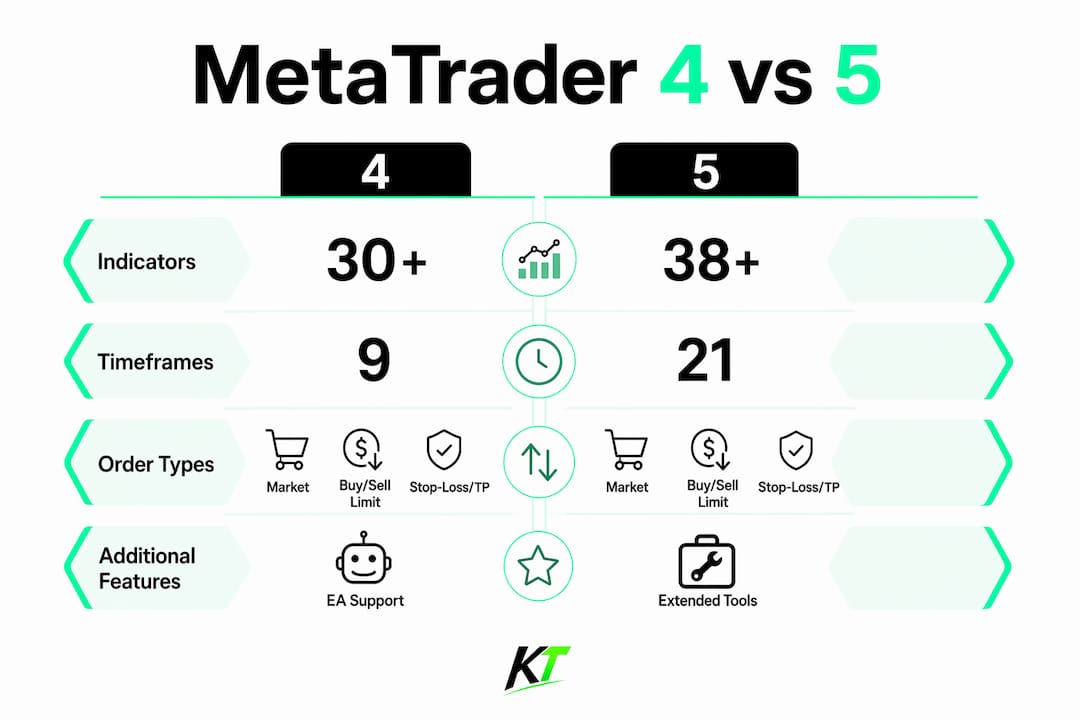
The charting environment is where most traders spend their time. MT4 ships with 30+ built-in indicators across 9 timeframes, covering everything from Moving Averages and MACD to Bollinger Bands and RSI. MT5 pushes that to 38+ indicators across 21 timeframes, adding an economic calendar and docked chart windows. Both platforms support candlestick, line, and bar chart types, plus drawing tools like Fibonacci retracements and trendlines.

The MQL scripting language is what separates MetaTrader from a basic charting app. MQL4 (for MT4) and MQL5 (for MT5) let you write custom indicators, scripts, and fully automated trading systems. If you cannot code, the MetaTrader Market gives you access to thousands of pre-built tools.
| Feature | MetaTrader 4 | MetaTrader 5 |
|---|---|---|
| Built-in indicators | 30+ | 38+ |
| Timeframes | 9 | 21 |
| Order types (pending) | 4 | 6 |
| Economic calendar | No | Yes |
| Multi-asset support | Forex, CFDs | Forex, stocks, futures, options |
| Strategy tester | Single-threaded | Multi-threaded |
| Programming language | MQL4 | MQL5 |
Order types on both platforms cover market orders, Buy/Sell Limit, Buy/Sell Stop, and stop-loss with take-profit. MT5 adds two more pending order types and supports partial order filling, which gives active traders tighter control over entries. Mobile apps for iOS and Android carry the full trading function set, so you can monitor and manage positions away from your desk without losing capability.
How Expert Advisors automate your forex strategies
Expert Advisors are the automation engine inside MetaTrader. An EA is a program written in MQL that watches the market, applies your logic, and executes trades automatically based on predefined rules. No emotion, no hesitation, no missed entry because you stepped away. The EA handles it.
The workflow looks like this:
- Write or purchase an EA in MQL4 or MQL5
- Load it onto a chart in the terminal
- Set your parameters (lot size, stop-loss distance, entry conditions)
- Let it run while the market is open
Backtesting is built into both platforms. You feed the EA historical price data and it simulates trades, giving you a performance report before you risk real capital. MT5’s strategy tester runs on multiple threads simultaneously, so testing a complex EA across several currency pairs takes a fraction of the time it would on MT4’s single-threaded tester.
Pro Tip: Run your EA on a VPS (virtual private server) hosted near your broker’s servers. This keeps the terminal online 24/7 and cuts execution latency even when your personal computer is off, which is critical for strategies that trade during the Asian session or react to news events.

One thing traders often overlook: MT4 and MT5 EAs are not interchangeable. MQL4 and MQL5 are different languages, so an EA built for MT4 must be completely rewritten to run on MT5. If you have a library of MT4 EAs that work, that rewrite cost is real. Factor it in before switching platforms.
You can also find hands-off trading systems that pair well with MetaTrader’s EA framework if you want to study how professional automated setups are structured before building your own.
What social and copy trading look like on MetaTrader
MetaTrader’s signal service lets you subscribe to another trader’s signals and have their trades replicated automatically on your account. You pick a provider from hundreds of free and paid options, set your risk level, and the platform does the rest. No manual copying, no watching someone else’s screen.
How copy trading works in practice:
- Browse signal providers by performance history, drawdown, and subscription cost
- Subscribe through the platform (demo or live account)
- MetaTrader mirrors the provider’s trades proportionally to your account size
- You can monitor results or let it run without intervention
The benefits are real for traders who lack time to analyze markets themselves. The risks are equally real. Past performance from a signal provider does not guarantee future results, and you are exposed to their drawdowns as well as their gains. Reviewing a provider’s trade copying strategy before subscribing helps you understand what you are actually signing up for.
Social trading on MetaTrader is not a passive income machine. It is a tool that requires the same due diligence as any other trading decision.
What the MetaTrader Market offers traders
The MetaTrader Market is a built-in store inside both MT4 and MT5 where you can browse, buy, and install trading robots, custom indicators, and scripts without leaving the platform. Thousands of free and paid tools are available, ranging from simple moving average crossover EAs to multi-condition algorithmic systems.
What you will find there:
- Free indicators and robots: Community-contributed tools with no cost, useful for testing ideas
- Paid EAs: Priced by one-time purchase or monthly rental, with vendor-set terms
- Custom indicators: Technical overlays built in MQL that go beyond the platform’s built-in set
- Scripts: Single-action programs that run once (close all trades, set break-even on all positions)
The quality varies. A high price tag does not mean a profitable EA, and a free indicator can be exactly what you need. Read the reviews, check the backtest parameters, and if possible, run any new tool on a demo account before attaching it to live capital. The marketplace ecosystem is one of MetaTrader’s genuine strengths, but it rewards skeptical buyers.
MetaTrader 4 vs. MetaTrader 5: which one fits your trading?
MT4 remains the dominant platform for pure forex trading in 2026, carried by its massive developer community, years of accumulated tools, and a user interface that experienced traders know cold. MT5 is the technically superior platform, but “superior” does not automatically mean “better for you.”
The core differences:
- Asset coverage: MT4 covers forex and CFDs. MT5 adds stocks, futures, options, and commodities, with access to Depth of Market data.
- Programming: MQL4 is procedural and straightforward. MQL5 is object-oriented, enabling more complex EA structures and multi-threaded backtesting.
- Order system: MT4 uses an order-based system where each trade gets its own ticket, which suits hedging strategies. MT5 uses a position-based system that nets trades in the same instrument.
- Charting depth: MT5 has 21 timeframes versus MT4’s 9, plus docked charts and a built-in economic calendar.
- EA compatibility: Strategies built for MT4 cannot run on MT5 without a full rewrite. This is the single biggest migration barrier.
Professional traders tend to choose based on what they actually trade, not which platform is newer. If your entire workflow is forex with a set of MT4 EAs that perform well, staying on MT4 is a rational decision. If you trade across multiple asset classes or want faster backtesting, MT5 is the logical move. The large MT4 ecosystem creates a network effect that keeps many traders anchored there even when they know MT5 exists.
Using MetaTrader in the U.S. forex market
MetaTrader is a platform, not a broker. That distinction is critical for U.S.-based traders. Execution speed and trade quality depend entirely on your broker, not on MetaTrader itself. Two traders using the same MT4 terminal with different brokers can experience completely different fills, spreads, and slippage.
Key considerations for U.S. traders:
- Broker regulation: In the U.S., forex brokers must be registered with the CFTC and be members of the NFA. MetaTrader is legal and widely available, but your broker’s regulatory status is what protects your funds.
- FIFO rule: U.S. regulations require First In, First Out trade management, which affects how you use hedging strategies on MT4. MT5’s netting system aligns more naturally with U.S. exchange-style rules.
- Leverage limits: U.S. retail forex leverage is capped by NFA rules (50:1 on major pairs, 20:1 on minors). MetaTrader enforces whatever limits your broker sets, so the platform itself is not the constraint.
- Broker selection: Not every international broker offering MetaTrader accepts U.S. clients. Verify NFA membership before depositing.
- Execution dependency: MetaTrader shows you the price your broker quotes. If your broker has wide spreads or slow servers, no platform feature fixes that.
The common beginner mistake: assuming that switching from one MetaTrader broker to another changes the platform experience. The charts look identical. What changes is execution quality, spreads, and available instruments, all of which are broker decisions.
How a professional trading keyboard upgrades your MetaTrader workflow
MetaTrader’s software tools are powerful, but the physical act of executing trades through a mouse and keyboard introduces delays that add up fast, especially for scalpers and prop traders managing multiple positions. A dedicated trading keyboard changes that equation.
Key-trade builds physical trading keypads designed specifically for MetaTrader 4 and MetaTrader 5 workflows. Each button is programmable to trigger a specific action: open a market order at a preset lot size, move a stop to break-even, close 50% of a position, or set a take-profit level. Actions that normally require three clicks and a dialog box happen in one keystroke.
The practical advantages:
- Faster execution: One physical button press beats navigating a software menu during a fast-moving market
- Reduced errors: Preset parameters mean you are not typing lot sizes under pressure
- Risk control at your fingertips: Break-even, SL/TP modification, and partial close mapped to dedicated keys
- Works alongside EAs: Hardware execution complements automated strategies for the trades you manage manually
- No technical knowledge required: Plug in, configure once, trade immediately
Pro Tip: Map your most-used risk management actions (break-even, partial close, full close) to the top row of your keypad. During a volatile news event, you want those functions accessible without looking away from the chart. Pairing this with MetaTrader’s MT5 execution speed gives you both automation and manual override in the same setup.
For traders running EAs alongside manual positions, the keypad handles the human side of the trade while the EA handles the systematic side. That split is how professional prop desks operate, and it is available to any serious retail trader willing to invest in the right setup. Check the trading desk efficiency guide for a full breakdown of how hardware fits into a professional workflow.

The Key-trade trading keyboard is built for MetaTrader traders who have outgrown clicking through menus. If execution speed and risk control matter to your strategy, it is worth a serious look.
Key Takeaways
MetaTrader functions as the essential software layer between forex traders and their brokers, with execution quality, spreads, and available instruments determined entirely by the broker, not the platform.
| Point | Details |
|---|---|
| Platform vs. broker | MetaTrader is software; your broker controls execution quality, spreads, and fund security. |
| MT4 for forex focus | MT4 remains dominant for pure forex trading in 2026, backed by a vast EA and indicator ecosystem. |
| MT5 for multi-asset | MT5 supports stocks, futures, and options alongside forex, with 21 timeframes and faster backtesting. |
| EA incompatibility | MQL4 and MQL5 are separate languages; EAs built for MT4 must be fully rewritten to run on MT5. |
| Hardware accelerates execution | Programmable trading keypads reduce execution time and errors for MetaTrader traders managing live positions. |
FAQ
Is MetaTrader good for forex trading?
Yes. MetaTrader 4 and MetaTrader 5 are the industry-standard platforms for forex trading, offering advanced charting, automated trading through Expert Advisors, and broad broker support worldwide.
Is MetaTrader 5 legal in the USA?
MetaTrader 5 is fully legal in the U.S. The key requirement is that your broker must be registered with the CFTC and hold NFA membership; the platform itself carries no legal restrictions.
Do professional traders use MetaTrader?
Many professional and institutional traders use MetaTrader, particularly MT4 for forex-focused strategies and MT5 for multi-asset trading, due to the platforms’ automation capabilities and deep customization through MQL.
Which MetaTrader version is best for forex?
MT4 is generally preferred for pure forex trading because of its simpler interface, extensive EA library, and order-based hedging system. MT5 suits traders who need multi-asset access or faster strategy backtesting.
Recommended
- cTrader Trade Management Features: Complete 2026 Guide – Key-Trade Trading Keyboards
- Why Traders Choose cTrader Platform: 2026 Guide – Key-Trade Trading Keyboards
- Why Futures Traders Use NinjaTrader: 2026 Guide – Key-Trade Trading Keyboards
- TradingView Trade Management Tools: 2026 Guide – Key-Trade Trading Keyboards