

Xeroflex.com Alternatives for Active Traders: Hardware vs. Software
TL;DR:
- Hardware keypads like Key-trade provide near-instant, tactile control for active traders needing speed and reliability. They operate independently of internet or server issues, unlike software middleware solutions such as Xeroflex. These physical devices are ideal for discretionary traders who require quick manual execution and robust risk management.
If you’re searching for xeroflex.com alternatives, the short answer is this: for execution-focused US traders, a physical trading keypad from Key-trade is the strongest substitute. Xeroflex operates as software middleware that routes automated orders and handles webhook integrations. Key-trade keypads do something fundamentally different: they put tactile, programmable controls directly in your hands, with near-zero input latency and zero dependence on a remote server. If your priority is manual execution speed on TradingView, MetaTrader 4/5, NinjaTrader, or cTrader, hardware wins the comparison before you even open a spec sheet.
The best-fit trader here is an active discretionary trader or prop desk operator who needs to partial-close, reverse, or scale out of positions in seconds, not milliseconds after a webhook fires.
Table of Contents
- What are the best Xeroflex.com alternatives for US traders?
- What does Key-trade offer execution-focused traders?
- What is Xeroflex, and when does software middleware still make sense?
- How do you choose between software middleware and a hardware keypad?
- How do you set up a hardware keypad with US trading platforms?
- What execution gains and risks should you expect when switching to hardware?
- Key Takeaways
- Why trading desks sometimes move away from software automation
- Key-trade is the hardware alternative to Xeroflex for US traders
- Useful sources
- FAQ
What are the best Xeroflex.com alternatives for US traders?
| Dimension | Software Middleware (Xeroflex / Xerolite) | Hardware Keypad (Key-trade) |
|---|---|---|
| Solution type | Software / middleware server | Physical programmable keypad |
| Execution latency | Depends on internet + server round-trip | Local device, near-zero input lag |
| Control model | Automated signal routing | Manual tactile button press |
| Core features | Webhook integrations, order routing, backtesting | Programmable buttons, partial close, order reversal, macro chains |
| Platform compatibility | Broker API / IB Gateway focus | TradingView, MT4/5, NinjaTrader, cTrader, SierraChart, Thinkorswim, Tradovate |
| Failure modes | Server outage, API rate limits, internet drop | USB/hardware fault, driver conflict |
| Cost model | Subscription or licensing fees | One-time hardware purchase |
| Best-fit use case | Systematic, signal-driven automated strategies | Active discretionary trading, scalping, prop desk execution |

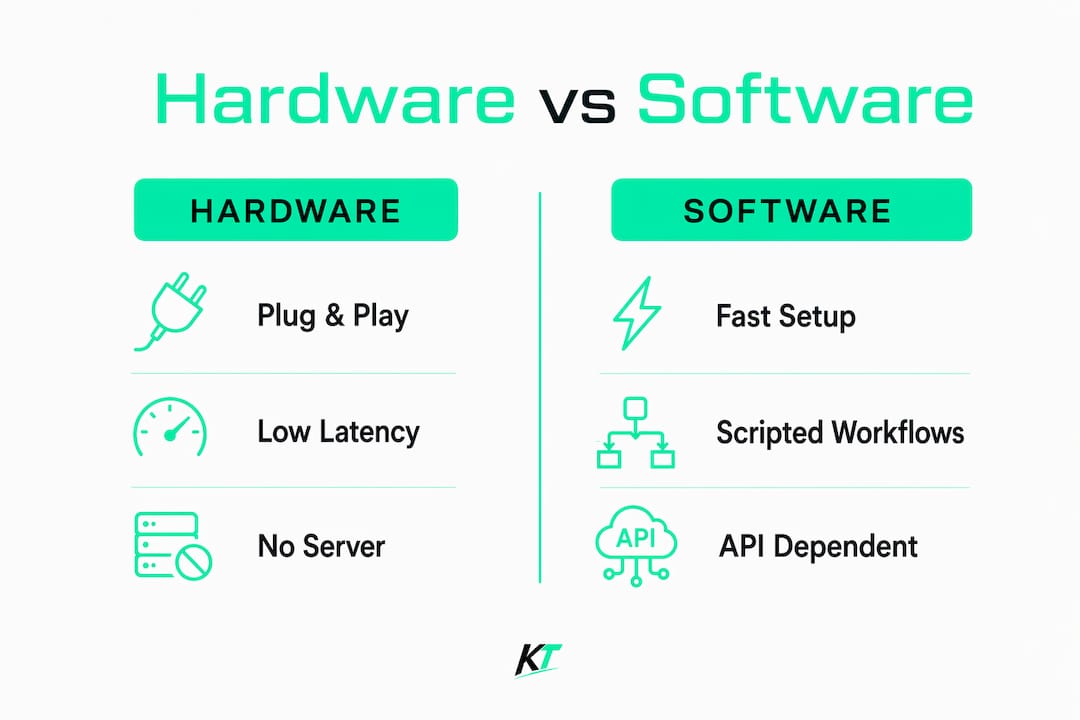
Software middleware is fast to configure for scripted workflows and works well when you want to delegate routine order flows to automation. Hardware keypads give you physical certainty: the button press registers locally regardless of what your internet connection is doing. The tradeoff is real in both directions.
What does Key-trade offer execution-focused traders?
Key-trade trading keypads are built around one idea: every critical trade action should be one button press away, with no software layer between your decision and the order.
Core features:
- Programmable buttons mapped to specific order actions (market entry, limit, stop)
- Partial close at preset percentages of the open position
- Order reversal with a single keypress
- Macro chains for multi-step sequences (e.g., enter + set SL/TP in one action)
- Lot-size presets and local device profiles per account or strategy
- Bundled software add-ons for platform-specific configuration
Platform compatibility:
Key-trade works with TradingView, MetaTrader 4, MetaTrader 5, NinjaTrader, cTrader, SierraChart, Thinkorswim, and Tradovate. Most platforms connect out of the box using the bundled configuration software. SierraChart and Thinkorswim may require a short manual mapping step to align keypad outputs with platform hotkey assignments.
Because the device operates as a plug-and-play peripheral, there is no server to maintain and no middleware process to monitor. That alone removes a category of failure that software-only setups carry permanently.
Pro Tip: Map one button to a partial-close macro at 50% of your position and a second to a full flatten. During a fast news spike, those two buttons handle your most common emergency actions without touching the mouse.
Key-trade ships worldwide, including to US addresses, and includes setup guides plus technical support. Warranty terms are listed on the product page.
What is Xeroflex, and when does software middleware still make sense?
Xeroflex is a software-based automated trading platform and middleware layer that connects trading signals to broker APIs. Its core use case is automating order placement via TradingView webhooks and managing order routing without manual intervention. Xerolite, a related product, functions as a middleware server between an AI signal layer (such as OpenClaw) and a broker gateway like IB Gateway.
Software middleware makes sense in three specific scenarios:
- You run a systematic strategy where signals fire automatically and human input is intentionally removed from execution.
- You want to connect a TradingView alert or external signal source directly to a broker without writing custom code.
- You are comfortable maintaining a server environment and monitoring API connectivity as part of your workflow.
Where it struggles: server and API dependencies create execution risk that hardware avoids entirely. An internet drop, an API rate limit, or an unexpected gateway update can introduce silent failures. For manual scalp trades, break-even adjustments, or quick scaling out, a software layer adds friction and latency that compounds under pressure. The naming confusion around “Xero Lite” across multiple unrelated products also means traders searching for alternatives sometimes end up evaluating tools that have nothing to do with trading automation.
How do you choose between software middleware and a hardware keypad?
Work through this checklist before committing to either solution.
Decision criteria:
- Execution latency tolerance. If a 200–500ms server round-trip during a fast market is acceptable, middleware works. If it is not, hardware is the answer.
- Manual vs. automated workflow. Systematic strategies with no discretionary input favor middleware. Active discretionary trading favors hardware.
- Need for partial-close and reversal hotkeys. Hardware handles these natively with a single button. Middleware requires scripted logic and a live connection.
- Platform compatibility. Confirm your primary platform is supported. Key-trade covers TradingView, MT4/5, NinjaTrader, cTrader, SierraChart, Thinkorswim, and Tradovate.
- Account type. For API-connected tools, IBKR Pro is recommended over Lite for better execution quality and access to additional order types.
- Support and warranty. Hardware should come with a clear warranty and responsive technical support. Software tools vary widely.
- US shipping and returns. Confirm the vendor ships to your address and has a return policy.
- Total cost of ownership. One-time hardware purchase vs. ongoing subscription fees.
Questions to ask any vendor:
- What is the support response SLA?
- Does the mapping software run locally or require a cloud connection?
- Are firmware updates free, and how are they delivered?
- Is there a demo mode or paper-trading integration guide?
Red flags:
- No clear warranty or support contact
- Critical controls depend on a remote server
- No US shipping or vague return policy
- Setup requires ongoing server maintenance with no documentation
How do you set up a hardware keypad with US trading platforms?
Setup for a Key-trade keypad follows a straightforward sequence that most traders complete in under an hour.
Unbox the device and check for a firmware update notification in the bundled software. Install the mapping software on your trading PC. Define account templates: set your default lot size, SL/TP values, and partial-close percentages per account or strategy profile. Map each button to the corresponding platform hotkey or API trigger. Where possible, configure the device for local-only control so it does not depend on an active internet connection for basic order actions.
| Platform | Native Mapping | Configuration Notes |
|---|---|---|
| TradingView | Yes | Hotkey bridge via bundled add-on |
| MetaTrader 4 | Yes | Direct hotkey assignment |
| MetaTrader 5 | Yes | Direct hotkey assignment; see MT5 keypad guide |
| NinjaTrader | Yes | Requires SuperDOM or ATM strategy mapping |
| cTrader | Yes | Native hotkey support |
| SierraChart | Requires config | Manual hotkey alignment step |
| Thinkorswim | Requires config | Manual hotkey alignment step |
| Tradovate | Yes | Web-based hotkey bridge |
After mapping, test every button on a paper trading account before going live. Log the response time between button press and order confirmation on your platform. If a button fires inconsistently, check USB port assignment and driver version. Contact Key-trade support with your platform version and OS details if the issue persists.
What execution gains and risks should you expect when switching to hardware?
Physical keypads reduce cognitive load during high-volatility sessions by replacing mouse navigation with a single button press. For scalp trades, that difference is felt immediately: your hand is already on the device, the action is muscle memory, and the order fires without hunting for a UI element. Partial-close and reversal execution become reflexive rather than deliberate.
Operational risks are real but manageable. Firmware bugs are rare but can cause a button to misfire. USB connection failures are the most common hardware issue: use a direct port, not a hub, and keep a backup hotkey map active in your platform as a fallback. Driver conflicts occasionally appear after OS updates; pre-market testing on the days following a Windows update is good practice. Pairing your keypad with a solid pre-trade strategy review using a tool like StrategyArchive helps ensure the signals you are executing are worth the speed advantage.
The scenario where hardware most clearly outperforms middleware: a server outage during a news event. Middleware goes silent. The keypad fires the order regardless.
Key Takeaways
Hardware keypads are the strongest xeroflex.com substitutes for active US traders who prioritize manual execution speed, tactile control, and reliability independent of internet or server conditions.
| Point | Details |
|---|---|
| Hardware beats middleware for manual execution | Key-trade keypads fire orders locally with near-zero latency, no server required. |
| Xeroflex suits systematic, automated strategies | Middleware works best when human input is intentionally removed from execution. |
| One-time cost vs. ongoing subscription | Key-trade is a one-time hardware purchase; software middleware typically carries recurring fees. |
| Setup is fast | Most traders complete platform mapping and testing in under an hour. |
| Key-trade recommendation | Key-trade keypads cover TradingView, MT4/5, NinjaTrader, cTrader, SierraChart, Thinkorswim, and Tradovate with worldwide shipping to US addresses. |
Why trading desks sometimes move away from software automation
The traders who switch from middleware to hardware are not abandoning automation. They are separating their systematic strategies from their discretionary execution layer. During a live session, confidence in your tools matters as much as the tools themselves. A button that always works the same way, regardless of network conditions, removes a variable that software cannot eliminate.
The practical tip worth keeping: map a single button to a 50% partial close and a second to a full flatten. Keep both accessible without looking down. Those two actions cover the majority of emergency risk management scenarios, and having them on hardware means they work even when everything else is going wrong.
Key-trade is the hardware alternative to Xeroflex for US traders
Most traders evaluating similar sites to xeroflex.com are looking for faster, more reliable execution, not more software to manage. Key-trade delivers that through a physical keypad that connects directly to your trading platform, ships to US addresses, and requires no ongoing subscription.

The device covers every major US platform, including TradingView, MetaTrader 4/5, NinjaTrader, cTrader, SierraChart, Thinkorswim, and Tradovate. Setup takes under an hour. Support and setup guides are included. Visit the Key-trade product page to see device specs, check compatibility with your platform, and place an order with worldwide shipping to your US address.
Useful sources
- Xeroflex automated trading platform overview — Picosoft Solutions
- OpenClaw + Xerolite: Interactive Brokers AI trading bot setup — Supa.is
- Xero Lite naming disambiguation — Glarity Ask AI
- Key-trade trading keypad product page
- External trading keypads for MT5: speed and accuracy — Key-trade
- Trading input devices for active traders: a full guide — Key-trade
- StrategyArchive: trading strategies, journals, and backtesting
FAQ
What is the main difference between Xeroflex and a hardware keypad?
Xeroflex is software middleware that routes automated orders via broker APIs and webhook integrations. A hardware keypad like Key-trade executes orders locally through a physical button press, with no server dependency.
Does Key-trade work with TradingView and MetaTrader 5?
Yes. Key-trade supports TradingView, MetaTrader 4, MetaTrader 5, NinjaTrader, cTrader, SierraChart, Thinkorswim, and Tradovate, with most platforms connecting through the bundled configuration software.
Is a hardware keypad a one-time purchase or a subscription?
Key-trade is a one-time hardware purchase. Software middleware solutions like Xeroflex typically carry recurring subscription or licensing fees.
When does software middleware make more sense than a hardware keypad?
Middleware is the better fit for fully automated, signal-driven strategies where human input is removed from execution. For discretionary trading, scalping, or any workflow requiring fast manual partial closes and reversals, hardware is more reliable.
What account type works best with hardware keypads for US traders?
For traders using API-connected platforms, an IBKR Pro account is recommended over Lite for better execution quality and access to a wider range of order types.
Recommended
- 5 Hardware Trading Alternatives 2026 – Key-Trade Trading Keyboards
- Top 6 tradekey.com Alternatives for 2026 – Key-Trade Trading Keyboards
- Best magickeys.trade Alternatives for Forex Traders in 2026 – Key-Trade Trading Keyboards
- Trading Input Devices for Active Traders: A Full Guide – Key-Trade Trading Keyboards