

NinjaTrader Platform Explained for Pro Traders
TL;DR:
- NinjaTrader is a Windows-only futures trading platform that offers advanced charting, automation, and simulation features. Its speed and effectiveness depend heavily on hardware, data feed quality, broker choice, and input devices, especially for professional traders. Proper configuration and system optimization are essential for achieving low-latency execution.
NinjaTrader is a Windows-based futures trading platform that centralizes advanced charting, precision order execution, and C#-driven automation in a single desktop application. For professional traders, the bottom line is this: it is free to download and use in simulation, deeply customizable, and built to handle the kind of high-frequency, low-latency workflows where milliseconds matter.
- Windows only. No Mac, no browser version. Free for charting, backtesting, and simulated trading without a funded account.
- Core capabilities: advanced multi-timeframe charting, Chart Trader in-chart order entry, SuperDOM market depth, ATM Strategies, and NinjaScript automation.
- Hardware matters here. Execution speed on NinjaTrader depends on your full stack: platform, data feed, broker, network, and input devices. This article covers all of it.
Table of Contents
- What does NinjaTrader actually do? Core features broken down
- Who actually uses NinjaTrader, and does it fit you?
- System requirements and performance for low-latency execution
- How NinjaTrader connects to brokers and market data
- How NinjaTrader automation runs, and what developers must test
- How hardware improves your NinjaTrader execution speed
- Getting started: setup checklist for professional traders
- Security, costs, and licensing
- Key Takeaways
- The part most traders skip
- Key-Trade trading keypads for NinjaTrader execution
- Useful sources and further reading
- FAQ
What does NinjaTrader actually do? Core features broken down
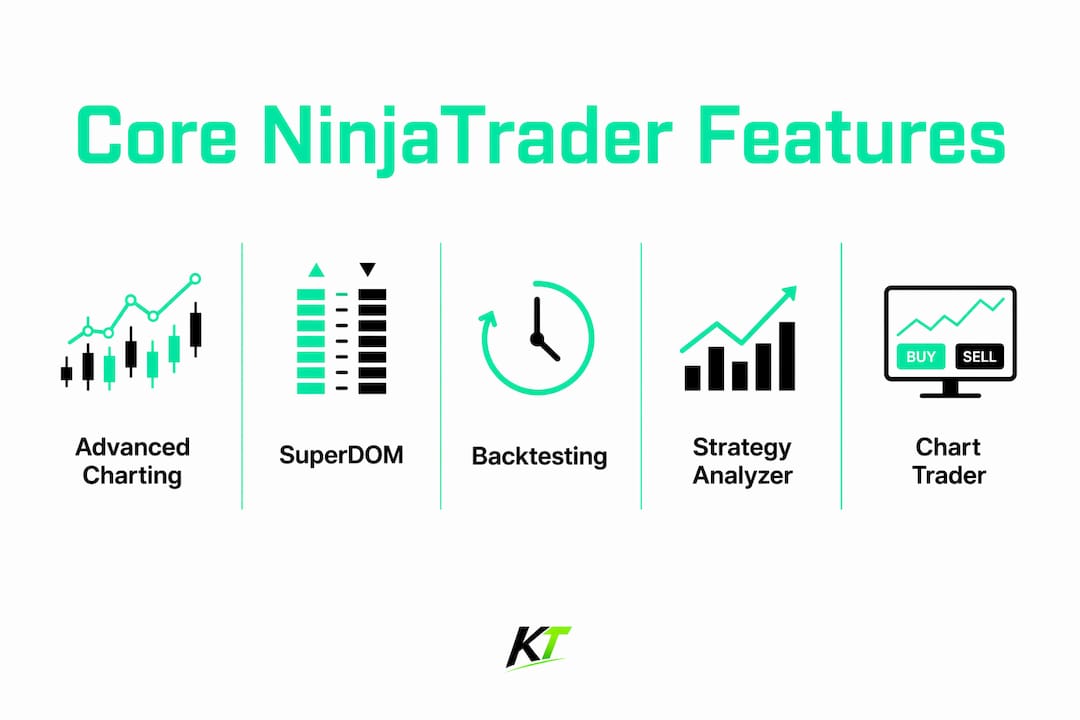
NinjaTrader’s feature set is wide, but for professional traders, a handful of tools drive most of the value.
Advanced charting supports hundreds of bar types: standard candlestick and OHLC, plus range bars, renko, tick, volume, and point-and-figure. Multiple chart windows can run simultaneously, synced to the same instrument. Chart Trader lets you place, modify, and cancel orders directly on the chart without touching a separate order ticket. NinjaTrader was among the first platforms to offer this, and it remains one of the fastest paths from signal to fill when paired with hotkeys.
SuperDOM (Depth of Market) displays the live order book at every price level. Scalpers and day traders use it for single-click order placement and rapid position management. ATM Strategies add semi-automation for discretionary traders: preset stop, target, and trailing rules that activate the moment a position opens. OCO orders (one-cancels-other) handle bracket logic natively.

Backtesting and Strategy Analyzer run against tick-by-tick historical replay, which means simulated results reflect actual market microstructure rather than bar-level approximations. The add-on ecosystem extends the platform through thousands of third-party indicators and apps, all accessible via NinjaScript.
| Feature | Professional benefit | Hardware interaction |
|---|---|---|
| Chart Trader | In-chart order entry, no ticket switching | Hotkey triggers one-click entries |
| SuperDOM | Full order book, single-click fills | Keypad macros for rapid DOM actions |
| ATM Strategy | Auto stop/target on open | Hotkey activates preset bracket |
| OCO orders | Bracket logic without manual management | Macro sequences for complex flows |
| Strategy Analyzer | Tick-level backtesting | N/A — setup phase |
| NinjaScript | Custom indicators and full automation | Hotkeys trigger custom strategy actions |
Who actually uses NinjaTrader, and does it fit you?
Professional traders treat NinjaTrader as a modular interface that centralizes strategy development while letting them pick the broker and data feed that best fit their latency and market access needs. Four personas dominate the user base.
High-frequency scalpers live in the SuperDOM and Chart Trader. They need sub-second order placement and rely heavily on hotkey pads to eliminate mouse travel. Discretionary futures day traders use ATM Strategies and multi-timeframe charts to manage positions without writing a line of code. Quant and automation developers build proprietary indicators and execution algorithms in NinjaScript, treating the platform as a C# runtime with direct market access. Prop traders value the futures trader workflow and the ability to connect to prop-firm-approved data feeds and brokers.
Strengths for pros:
- Deep NinjaScript customization with low-level order and fill access
- Free simulation tier for strategy validation before going live
- Large third-party ecosystem for indicators and execution tools
- Flexible broker and data feed selection
Weaknesses to know:
- Windows only — no Linux or Mac support
- Complexity has a real learning curve; expect days, not hours, to configure a professional workspace
- Premium features (advanced order types, full automation) require a paid license
Go deeper if you need native C# automation, SuperDOM scalping, or tick-level backtesting. If your workflow is equity-focused or browser-based, NinjaTrader is not the right fit.
System requirements and performance for low-latency execution
NinjaTrader runs on Windows and recommends validating system resources before installing, especially for multi-monitor or heavy charting setups. For low-latency professional use, the minimum specs are a starting point, not a target.
Pre-installation checklist:
- Current Windows 10 or 11 (64-bit), fully updated with latest drivers
- Stable internet connection with low jitter — test with a ping tool before going live
- Multi-core CPU with high single-core clock speed for tick processing
- 16 GB RAM minimum for heavy charting; 32 GB if running multiple strategies simultaneously
- NVMe SSD for replay datasets and platform data to avoid I/O stalls
- Dedicated GPU with multi-monitor support; verify driver stability under load
- Network interface card (NIC) settings tuned for low latency (disable power-saving modes)
Pro Tip: Before committing to a local machine vs. a trading VPS, run NinjaTrader’s tick-replay feature under your typical chart load and measure CPU and RAM usage. If you consistently hit 80%+ CPU during market open, a VPS closer to your broker’s servers will likely outperform a local machine with better specs.
How NinjaTrader connects to brokers and market data
NinjaTrader is the interface. Your broker and data feed are separate choices, and that distinction directly affects your execution latency. NinjaTrader, LLC provides the software; NinjaTrader Clearing, LLC clears trades and holds funds as a separate regulated entity. You can also connect to third-party brokers and data providers.
Execution latency is a product of the full chain: platform, data feed, brokerage clearing path, and local hardware. No amount of platform optimization compensates for a slow data feed or a broker with poor colocation.
What to verify before going live:
- Confirm your broker supports the NinjaTrader API and which connection method it uses
- Check data feed quality: tick-level vs. bar-level, and whether full market depth is included
- Ask about server proximity to the exchange (CME colocation matters for ES and NQ)
- Understand clearing times and whether partial fills are handled at the broker or platform level
- Test order round-trip time in simulation before funding the account
NinjaTrader uses CQG Continuum as its primary data provider for live brokerage accounts, with Rithmic also supported. For multi-platform prop trading workflows, verifying data feed compatibility across platforms before committing is worth the extra hour.
How NinjaTrader automation runs, and what developers must test
NinjaScript is a C#-based framework that gives developers low-level access to orders, fills, and account data. It runs inside the desktop client, not on a remote server, which means your local machine’s performance directly affects strategy execution timing.
The critical risk most developers underestimate: blocking operations inside strategy code — database calls, file writes, or synchronous HTTP requests — execute on the same thread as order logic. One slow operation can delay a fill by hundreds of milliseconds. Profile your strategy code the same way you profile your hardware.
Automation testing checklist:
- Backtest with tick-replay enabled, not bar-level data, to capture realistic fill behavior
- Forward-test in a simulated account with live market data before any capital is at risk
- Log order submission timestamps at both the client and broker ends to isolate bottlenecks
- Test partial close behavior and position reversal logic under fast market conditions
- Monitor CPU and RAM usage during strategy execution at market open
- Run account evaluation automation tests if you are trading on a prop firm account
For scalping-style automation, higher single-core CPU clocks and local NVMe storage for replay datasets reduce I/O stalls during intensive tick processing.
How hardware improves your NinjaTrader execution speed
Software optimization has a ceiling. Once your platform, data feed, and broker are tuned, the next constraint is often the input device itself. Mouse-driven order entry introduces variable latency — the time between a signal and a click is inconsistent under pressure.
A dedicated trading keypad maps specific keys to Chart Trader actions: one key for a market buy, another for a preset ATM bracket, a third for a partial close. The result is a repeatable, sub-100ms input sequence that does not depend on cursor position or menu navigation. For SuperDOM scalpers, keypad macros can handle the full sequence of placing, modifying, and canceling orders without lifting a hand from the device.
Hardware is not a shortcut — it is a consistency tool. The traders who benefit most are those who have already optimized their software stack and are now losing time to GUI interaction, not to strategy logic or data latency.
Pro Tip: Map your three most frequent actions first: entry, stop adjustment, and full close. Test each hotkey in simulation for at least 50 repetitions before using it live. Muscle memory built in sim transfers directly to live execution.
Key-trade hardware is compatible with NinjaTrader and supports programmable hotkeys for Chart Trader and SuperDOM workflows. See the risk management hardware setup guide for configuration details.
Getting started: setup checklist for professional traders
- Create a NinjaTrader account and download the desktop installer from the official site
- Install on a validated Windows machine meeting the performance specs above
- Connect a market data feed (CQG or Rithmic for live; free simulated data for testing)
- Configure Chart Trader and SuperDOM in your workspace layout
- Map hotkeys for your three primary actions and test each in simulation
- Enable simulated trading and run tick-replay sessions under realistic market conditions
- Log order timestamps and compare client-side vs. broker-side timing
- Validate partial close and bracket behavior before funding any account
Run at least two full trading sessions in simulation before touching live capital. Tick-replay is your best diagnostic tool.
Security, costs, and licensing
NinjaTrader’s pricing tiers give professional traders a clear cost structure. The free plan covers charting, backtesting, and simulation with higher per-contract commissions. A monthly lease reduces commissions and unlocks premium features. A lifetime license eliminates the recurring fee and includes the Order Flow+ suite.
| Plan | Cost | Live trading | Advanced features |
|---|---|---|---|
| Free | $0 | Higher commissions | Charting, sim, basic backtesting |
| Monthly lease | From $60/month | Reduced commissions | Automation, advanced order types |
| Lifetime license | $1,099 one-time | Lowest commissions | All features including Order Flow+ |
Account minimums: $400 for futures, $50 for forex. Futures commissions start from $0.25 per contract side (from $0.09 per Micro contract side).
Security checklist: Enable multi-factor authentication on your NinjaTrader account. Keep Windows fully patched and use a dedicated trading machine that does not double as a general-purpose browser. Store API credentials in a password manager, not a text file. Back up your workspace and strategy files to an encrypted external drive weekly.
Budget separately for data feed fees (full market depth costs more than top-of-book), add-on licenses, and hardware. These are real costs that affect your monthly P&L.
General information only — confirm current pricing, fees, and regulatory details directly with NinjaTrader and your broker before committing capital.
Key Takeaways
NinjaTrader is a Windows-only futures platform that is free to simulate, deeply customizable via C#, and only as fast as the weakest link in your platform-data-broker-hardware chain.
| Point | Details |
|---|---|
| Windows requirement | NinjaTrader runs on Windows 10/11 only; no Mac or browser version exists. |
| Free simulation tier | Charting, backtesting, and simulated trading are free without a funded account. |
| Automation via NinjaScript | C# framework gives low-level order access; blocking code in strategies introduces latency directly. |
| Broker and data feed matter | Execution latency depends on your full chain — platform, data feed, broker, and hardware. |
| Key-trade hardware | Programmable keypads compatible with NinjaTrader reduce GUI interaction and improve execution consistency. |
The part most traders skip
Most NinjaTrader guides stop at features. The traders who actually get faster are the ones who treat the platform as one layer in a stack, then work outward: data feed quality, broker colocation, machine specs, and finally input devices. Skipping any layer and jumping straight to hardware is like buying racing tires for a car with a clogged fuel filter.
The hardware upgrade delivers real results, but only after the software stack is clean. Map your hotkeys in simulation. Run tick-replay under load. Measure your round-trip order time before and after any change. The traders who do this systematically are the ones who can actually tell you whether a keypad saved them 80ms or 200ms — and why that number matters for their specific strategy.
The other thing most guides miss: NinjaScript’s power is also its risk. A poorly written strategy can introduce more latency than a slow data feed. Profile your code before you profile your hardware.
Key-Trade trading keypads for NinjaTrader execution
Faster execution on NinjaTrader starts with removing the mouse from your critical order flow. Key-trade’s trading keyboard and hotkey pad is built for exactly this: programmable physical buttons that map directly to Chart Trader entries, ATM bracket activations, partial closes, and SuperDOM actions.

The device connects via wired USB with low-latency HID response, requires no coding knowledge to configure, and is compatible with NinjaTrader alongside TradingView, MetaTrader 4 and 5, cTrader, and other major platforms. Worldwide shipping is available. Visit the Key-trade product page for full specifications, compatibility details, and purchasing options.
Useful sources and further reading
- NinjaTrader Desktop Platform — official feature list, Windows requirements, and multi-monitor guidance
- NinjaTrader Pricing — plan comparison, commission rates, and corporate structure details
- NinjaTrader Customize / NinjaScript — C# framework documentation and developer resources
- NinjaTrader Platform Training — tick-replay, Strategy Analyzer, and simulation guides
- Key-Trade: Why NinjaTrader Traders Need Fast Execution — hardware-focused execution analysis for NinjaTrader workflows
Always validate system requirements, broker compatibility, and data feed latency in simulated mode before trading live capital.
FAQ
Is NinjaTrader free to use?
NinjaTrader is free to download for charting, backtesting, and simulated trading. Live trading with premium features requires a monthly lease (from $60/month) or a one-time lifetime license ($1,099).
Does NinjaTrader work on Mac?
No. NinjaTrader is a Windows-only desktop application. There is no Mac version and no browser-based alternative for the full platform.
What is NinjaScript and why does it matter for latency?
NinjaScript is NinjaTrader’s C#-based automation framework that provides low-level access to orders and fills. Poorly written strategy code can introduce execution delays directly inside the client, making code quality as important as hardware.
How do trading keypads improve NinjaTrader execution?
A dedicated keypad maps physical buttons to Chart Trader entries, ATM brackets, and partial closes, replacing variable mouse-click timing with a consistent, repeatable input sequence. Key-trade keypads are compatible with NinjaTrader and require no coding to configure.
What data feeds does NinjaTrader support?
NinjaTrader uses CQG Continuum as its primary data provider for live brokerage accounts, with Rithmic also supported. Third-party broker connections are available, and data feed quality directly affects execution latency.
Recommended
- NinjaTrader Chart Trader: A Complete Guide for Traders – Key-Trade Trading Keyboards
- Why Futures Traders Use NinjaTrader: 2026 Guide – Key-Trade Trading Keyboards
- NinjaTrader SuperDOM Explained: How It Works – Key-Trade Trading Keyboards
- Why Traders Choose cTrader Platform: 2026 Guide – Key-Trade Trading Keyboards