

What Is Forex Order Execution and Why Speed Matters
Forex order execution is the process that turns your click on “buy” or “sell” into a confirmed position in the market, moving from submission to routing to a filled trade. On institutional systems that entire sequence happens in low double-digit milliseconds; on a typical retail setup it takes noticeably longer. That gap matters because it determines what actually shows up on your ticket:
- Filled at price: you get exactly what you asked for.
- Slippage: you get filled, but at a worse (or occasionally better) price than you clicked.
- Requote or partial fill: the broker asks you to confirm a new price, or only part of your order goes through.
Retail traders often blame slippage on a shady broker. More often, it comes down to available liquidity, distance to the server, or the execution mode the account uses.
Key Takeaways
Forex order execution quality depends on the combination of execution mode, broker routing model, and the trader’s own reaction speed, not on any single factor alone.
| Point | Details |
|---|---|
| Know your execution mode | Market execution guarantees a fill but risks slippage; instant execution risks a requote instead. |
| Activation isn’t execution | A stop or stop-limit order triggers at one price but can fill at another, especially in fast markets. |
| Check the routing model | A-book brokers route to external liquidity; B-book brokers internalize trades, which affects transparency. |
| Measure, don’t guess | Use platform journals to calculate your own median latency and slippage across real trades. |
| Cut manual delay | Programmable hardware controls can shorten the gap between your decision and the order reaching the platform. |
Table of Contents
- Market Execution vs. Instant Execution: What Each One Actually Promises
- Order Types, and Why Activation Isn’t the Same as Execution
- How Your Broker Routes the Order Behind the Scenes
- The Metrics That Actually Tell You If Your Execution Is Good
- How To Test Your Own Execution Quality This Week
- Where Hardware Fits Into the Execution Equation
- What Actually Separates Good Execution From Marketing Claims
- Sources
- FAQ
Market Execution vs. Instant Execution: What Each One Actually Promises
The two protocols solve the same problem, filling your order, in opposite ways, and the difference decides whether you get a guaranteed fill or a guaranteed price.
Market execution fills your order immediately at whatever price the market offers at that instant. You are guaranteed a fill, but not a specific price. If EUR/USD moves half a pip between your click and the broker’s server processing it, you eat that difference as slippage.
Instant execution tries to fill you at the exact price you clicked. If the market has moved by the time your order lands, the broker sends back a requote instead of filling you at a different price. You either accept the new price or cancel.
- Market execution: no requotes, occasional slippage, common on ECN/STP accounts.
- Instant execution: no unexpected slippage, occasional requotes, common on dealing-desk (market maker) accounts.
Neither model is objectively better. A scalper chasing a five-pip move usually wants market execution’s certainty of fill. A trader working a tight breakout level might prefer instant execution’s price certainty, accepting that a requote sometimes means missing the move entirely.
Pro Tip: Check your account type before you assume how your orders will behave. Dealing-desk accounts default to instant execution far more often than ECN accounts, and that single detail explains most “why didn’t I get filled” complaints.
Order Types, and Why Activation Isn’t the Same as Execution
Every forex order type answers one question: at what price and under what condition should this trade go live? Here are the core ones you’ll actually use.
- Market order: executes now, at the current price. Fastest, but subject to slippage.
- Limit order: executes only at your specified price or better. Protects against paying too much, but might never fill if price never reaches it.
- Stop order: activates once price hits a trigger level, then executes as a market order. Good for breakouts, bad for slippage during fast moves.
- Stop-limit order: activates at the trigger, then only fills at your limit price or better. Caps slippage but risks no fill at all.
- Stop-loss / take-profit: pre-set exit orders attached to an open position, behaving like a stop or limit depending on direction.
- Trailing stop: a stop that moves with price in your favor, locking in gains without manual adjustment.
The detail most traders miss: activation is not execution. A stop order at 1.0950 doesn’t fill at 1.0950. It triggers there, then hunts for the next available price, and in a fast market that next price can be several pips away. That gap between trigger and fill is exactly where slippage lives. Limit orders reduce price risk because they refuse to fill outside your terms. Market and stop orders prioritize getting you in or out over getting you an exact price.
How Your Broker Routes the Order Behind the Scenes
What happens after you hit “buy” depends heavily on your broker’s execution model, and this is the part most trading education skips.
A-book brokers route your order to external liquidity providers, banks, hedge funds, other market participants, who take the other side of the trade. Your fill reflects real market pricing, and the broker earns money on the spread or a commission, not on your losses.
B-book brokers internalize the order, meaning the broker itself takes the opposite position. This isn’t inherently predatory, but it creates a structural conflict: the broker profits when you lose. Execution transparency tends to be lower here, and it’s worth checking your broker’s disclosures for which model applies to your account.
- Liquidity providers and FIX bridges determine both the price you see and how fast it updates.
- More liquidity providers connected to your broker generally means tighter spreads and fewer instances of an order “walking the book” for lack of depth at your price.
- Server co-location, placing your trading infrastructure physically near the broker’s matching engine, cuts the physical distance data has to travel, which is why professional desks pay for space in data centers like LD4 or NY4.
The Metrics That Actually Tell You If Your Execution Is Good
Most traders judge execution quality by gut feeling after a bad fill. A better approach is tracking four measurable numbers.
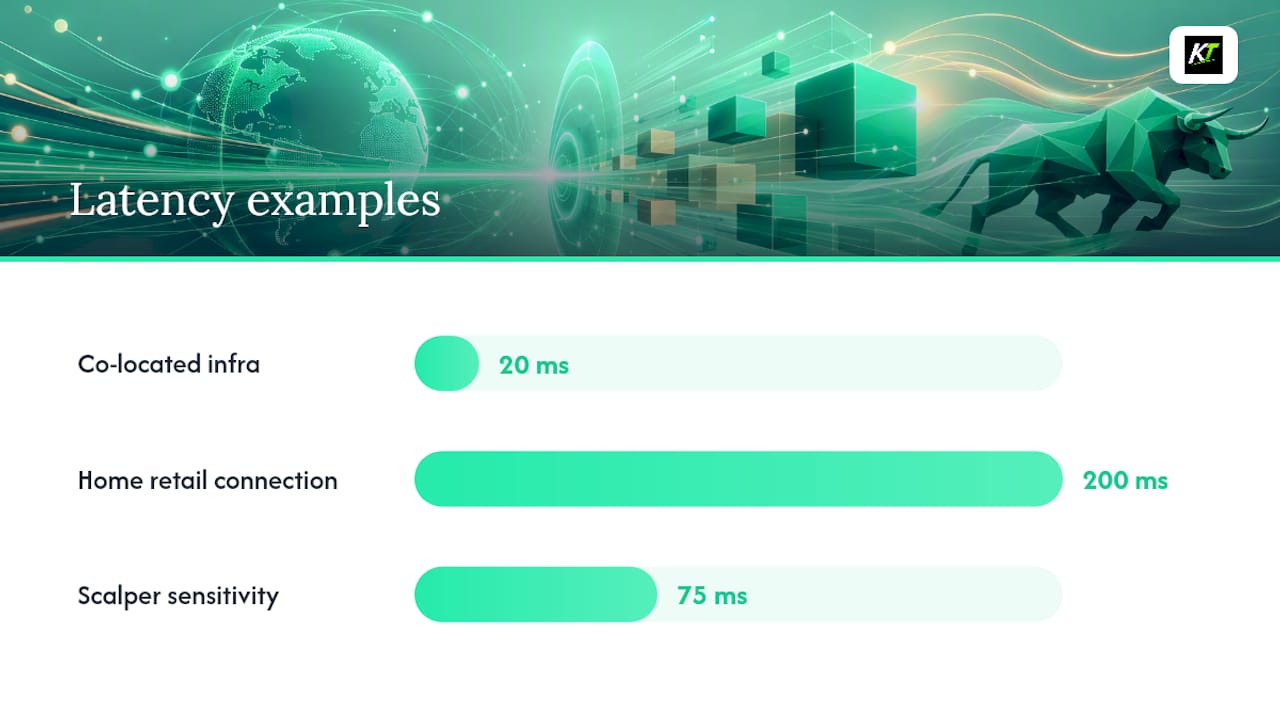
- Latency: the time between order submission and fill confirmation. Co-located institutional setups can hit low double-digit millisecond fills; a home retail connection routinely runs into the hundreds of milliseconds, according to KenMacro’s execution breakdown.
- Slippage: the difference between requested and filled price, usually tracked as a median in pips.
- Fill rate: the percentage of orders filled at or better than your requested price.
- Rejection and partial-fill rate: how often orders bounce back unfilled or only partly filled.
Fill policies shape what happens to the leftover volume. Fill or Kill (FOK) cancels the entire order if it can’t be filled in full immediately. Immediate-or-Cancel (IOC) fills whatever quantity it can right away and cancels the rest. Some brokers offer a return/partial policy that keeps unfilled volume working instead of canceling it.
Sensitivity to all this varies by strategy. Scalpers live or die by median and tail latency, where even a 50 to 100 millisecond swing can erase an edge, per KenMacro’s analysis. Swing traders holding for hours or days barely notice it.
How To Test Your Own Execution Quality This Week
You don’t need institutional tools to get real data on your own fills. Here’s a practical sequence.
- Export your trade journal from MetaTrader or cTrader and compare the “order sent” timestamp against the “fill” timestamp for a batch of recent trades.
- Calculate median latency and slippage across those trades, not just the worst outlier you remember.
- Run controlled test orders during known volatility windows, the London open, a Non-Farm Payrolls release, and compare the numbers against a quiet Tuesday afternoon.
- Match execution mode to strategy. If you scalp, market execution’s fill certainty usually beats instant execution’s requote risk.
- Use stop-limit orders when you need a hard ceiling on slippage, even if it means occasionally missing a fill.
- Cut your lot size or step back entirely during scheduled news events if your platform shows a pattern of wide slippage there.
Platform-specific tuning helps too. Our guide on cTrader execution speed and our walkthrough on executing trades faster on TradingView both cover settings most traders never touch.
Pro Tip: Run your latency test twice, once during your platform’s quietest hour and once during a major news release. The delta between those two numbers tells you more about your real execution risk than either number alone.
Where Hardware Fits Into the Execution Equation
Software latency is only half the equation. The other half is how fast you physically act once you decide to trade, and a mouse click through multiple menu layers adds real delay before your order even reaches the platform.
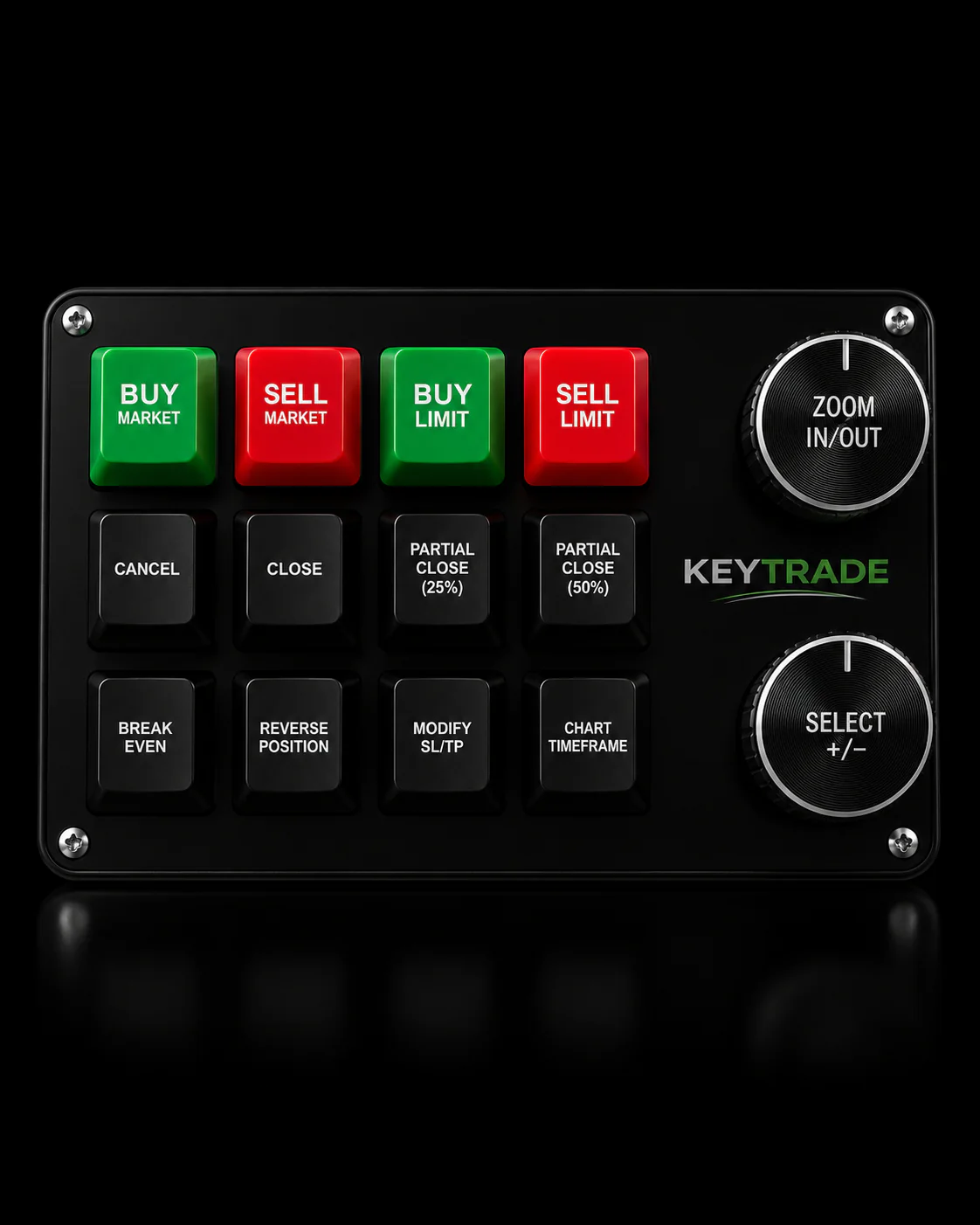
- Programmable keypads send a single button press directly to the platform, cutting the manual steps between decision and order submission.
- Key-Trade devices support partial closures, SL/TP edits, and order reversal across TradingView, MetaTrader 4 and 5, cTrader, NinjaTrader, SierraChart, Thinkorswim, and Tradovate.
- Our post on why trading desks need fast execution breaks down the infrastructure side in more depth.
If manual click delay is part of your execution problem, a dedicated trading keypad addresses the part of the chain software alone can’t fix.
What Actually Separates Good Execution From Marketing Claims
Most execution content sells fear: “your broker is stealing your pips through slippage.” The reality is duller and more useful. Slippage is usually a liquidity problem, not a conspiracy, and it shows up more during news events regardless of which broker you use.
The bigger blind spot is that traders obsess over broker selection while ignoring their own contribution to the delay. Manual clicking, tab switching, and hunting for the right button on a cluttered platform interface routinely add more latency than the difference between two decent ECN brokers. A broker publishing monthly fill-at-requested-price statistics is a genuinely useful transparency signal, but it only tells you half the story if your own reaction time is the slower link in the chain.
If you’re a scalper, prioritize measuring your own median latency before you shop for a “faster” broker. If you’re a swing trader, spend your energy on order type selection instead, since a few hundred milliseconds of latency rarely changes the outcome of a trade held for six hours. The advice that gets skipped most often: test with your own trade journal data, not with what a broker’s marketing page claims about its infrastructure.
Sources
FAQ
What does “execution” mean in forex trading?
Execution is the completion of a trade order, the moment your buy or sell instruction is matched, routed, and confirmed as a filled position in the market.
What is a forex order?
A forex order is an instruction to buy or sell a currency pair under specific conditions, such as at the current market price (market order) or only at a set price or better (limit order).
Is it possible to make $1,000 a day in forex?
It’s mathematically possible with a large enough account and consistent strategy, but daily targets like this ignore variable execution quality, slippage, and drawdown risk, and most retail traders lose money chasing them rather than focusing on realistic risk-adjusted returns.
What is order execution in trading?
Order execution in trading is the full process from submitting an order to receiving a fill confirmation, covering submission, activation for conditional orders, routing to a liquidity source, and the final price you’re filled at.
Recommended
- Why Trading Desks Need Fast Execution: A Practical Guide – Key-Trade Trading Keyboards
- Why NinjaTrader Traders Need Fast Execution – Key-Trade Trading Keyboards
- cTrader Trade Execution Speed Tips That Actually Work – Key-Trade Trading Keyboards
- How to Execute Trades Faster on TradingView in 2026 – Key-Trade Trading Keyboards