

Trading Keys for Pro Traders: Speed, Setup & Reliability
A dedicated trading keypad is the fastest, safest way to add hotkeys to a professional trading workflow. Hotkey execution cuts order-entry latency from roughly 2–3 seconds down to about 150–200 milliseconds — the difference between catching a momentum entry and watching it fill against you. The five core keys (buy market, sell market, flatten, cancel all, set stop) cover the majority of day-trading actions, and a physical keypad puts all of them under your fingers without a single mouse click.
Key points at a glance:
- Latency: Hardware keypads deliver 150–200 ms execution vs. 1–2+ seconds for mouse-driven entry
- Compatibility: TradingView, MetaTrader 4/5, cTrader, thinkorswim, NinjaTrader, SierraChart, Tradovate
- Recommended device: Key-trade trading keypad — desk-grade build, programmable macros, wired low-latency connection, US shipping
Key Takeaways
A dedicated hardware trading keypad cuts order-entry latency to roughly 150–200 ms, covers the core trading actions with five to seven keys, and requires firmware stability, platform compatibility, and a clear warranty before it belongs on a live desk.
| Point | Details |
|---|---|
| Latency gain | Hardware keypads cut order-entry time from 2–3 seconds to roughly 150–200 ms. |
| Core key set | Five keys (buy, sell, flatten, cancel all, set stop) cover the majority of day-trading actions. |
| Pre-live testing | Paper-trade with the keypad for at least two weeks and run debounce checks before going live. |
| Desk procurement | Require a written SLA, staging units, and a firmware rollback option before bulk deployment. |
| Key-trade | Key-trade’s wired keypad meets latency, firmware, and warranty requirements for US pro traders and desks. |
Table of Contents
- Why do trading keypads matter for active traders?
- How do you choose the right trading keypad?
- What does platform integration actually look like?
- What hotkey workflows and macros should you build first?
- How do latency and safety controls affect execution risk?
- What does a prop firm or trading desk need for deployment?
- Key-trade: built for the way pro traders actually work
- Desk procurement vs. solo setup: what actually matters
- Sources
- FAQ
Why do trading keypads matter for active traders?
Speed is the obvious answer, but it’s not the whole story. The real gain is consistency. A scalper hitting 40–60 trades a day can’t afford to hunt through a right-click menu for a partial close. An intraday momentum trader needs a flatten key that fires the instant a setup fails. A prop-firm trader running a challenge account needs risk controls that don’t depend on remembering keyboard shortcuts under pressure.
Hot keys let traders execute orders, manage positions, and navigate platforms with single keystrokes — and they work as manual overrides for algorithmic systems when the tape moves faster than any algo parameter anticipated.
Who benefits most:
- Scalpers need sub-200 ms execution on entries and exits; a physical key with dedicated debounce handling beats a software macro every time
- Intraday momentum traders benefit from one-touch partial closes and break-even stop moves during fast price action
- Prop-firm challenge traders need consistent lot-sizing keys and a panic flatten that can’t be accidentally triggered
- Multi-account desk operators gain from hardware organized into navigation, trading, and value-editing key clusters — each cluster handling a distinct workflow without cross-contamination
- Execution desk operators running multiple assets need profile switching between instruments without reconfiguring anything mid-session
Learn why forex traders specifically rely on hotkeys for speed — the same principles apply across equities, futures, and crypto desks.
How do you choose the right trading keypad?
Start with the hard criteria, then layer in the soft ones.
Hard criteria checklist
- Programmable button count and layout — minimum 12 dedicated keys for a solo trader; 20+ for a desk operator managing multiple instruments
- Macro complexity — can it handle multi-step sequences (e.g., set lot size, enter long, set stop, set target) in a single keypress?
- Platform compatibility — confirm the exact integration method: native hotkey mapping, HID keyboard emulation, or API bridge
- Connection type and latency — wired USB or USB-C only; avoid wireless for execution-critical workflows
- Build quality and key durability — programmable keys, durable switches with fast response times, and ergonomics materially affect execution accuracy and trader endurance
- Debounce handling — firmware-level debounce prevents double-fires on fast repeated keypresses
Questions to ask any vendor
- What is the measured input latency from keypress to platform event?
- Which platforms are supported, and how exactly does the integration work?
- Is multi-seat licensing available, and how are profiles provisioned across units?
- What is the return policy and RMA turnaround time for US orders?
Red flags to avoid
- No documented latency benchmarks
- Firmware that hasn’t been updated in over 12 months
- Single-vendor-only drivers with no fallback HID mode
- No dedicated flatten/panic key or accidental-press lock
- Macro documentation that lives only in a PDF with no software support
Pro Tip: Paper-trade exclusively with your new keypad for at least two weeks before going live. Muscle memory for a wrong key is worse than no keypad at all.
Pricing for pro-grade devices varies by button count, build quality, and firmware capability. Single-unit orders typically ship within a few business days for US addresses; bulk orders for desks may require lead-time confirmation with the vendor.
What does platform integration actually look like?
Most trading keypads connect via one of three methods: HID keyboard emulation (the keypad appears as a standard keyboard), a vendor-supplied driver that maps keys to platform-specific hotkey IDs, or a software bridge that translates keypress events into platform API calls.
Compatibility matrix
| Platform | Integration method | Notes |
|---|---|---|
| TradingView | HID keyboard emulation | Map keys to TradingView’s built-in hotkey settings |
| MetaTrader 4/5 | HID + MQL scripting | MT5 supports richer macro scripting via MQL5 |
| cTrader | HID + cTrader hotkey API | Native shortcut functions available |
| thinkorswim | HID keyboard emulation | Assign keys to thinkorswim’s hotkey manager |
| NinjaTrader | HID + NinjaTrader hotkey config | Supports order-entry hotkeys natively |
| SierraChart | HID keyboard emulation | Map via SierraChart’s keyboard shortcut editor |
| Tradovate | HID keyboard emulation | Web-based; map keys to Tradovate’s hotkey panel |
Standard setup sequence
- Install the vendor driver or firmware tool and update to the latest firmware version
- Create a named profile for each platform or instrument group
- Map core order-entry keys: buy market, sell market, flatten all, cancel all, set stop
- Map position-management keys: partial close (25%, 50%), break-even stop move, scale in
- Test every key in a paper/simulator environment before connecting to a live account
- Confirm debounce settings and run a rapid-fire keypress test to check for double-fires
For MT5-specific integration details, the external trading keypads for MT5 guide covers the MQL5 scripting layer in depth. For cTrader, the cTrader keyboard shortcut guide walks through every native shortcut function available.
What hotkey workflows and macros should you build first?
Start simple. A five-key core cluster handles the majority of live trading scenarios.
Core key cluster (suggested layout)
- Key 1 (index finger, left): Buy market at preset lot size
- Key 2 (middle finger, left): Sell market at preset lot size
- Key 3 (ring finger, left): Flatten all positions
- Key 4 (index finger, right): Cancel all pending orders
- Key 5 (middle finger, right): Set break-even stop on active position
Build outward from there.
Macro complexity levels
Simple: Single action per key — buy 1 lot at market. No conditions, no sequences.
Intermediate: Two-step sequence — enter long at market, immediately set stop at 10 ticks below entry. Macro-enabled keypads record multi-step sequences and assign them to a single key; keep each macro modular and single-purpose to reduce risk.
Conditional/risk-based: Parameterized lot sizing based on a pre-set account risk percentage. This requires platform scripting (MQL5 for MT5, cTrader API) triggered by the keypad’s keypress event.
Pro Tip: *Build one macro per action, never one macro for everything.
Testing checklist before going live
- Run every macro in simulator mode for a full session
- Trigger each key 10 times rapidly to check for debounce failures
- Confirm the flatten key fires even when a different application window is in focus
- Test profile switching between instruments without restarting the platform
- Verify lot-size parameters reset correctly after a partial close
How do latency and safety controls affect execution risk?
A properly encoded hotkey workflow compresses decision-to-fill latency during high tape-speed windows from many seconds to roughly 1–2 seconds — and a dedicated hardware keypad pushes that further, to the 150–200 ms range measured for direct hotkey execution. That gap matters most during market opens, news events, and fast tape windows where a two-second delay is a full price level.
Latency benchmark: Wired USB/USB-C hardware keypads: ~150–200 ms keypress-to-platform. Software-only macro bridges: typically 300–800 ms depending on system load.
Reliability factors that actually move the needle:
- Firmware quality — stable, regularly updated firmware prevents key-event drops under load
- Driver stability — a keypad that loses its driver mapping mid-session is worse than no keypad
- Physical debounce — hardware-level debounce is more reliable than software debounce for fast repeated keypresses
- Dedicated hardware vs. software macros — a physical device with its own processor doesn’t compete with your trading platform for CPU cycles
Safety controls worth requiring from any vendor:
- A distinct flatten/panic key with a physical guard or recessed placement to prevent accidental press
- Confirmation mode for high-risk actions (reverse position, cancel all) that requires a second keypress within 500 ms
- Profile locking so a desk operator can’t accidentally switch instrument profiles mid-trade
- End-to-end verification: after any firmware update, run a full keypress test on every mapped key before the next live session
What does a prop firm or trading desk need for deployment?
Buying 10 units is a different problem than buying one. The procurement and provisioning questions are distinct.
Procurement checklist for desks
- Confirm quantity discount tiers and minimum order quantities
- Request staging units for IT testing before full deployment
- Ask about spare keycaps and a spares policy for high-wear keys
- Confirm the firmware update policy: who pushes updates, how often, and whether rollback is supported
- Get a written SLA for support response time and RMA turnaround
Deployment steps
- Image/configure a master profile set before distributing units
- Assign per-seat profiles based on trader role (scalper, intraday, multi-asset)
- Review USB device policies with IT — some institutional environments restrict unrecognized HID devices
- Bench-test every unit against the master profile before sign-off
- Document the profile configuration for each seat so replacements can be provisioned in under 30 minutes
Key questions for vendor support:
- What is the RMA turnaround for a failed unit shipped from the US?
- Can firmware be rolled back if an update causes platform compatibility issues?
- Is remote support available for profile configuration issues?
The trading desk efficiency guide covers the full provisioning workflow for multi-seat deployments.
Key-trade: built for the way pro traders actually work

Key-trade’s trading keypad matches every criterion in the checklist above. Wired USB connection delivers the low-latency hardware response that execution-critical workflows require. Programmable keys support both simple single-action macros and multi-step sequences, with platform-specific profiles for TradingView, MT4/5, cTrader, thinkorswim, NinjaTrader, SierraChart, and Tradovate. Firmware updates ship regularly, and the device includes a dedicated flatten key with physical safety design.
For prop firms and desks, Key-trade supports bulk procurement with provisioning guidance, technical setup documentation, and direct support for multi-seat deployments. US shipping is standard, with warranty coverage and a clear return policy.
See full specs and order the Key-trade trading keypad — or contact Key-trade directly for desk procurement and bulk pricing.
Desk procurement vs. solo setup: what actually matters
The biggest mistake desk leads make is buying keypads the way a solo trader would — optimizing for personal ergonomics and macro flexibility instead of provisioning consistency and support SLAs.
A solo pro trader should spend time on macro customization: personal lot-sizing logic, instrument-specific profiles, and ergonomic key placement tuned to their own hand. That personalization is a genuine edge. For a desk of 12 traders, that same customization becomes a support liability the moment someone’s profile breaks mid-session and IT has no master config to restore from.
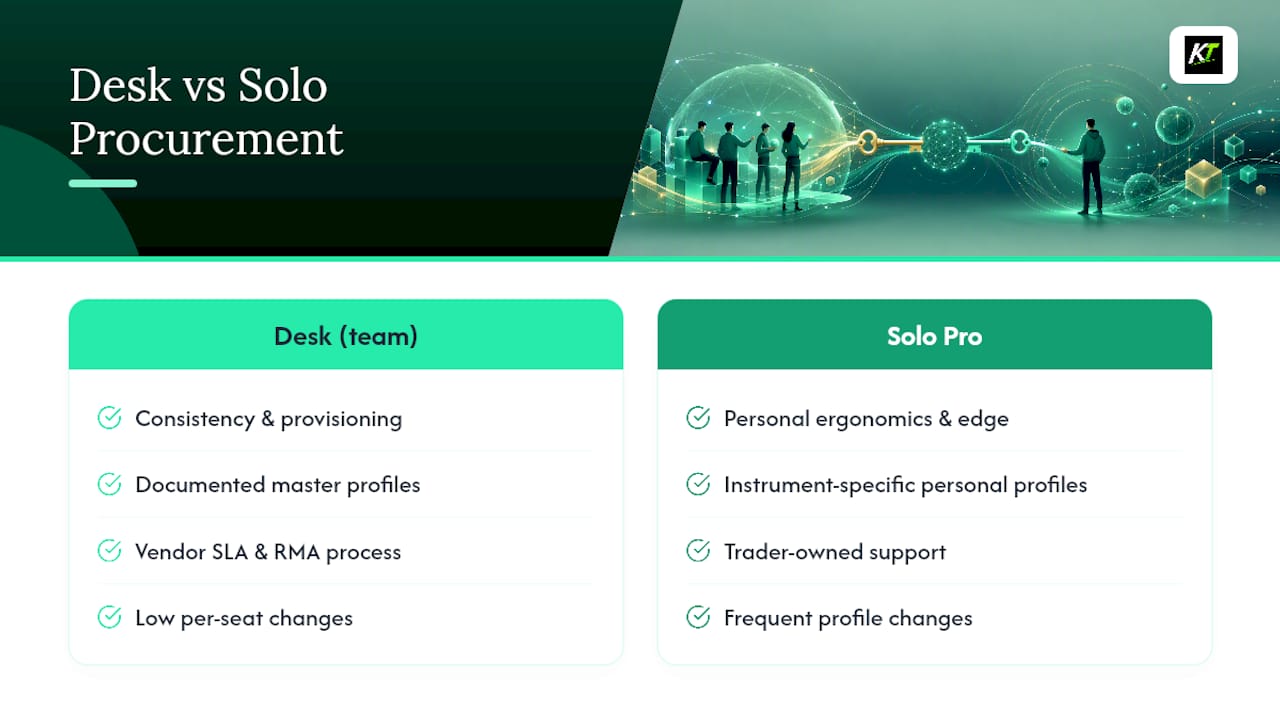
The right procurement path comes down to three questions: How many seats? How often do traders need profile changes? And who owns the support relationship when something breaks at 9:31 AM? Desks need provisioning, documented profiles, and a vendor with a real RMA process. Solo pros need flexibility and a device that fits their hand after 200 trades.
Sources
- Hot Keys for Day Trading: Speed Execution Setup Guide for Every Platform | TradeAlgo
- Daytrading
- Using EBS Keypad (CME Group)
- Sterling Trader Pro DMA Workflow: Hot Keys, Routes & Tape Speed | Vortex Capital Group
FAQ
What is a trading key or trading keypad?
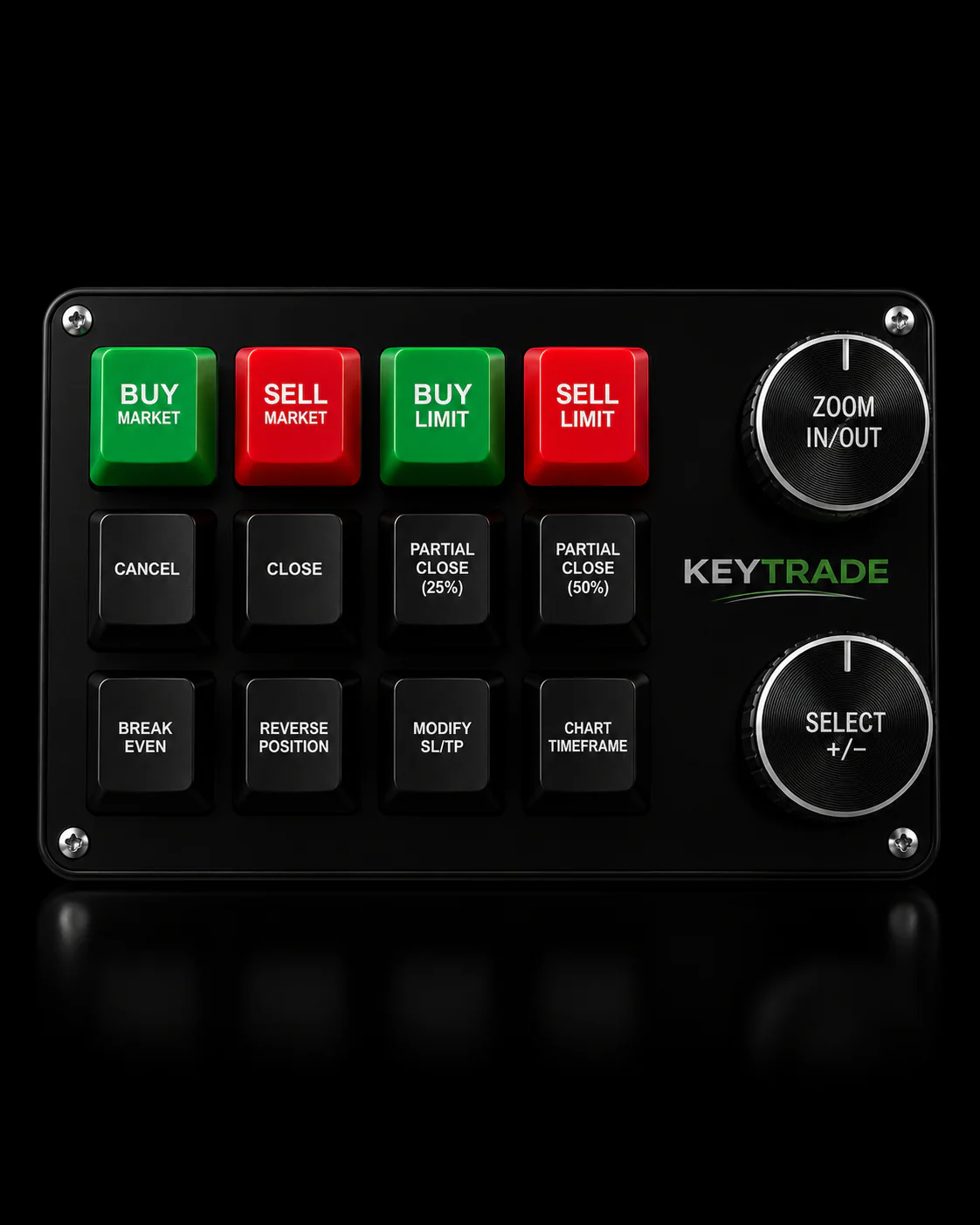
A trading keypad is a programmable hardware device that maps physical keys to platform actions — order entry, position management, and risk controls — so traders can execute without a mouse or keyboard shortcut memorization.
Which trading platforms are compatible with hardware keypads?
Key-trade’s keypad supports TradingView, MetaTrader 4/5, cTrader, thinkorswim, NinjaTrader, SierraChart, and Tradovate via HID keyboard emulation and platform-specific hotkey mapping.
How much faster is a hardware keypad than mouse-driven execution?
Hotkey execution reduces order-entry latency from roughly 2–3 seconds to about 150–200 milliseconds, a measurable edge during fast tape windows and market-open conditions.
Can prop firms deploy trading keypads across multiple seats?
Yes. Desk deployments require per-seat profile provisioning, a master config for fast replacement, and a vendor SLA covering RMA turnaround and firmware support — all factors to confirm before bulk purchase.
What is the most important safety feature on a trading keypad?
A dedicated flatten/panic key with physical guard placement or confirmation mode is the single most critical safety control, preventing accidental full-position exits while still allowing instant execution when needed.
Recommended
- Key Trading Keypads: Best Picks for Active Traders – Key-Trade Trading Keyboards
- Why Forex Traders Use Hotkeys to Win on Speed – Key-Trade Trading Keyboards
- Best Lexx-Trade.com Alternatives for Pro Traders – Key-Trade Trading Keyboards
- External Trading Keypads for MT5: Speed and Accuracy – Key-Trade Trading Keyboards