

Trading Desk Efficiency Improvement Guide for Pros
TL;DR:
- Trading desk efficiency improves by reducing manual tasks, shortening trade cycles, and focusing on high-value decisions. It relies on phased automation, purpose-built infrastructure, and exception-based KPIs to eliminate inefficiencies and enhance performance.
Trading desk efficiency improvement is the process of reducing manual intervention, shortening the trade lifecycle, and directing trader attention toward high-value decisions. The most effective desks in 2026 combine phased automation, purpose-built infrastructure, and AI-assisted analytics to cut operational drag at every stage. This guide covers the exact methods professional traders and trading desk managers use to measure inefficiencies, deploy automation in stages, and build workflows that hold up under real market pressure. The primary keyword “trading desk efficiency improvement guide” reflects what practitioners search for, but the recognized industry term for this discipline is operational efficiency in trade execution.
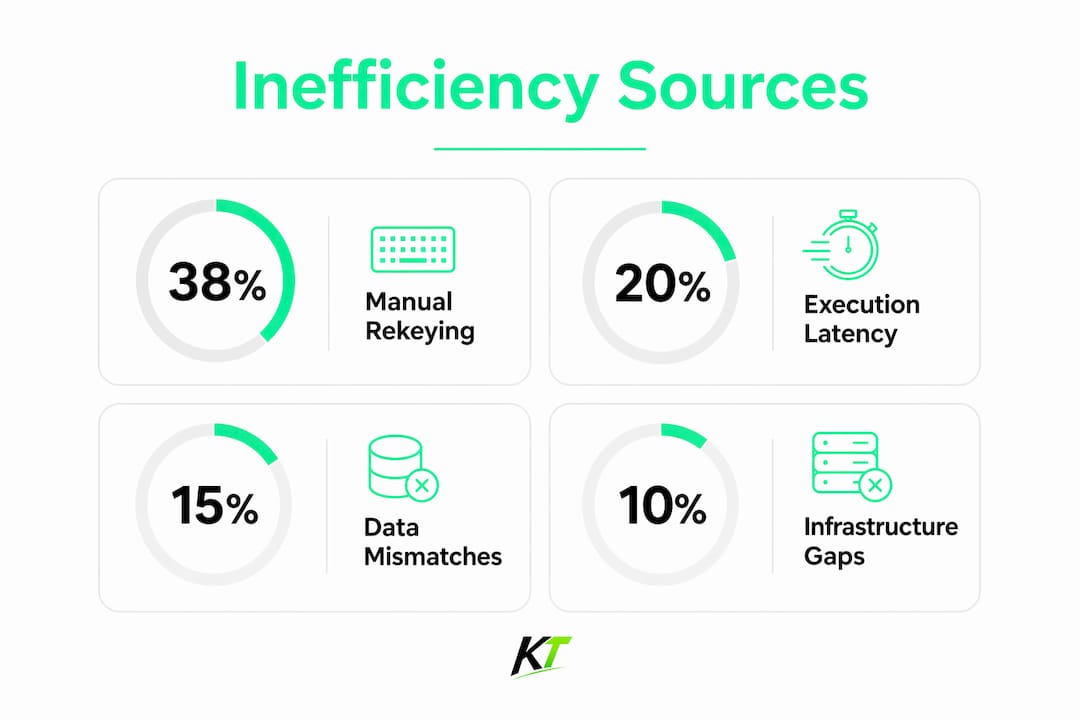
What are the main sources of inefficiency on trading desks?
Manual data rekeying between systems is the top efficiency bottleneck for 38% of industry participants. That number means more than one in three desks is losing measurable time and accuracy to a problem that is entirely preventable with targeted automation.
Latency is the second major drag. When more than 20% of a desk’s strategies require sub-millisecond execution, engineering solutions like FPGA become mandatory. Human-speed floors are miscalibrated for markets where 60–75% of equity flow is already algorithmic. Treating a latency problem as a staffing problem wastes both budget and time.
Measurement gaps compound these issues. Most desks still track average throughput, which hides the real damage. The metrics that matter are exception rates, time-to-repair on trade breaks, and cost-per-trade. Shifting to these exception-based KPIs exposes the specific failure points that throughput averages obscure.
A practical diagnostic starts with three questions:
- Where does data get typed twice? Map every handoff between systems and flag any step that requires manual re-entry.
- Where do trade breaks cluster? Break frequency by workflow stage reveals which processes need automation first.
- What percentage of trader time goes to administrative tasks versus analysis? Reclaiming even 30 minutes daily per trader shifts meaningful capacity toward portfolio analysis and client engagement.
Understanding the structure of a trading desk’s core functions is the prerequisite for any efficiency audit. Without that baseline, automation targets are guesswork.
How to implement phased order lifecycle automation
Incremental automation between fragmented systems delivers better ROI than large-scale infrastructure replacements. The principle is simple: automate specific, describable, repeatable tasks first, then expand.
A proven 12-week schedule breaks the work into three phases:
- Weeks 1–4: Trade capture and limit checking. Automate the initial order entry and pre-trade risk checks. This phase eliminates the most common source of manual rekeying and catches limit breaches before they become trade failures.
- Weeks 5–8: Confirmation generation and matching. Automate the generation of trade confirmations and the matching process against counterparty records. This phase reduces the back-and-forth that inflates time-to-confirm metrics.
- Weeks 9–12: Settlement instruction and message generation. Automate the creation and routing of settlement instructions. This is where end-to-end standardization pays off, because automation without standardized data formats shifts risk to compliance rather than eliminating it.
The table below summarizes what each phase targets and the primary metric it improves:
| Phase | Focus area | Primary metric improved |
|---|---|---|
| 1: Trade capture | Order entry, pre-trade risk checks | Manual rekeying incidents |
| 2: Confirmation | Confirmation generation, matching | Time-to-confirm |
| 3: Settlement | Settlement instructions, message routing | Trade break rate |
Each phase builds on the last. Skipping phase one and jumping to settlement automation is a common mistake. The data quality problems that cause settlement failures almost always originate at capture.
Pro Tip: Automate only tasks you can fully describe in writing before you start. If you cannot write a clear rule for a process, a human still needs to own it.
The cTrader trade management features offer a useful reference for how platform-level automation handles order lifecycle steps, including partial closures and SL/TP modification, without requiring custom engineering.
What infrastructure and technology optimizations enhance trading desk performance?
Physical and technological infrastructure both determine how well a desk performs under load. Cooling, hardware stability, and input device design are not secondary concerns. They are the foundation that keeps automated systems running at full throughput.

The distinction between human-speed and sub-millisecond execution defines the infrastructure decision. Human-speed workflows need ergonomic, reliable hardware. Sub-millisecond strategies need FPGA or compute-based solutions. Mixing the two without clear separation creates resource conflicts and miscalibrated cost structures.
Key infrastructure elements for a high-performance desk include:
- Raised floors and chilled water cooling. Physical floor infrastructure prevents hardware instability at high throughput. Heat is the most common cause of unplanned downtime on dense trading floors.
- Integrated circuit breakers and kill switches. These must be embedded in the infrastructure itself, not added as software afterthoughts. A kill switch that requires three clicks to activate is not a kill switch.
- P&L monitors with real-time alerts. Position-level P&L visibility reduces the lag between a market event and a trader’s response.
- Ergonomic modular desk setups. Adjustable configurations reduce fatigue during extended sessions and support the physical focus that fast execution demands.
- Programmable input devices. Replacing keyboard-heavy manual inputs with dedicated programmable devices cuts both errors and execution delay. Every extra keystroke in a fast market is a risk.
Pro Tip: Build desk infrastructure to handle 2x your current strategy count. Trading complexity grows faster than most managers plan for, and retrofitting a dense floor is far more expensive than building headroom in.
How can AI and analytics improve efficiency without increasing risk?
AI on the trading desk is most effective as a filter, not a decision-maker. The core use case is reducing the volume of low-value alerts and surfacing the exceptions that actually need trader attention. AI accelerates decisions by summarizing market intelligence, filtering low-signal alerts, and flagging genuine anomalies.
Two deployment models define how AI reaches traders:
- Pull model: The trader queries the system. AI summarizes a news feed, a position report, or a counterparty exposure on demand. This model is lower risk because the trader controls when AI input enters the workflow.
- Push model: The system proactively surfaces alerts. AI flags an exception before the trader asks. This model is more powerful but requires tighter controls on what triggers an alert.
Successful AI adoption in trading requires controlled, auditable use. The goal is to build trust by embedding AI into workflows where its outputs can be checked, corrected, and traced. Speed without auditability creates compliance exposure, not efficiency.
Measuring AI impact requires three metrics: time saved per trader per session, reduction in false-positive alerts, and improvement in signal-to-noise ratio across the desk. Without these baselines, AI adoption becomes a cost center rather than a performance driver.
Risk tiering matters. Low-stakes summarization tasks carry minimal risk and are the right place to start. Autonomous execution or position-sizing recommendations require a much higher bar of validation before deployment. The AI adoption framework Key-trade outlines follows this exact progression, starting with information tasks and building toward workflow integration.
What workflow redesign and team practices drive sustainable efficiency?
Sustainable efficiency requires more than technology. It requires aligned KPIs, cross-functional collaboration, and a feedback loop that catches workflow drift before it becomes a performance problem.
Leading buy-side desks have moved from manual order routing to integrated workflows that combine automation, analytics, and connectivity. The shift is not just technical. It requires front, middle, and back-office teams to share performance data and act on it together.
Practical workflow redesign centers on four practices:
- Replace throughput KPIs with exception targets. Track cost-per-trade, time-to-confirm, and exception rates instead of raw order volume. These metrics reveal where the workflow is breaking, not just how busy it is.
- Run weekly execution outcome reviews. A 30-minute review of the prior week’s trade breaks, missed confirmations, and latency spikes creates a continuous improvement cycle. Without a formal review, problems accumulate silently.
- Integrate front-to-back performance visibility. Front-office traders need to see how their order flow affects middle and back-office workloads. Siloed visibility creates siloed problems.
- Assign cross-functional ownership for each workflow stage. When a confirmation fails, someone specific is accountable. Shared accountability without individual ownership produces slow responses.
Operational efficiency means maximizing throughput from existing resources while shortening the trade lifecycle. That definition requires both internal process discipline and the right vendor integrations to close gaps that internal teams cannot solve alone.
Key Takeaways
Trading desk efficiency improvement requires phased automation, purpose-built infrastructure, and exception-focused KPIs working together to reduce manual work and shorten the trade lifecycle.
| Point | Details |
|---|---|
| Manual rekeying is the top bottleneck | 38% of desks cite it as their primary inefficiency; automate trade capture first. |
| Use a 12-week phased automation schedule | Progress from trade capture to confirmation to settlement in three structured phases. |
| Match infrastructure to execution speed | Sub-millisecond strategies need FPGA; human-speed workflows need ergonomic, programmable hardware. |
| Measure exceptions, not throughput | Track cost-per-trade, time-to-confirm, and exception rates to find real failure points. |
| Deploy AI as a filter, not a decision-maker | Start with summarization and alert filtering; require auditability before expanding AI scope. |
The efficiency trap most desks fall into
The most common mistake I see is desks that buy technology to solve a problem they have not yet defined. A new execution management system does not fix a broken confirmation workflow. A faster network does not fix a manual rekeying habit. Technology applied to an undefined problem creates a more expensive version of the same problem.
The desks that improve fastest start with a specific business challenge. They measure it, automate the most repeatable part of it, and then measure again. The “rip and replace” instinct is almost always wrong. Incremental linkages between existing systems consistently outperform wholesale replacements in both speed of delivery and actual ROI.
The cultural piece matters as much as the technical one. Traders who understand why a workflow changed will use it correctly. Traders who feel a system was imposed on them will work around it. Efficiency gains that depend on workarounds are not gains. They are deferred failures.
The desks I respect most treat efficiency as an ongoing measurement discipline, not a project with an end date. They review execution outcomes weekly, adjust KPIs when the market structure shifts, and keep their physical and software environments modular enough to change without a full rebuild.
— Key-trade
Key-trade professional trading keyboards for desk efficiency
Reducing manual input errors is one of the fastest wins available to any trading desk, and hardware is where that improvement starts.

Key-trade designs professional trading keyboards specifically for traders who need faster execution with fewer errors. Each device features programmable buttons mapped to order entry, partial closures, break-even adjustments, and SL/TP modifications across platforms including TradingView, MetaTrader 4 and 5, cTrader, NinjaTrader, SierraChart, Thinkorswim, and Tradovate. The result is a direct reduction in the keystroke count per trade, which cuts both execution time and the risk of input errors under pressure. Key-trade ships worldwide and requires no technical setup knowledge, making it a practical upgrade for both prop trading firms and serious retail traders.
FAQ
What is trading desk efficiency improvement?
Trading desk efficiency improvement is the process of reducing manual tasks, shortening the trade lifecycle, and directing trader time toward high-value decisions through automation, better infrastructure, and aligned KPIs.
What causes the most inefficiency on a trading desk?
Manual rekeying of data between systems is the leading cause, cited by 38% of industry participants. It produces trade failures, delays, and errors that compound across the full trade lifecycle.
How long does phased automation take to implement?
A structured 12-week schedule covers trade capture and limit checking in weeks 1–4, confirmation matching in weeks 5–8, and settlement instruction automation in weeks 9–12.
When does a trading desk need FPGA infrastructure?
FPGA or compute-based solutions become mandatory when more than 20% of a desk’s strategies require sub-millisecond execution. Human-speed infrastructure cannot support that latency requirement.
How should AI be introduced on a trading desk?
Start with low-risk summarization and alert-filtering tasks where AI outputs can be checked and corrected. Expand scope only after establishing auditability and measuring time saved and error reduction.
Recommended
- What Is a Trading Desk? Explained for Professionals – Key-Trade Trading Keyboards
- cTrader Trade Management Features: Complete 2026 Guide – Key-Trade Trading Keyboards
- TradingView Chart Trading: A Complete 2026 Guide – Key-Trade Trading Keyboards
- 5 Hardware Trading Alternatives 2026 – Key-Trade Trading Keyboards