

8-Step Panic Button Trading Test for Active Traders
A panic button cancels every pending order first, then flattens all open positions at market or with marketable limit orders. Most implementations also disable bot re-entry so nothing reopens a position right after the flatten. The goal is simple: stop the bleeding fast, before slippage, a bad fill, or a runaway bot turns a bad trade into a blown account.
TL;DR:
- The correct sequence for panic button activation is cancel pending orders first, then close open positions to prevent re-entry of stale orders.
- Hardware panic buttons offer consistent, tactile response and should be mapped to account-specific functions with safety confirmations to avoid misfires.
- Testing your panic setup on small live positions across different access methods ensures reliable execution before real emergencies occur.
- Panic triggers should be used only during severe scenarios like bot malfunctions or market shocks, not for routine losses or minor pullbacks.
- Exchange halts, limit-ups, and broker outages can prevent electronic panic triggers from executing, making phone fallback a crucial backup.
Table of Contents
- How Panic Button Trading Works: Order Sequence and Failure Modes
- Activation Methods: Hotkeys, Panels, Plugins, and Hardware
- Hardware Panic Buttons: Where Trading Keypads Fit In
- Testing Your Panic Setup Before You Actually Need It
- Emergency Protocol: What to Do the Moment Things Go Wrong
- What Panic Button Tools Actually Cost
- Legal and Regulatory Considerations for Rapid Liquidation
- How a Panic Trigger Changes Your Trading Psychology
- The Real Risks of Relying on Panic Button Trading
- Panic Buttons vs. Automated Stop-Loss Orders
- When You Should Actually Use a Panic Button
- Setting Up Account Scope to Prevent Demo/Live Mixups
- Author Perspective: Combine the Technology With the Protocol
- If You Want a Hardware Panic Button, Start Here
- Sources
- FAQ
How Panic Button Trading Works: Order Sequence and Failure Modes
Sequence matters more than speed. A panic trigger that closes positions before canceling pending orders can leave a stale limit order sitting live, ready to fill you right back into a position you just paid to exit. The correct order is: cancel everything working, then close what’s open.
Here’s what actually happens on trigger, in most setups:
- Pending orders (limits, stops, OCOs) get canceled across the account.
- Open positions close via market order or a marketable limit, depending on the platform.
- Bots pause and their buy or sell logic gets disabled so nothing re-enters automatically.
- Some tools apply this globally across every connected account unless you’ve scoped it.
That last point trips up more traders than any other panic feature bug. A global panic hotkey can flatten your live account and your demo account in the same keystroke if the terminal treats them as one target.
Statistic callout: Exchange halts and circuit breakers are the scenario panic buttons cannot fix. When a market is limit-locked or trading is paused, electronic panic triggers often cannot execute at all, which is why a phone fallback to your broker’s desk isn’t optional. It’s the only backup that still works when the exchange itself freezes.
Activation Methods: Hotkeys, Panels, Plugins, and Hardware
Speed and safety pull in opposite directions here, and every activation method is really a tradeoff between them.
- Keyboard hotkeys. A single combination like Shift+Esc triggers flatten-all instantly on many platforms. Fast, but a stray keystroke during a stressful session can trigger it by accident.
- On-chart panic panels. MQL5 utilities add a large visible button with optional confirmation modes, close filters (buys only, sells only), and retry logic that improves fill reliability during fast markets.
- Hardware buttons. A dedicated physical control, separate from your mouse and keyboard, removes the risk of a misclick inside a cluttered software interface.
- Plugins and scripts. Community and paid utilities extend flatten-all functionality to platforms that don’t ship one natively.
Two-click confirmation and a five-second countdown are the two most common safety layers, and reputable panic implementations offer at least one of them. Some tools also support a lock/unlock mode, so the button stays inert until you deliberately arm it.
Pro Tip: Set your hotkey to something you would never press by accident during normal trading, like Ctrl+Alt+Shift+X, not a single key near your usual order-entry shortcuts.
Hardware Panic Buttons: Where Trading Keypads Fit In
Software panic buttons live inside the same interface that’s often the source of the stress. When five charts are flashing red and your cursor is fighting for the right window, a UI button buried in a menu is not fast. That’s the case for a dedicated physical device.
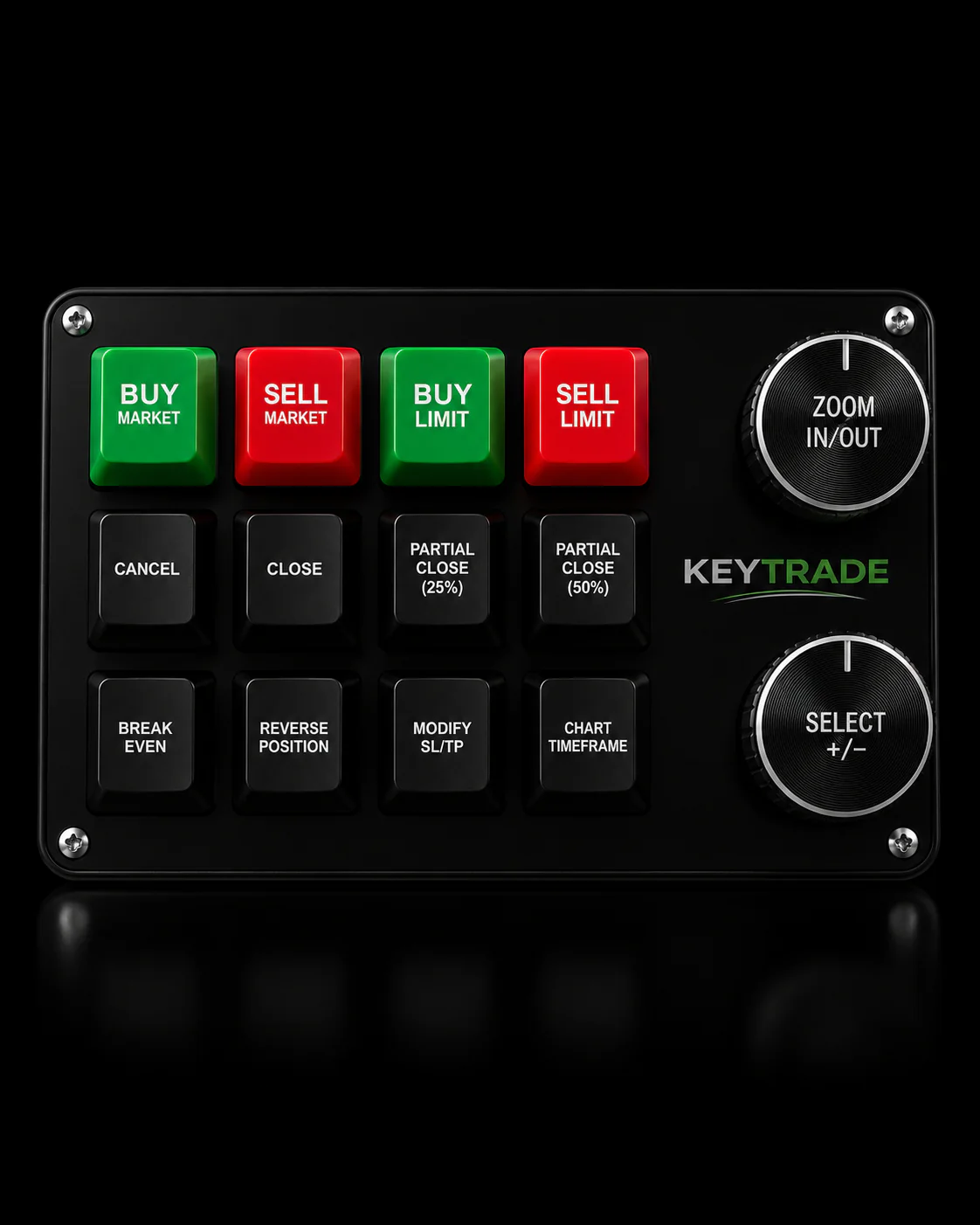
A trading keypad turns panic response into a single, tactile action, separate from your mouse and keyboard entirely. Programmable buttons can map to flatten-all, cancel-all-orders, partial close, or a mode switch that arms the panic function only when you intend to use it. Because the mapping happens at the hardware layer, it works consistently whether you’re on TradingView, MT4, MT5, cTrader, NinjaTrader, SierraChart, Thinkorswim, or Tradovate.
What matters most in a hardware panic setup:
- Per-account button mapping, so one keypad doesn’t flatten a demo and a live account at once.
- Confirmation modes on destructive buttons (flatten-all, cancel-all) to prevent misfires.
- Cross-platform compatibility, since many traders run more than one platform side by side.
- Physical separation from the keyboard, so muscle memory doesn’t misfire during normal trading.
Pro Tip: Assign your least-destructive panic action, like cancel-pending-only, to a button you’d naturally reach for under stress, and reserve the full flatten-all for a button that needs a deliberate second press.
Some trading keypad manufacturers build keypads around this principle: dedicated, programmable buttons that map to flatten-all, order cancellation, and partial closes without touching your existing software setup.
Testing Your Panic Setup Before You Actually Need It
An untested panic button is a guess dressed up as a safety feature. Confirm it works exactly as intended before you’re relying on it during a real crisis.
- Open a tiny live position, small enough that a mistake costs nothing meaningful.
- Trigger your panic function exactly the way you would in an emergency.
- Pull up your broker’s account statement and confirm the position actually closed and the fill matches what you expected.
- Check that pending orders canceled first, not after the position closed.
- Verify account-scoped mapping: trigger it on a demo account and confirm your live account was untouched.
- Test a second access method, like your mobile app over a cellular hotspot, in case your main connection drops.
- Save your broker’s trading-desk phone number and account number somewhere you can find it in seconds, then actually call once to confirm it connects.
- Write down what you tested and when, so you’re not guessing six months from now whether the setup still works.
Testing on a small live position and confirming against broker records removes the single biggest source of uncertainty traders have about panic tools: whether they actually do what the settings menu claims.
Emergency Protocol: What to Do the Moment Things Go Wrong
A panic button without a protocol around it is just a faster way to make an emotional decision. The button is the mechanism. The protocol is what decides when you pull it.
Set non-discretionary triggers before you need them: a loss threshold as a percentage of account equity, a maximum number of stop-loss edits in one session, or a specific price level that invalidates your thesis. When one of those hits, you act. No debate in the moment.
The execution sequence should stay the same every time: cancel pending orders, flatten positions, verify the closure against your broker’s own records, then document what happened before you touch the market again.
Infrastructure backup matters as much as the button itself. A secondary internet connection, a UPS for power outages, and a second broker account meaningfully cut the odds you’re stuck unable to execute an emergency close during an outage.
Statistic callout: Behavioral rules do real work here too. A session pause rule like two losses in a row triggers a 60 minute break keeps you from reaching for the panic button out of frustration instead of genuine risk.
- Pre-commit your loss limits in writing, not in your head.
- Pause trading for a fixed window after repeated losses.
- Reconcile every panic event against broker statements afterward.
- Never resume trading the same session without reviewing what triggered the panic.
What Panic Button Tools Actually Cost
Free community scripts and open-source utilities exist for most platforms and cover the basics: cancel pending, flatten positions. They’re often good enough for demo accounts or casual use.
Paid options run higher. MQL5 marketplace utilities and third-party plugins typically charge a one-time fee or a small license cost, and add features like confirmation modes, selective close filters, and retry logic.
- Free scripts: no cost, basic flatten-all, minimal safety features.
- Paid software utilities: one-time or small recurring fee, better filtering and reliability.
- Hardware keypads: one-time purchase, price varies with button count and build quality.
- Ongoing costs to weigh: platform compatibility, support availability, and whether the tool can be scoped per account.
Legal and Regulatory Considerations for Rapid Liquidation
Rapid liquidation itself isn’t restricted. Closing your own positions fast, whether manually or through an automated panic trigger, is a normal part of order management on every major retail platform. Where the rules actually apply is around what surrounds that liquidation: pattern day trading requirements, margin call procedures, and account-level restrictions your broker imposes.
If you’re trading in a margin account and your panic close triggers a margin call resolution, your broker’s own liquidation policy takes over, and that policy is disclosed in your account agreement, not something a panic button script controls. Prop trading firms often add their own layer on top: many firms restrict or flag rapid full-account liquidation as a violation of their risk parameters if it happens outside a defined drawdown event, since it can look like an attempt to lock in a result before a rule-based reset.
Automated flattening tied to a trading bot also falls under whatever exchange or broker rules govern algorithmic order activity on that venue, including message-rate limits some exchanges impose on high-frequency order cancellation and resubmission. A panic trigger that cancels and resubmits orders rapidly across dozens of instruments at once could bump against those limits on some platforms.
None of this makes panic button tools risky to use. It means the panic button operates inside your broker’s existing account rules, not outside them, and you’re responsible for knowing what your specific account agreement says about liquidation, margin, and bot activity before you need the button in a real crisis.
How a Panic Trigger Changes Your Trading Psychology
The existence of a panic button changes how you trade even when you never press it. Knowing you have a hard exit available tends to reduce the low-grade anxiety that pushes traders into constant position-checking and premature manual exits.
There’s a flip side worth naming directly: a panic button can become a crutch that lets you avoid setting real stop-losses in the first place. If you’re mentally relying on “I’ll just hit panic if it gets bad,” you’re substituting a reactive tool for a planned one, and reaction time under stress is worse than a pre-set order that executes without you.
The traders who get the most out of panic functionality treat it as a last-resort backstop, not a primary risk management tool. Your stop-loss orders should already be doing the routine work of capping losses. The panic button exists for the scenario your stop-loss didn’t anticipate: a bot malfunction, a data feed error, a geopolitical headline that gaps through your normal risk parameters in seconds.
Used that way, a panic button actually strengthens discipline rather than replacing it. You’ve pre-decided the triggers, pre-tested the mechanism, and removed the moment of paralysis where panic itself, the emotion, would otherwise dictate a slower and worse decision.
The Real Risks of Relying on Panic Button Trading
Panic buttons solve one problem and introduce a few of their own. The biggest is slippage. A flatten-all trigger during a fast-moving market sends market orders into a book that may have thinned out, and you can close at a materially worse price than what you saw on screen half a second earlier.
Emotional misuse is the second major risk. If your panic trigger isn’t tied to a pre-committed, non-discretionary rule, you’ll eventually press it on a normal pullback that didn’t actually threaten your account, locking in a loss that a calmer trader would have held through.
Account scope errors round out the list. A panic hotkey that isn’t configured per account can flatten a live position while you meant to test something on demo, or vice versa, leaving a real position open when you thought it was closed.
- Slippage on market orders during high volatility can meaningfully worsen your exit price.
- Emotional or premature triggering locks in losses that a rule-based stop wouldn’t have taken.
- Cross-account misconfiguration can close the wrong account entirely.
- Exchange halts and circuit breakers can prevent execution regardless of how well the button is set up.
Panic Buttons vs. Automated Stop-Loss Orders
These two tools solve different problems, and the comparison isn’t about which one wins.
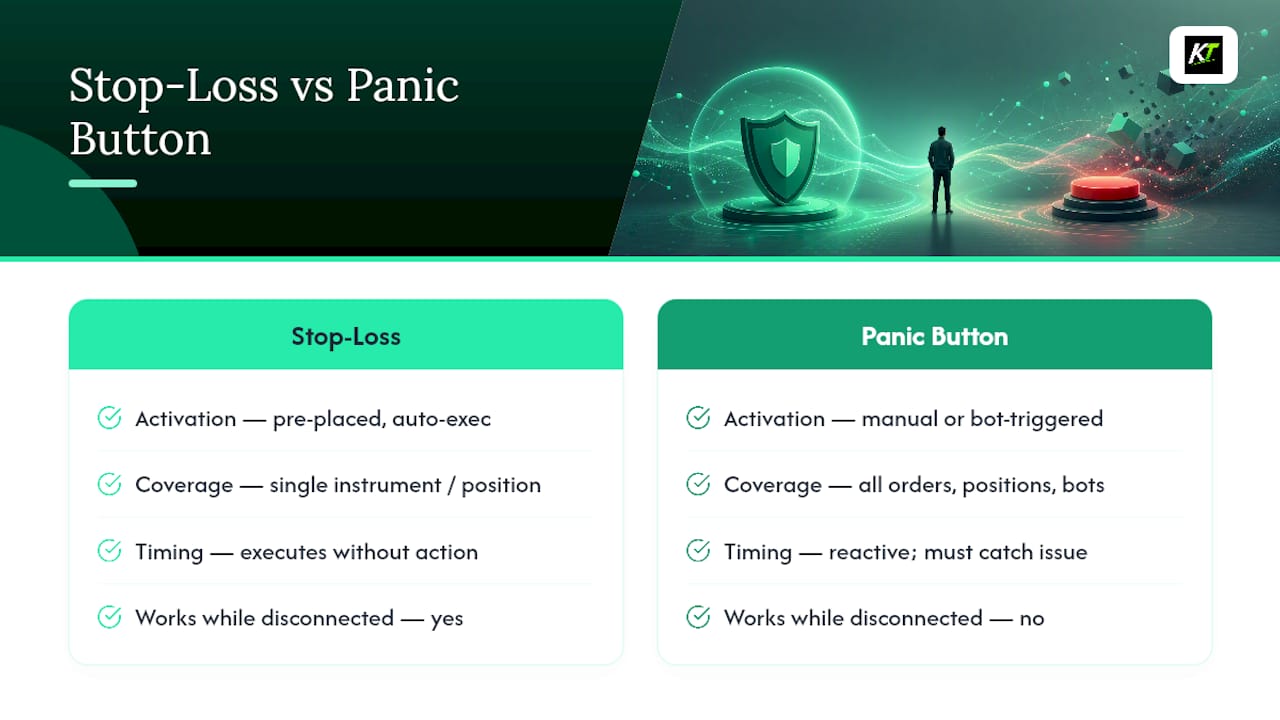
A stop-loss order is pre-placed and executes without you touching anything. It’s precise, it’s scoped to one position, and it works even if you’re away from your desk, asleep, or disconnected. Its weakness is that it only covers what you anticipated. A stop-loss on one instrument does nothing if your account is bleeding across five other uncorrelated positions during a broad market shock.
A panic button is reactive and manual (or bot-triggered by a broader condition), and it covers everything at once: every pending order, every open position, every bot process. Its weakness is timing. It only works if you, or your bot’s logic, catch the problem and act, and it’s exposed to the slippage and execution risk that comes with market orders during volatility.
The strongest setups don’t choose one. Stop-losses handle the routine, per-trade risk that you can define in advance. The panic button handles the scenario nobody wrote a rule for: a feed error, a broker outage recovery gone wrong, a bot loop, or a market-wide shock that touches every position simultaneously. Treat the panic button as the backstop behind your stop-losses, not a replacement for them.
When You Should Actually Use a Panic Button
Not every red day calls for flattening the account. Reserve the panic trigger for scenarios where the normal risk controls have already failed or clearly can’t respond fast enough.
Use it when a bot malfunctions and starts placing unintended orders faster than you can manually intervene. Use it during a sudden, account-wide shock, like a surprise rate announcement or geopolitical headline that moves multiple correlated positions against you simultaneously. Use it if your platform’s connection is behaving erratically and you’re not confident your existing stop-losses will fire correctly. And use it if you’ve hit a pre-committed loss threshold for the session and the rule says stop, full stop, no exceptions.
Don’t use it as a substitute for a normal stop-loss on a single position, and don’t use it to escape a garden-variety losing trade that hasn’t actually breached your plan. That’s the scenario where a panic trigger stops being a risk tool and starts being an emotional exit dressed up as discipline.
Setting Up Account Scope to Prevent Demo/Live Mixups
Cross-account flattening is the single most preventable panic button failure, and it’s almost always a configuration oversight rather than a software bug.
Start by checking whether your platform’s panic feature applies globally to every connected account by default or whether it’s scoped per account. Many terminals default to global, which means a hotkey pressed while your demo account is active can still touch a live account running in a second window.
Set up separate hotkey profiles or separate panic instances for demo and live if your platform supports it. If it doesn’t, keep demo and live sessions in physically separate application windows or, better, on separate devices entirely, so there’s no chance a single keystroke reaches both. If you’re using a hardware keypad, map panic functions to account-specific button layers where the device supports profile switching, and confirm the active profile visually before you trigger anything destructive.
Run the scope test from the checklist above regularly, not just once. Platform updates and broker migrations can silently reset scope settings back to a global default without any notification, and you won’t find out until the wrong account gets flattened.
Author Perspective: Combine the Technology With the Protocol
Panic buttons get sold as safety features, but the button is only the last step in a chain that starts long before you ever press it. The real defense is the pre-committed rule set: the loss threshold you wrote down in advance, the account scoping you tested last week, not the one you’re hoping works today.
Hardware helps because it removes friction at the exact moment friction costs you the most. A dedicated keypad button doesn’t get lost behind five chart windows during a volatility spike. That’s a genuine execution advantage, but it only pays off if the protocol behind it, cancel, flatten, verify, document, is already built and tested.
Run the checklist. Do it on a small live trade this week, not after the next crisis proves you needed to.
— key-trade
If You Want a Hardware Panic Button, Start Here
Key-trade is the alternative to relying on a software menu buried three clicks deep when your account needs a flatten-all in under a second. A programmable trading keypad gives you a dedicated physical button mapped directly to flatten-all, cancel-pending, or partial close, separate from the mouse and keyboard you’re already fighting during a volatile session.

The devices integrate with TradingView, MetaTrader 4 and 5, cTrader, NinjaTrader, SierraChart, Thinkorswim, and Tradovate, with more platforms added over time, so your panic mapping works the same way regardless of which chart you’re staring at when things go wrong. Setup doesn’t require technical knowledge, and the keypads ship worldwide with support and setup guides included, whether you’re running a personal live account or trading under a prop firm.
If the testing checklist above convinced you that your current panic setup has gaps, particularly around misclicks or slow software navigation under stress, check device compatibility with your platform and see which button layout fits your trading style before your next volatile session, not during it.
Sources
- What does the panic button do? — Cryptohopper Support
- Emergency risk management protocols for futures traders — NexusFi Academy
- Emergency Close All Positions Button — MQL5 Marketplace
FAQ
What Is the Purpose of a Panic Button in Trading?
A panic button exists to cancel every pending order and close all open positions immediately, giving you a single fast action to stop losses when normal risk controls aren’t reacting quickly enough.
How Much Does a Panic Button Cost?
Free community scripts cover basic flatten-all functionality, paid software utilities typically run a one-time or small licensing fee, and a hardware trading keypad is a one-time purchase priced by feature set and build quality.
What Happens When You Press the Panic Button?
Pending orders cancel first, then open positions close via market or marketable limit orders, and many setups also disable bot re-entry so nothing reopens automatically right after the flatten.
How Do I Activate a Panic Button?
Activation is usually a single hotkey, an on-screen button, or a dedicated hardware button, often with an optional two-click confirmation or countdown to prevent accidental triggers.
Can a Panic Button Fail to Execute?
Yes. During exchange halts, limit-up or limit-down conditions, or a broker outage, electronic panic triggers may not execute at all, which is why keeping your broker’s trading-desk phone number ready as a fallback matters.