

NinjaTrader ATM Strategy: A Complete Trader's Guide
TL;DR:
- The NinjaTrader ATM strategy is a preset template that automatically submits linked stop-loss and profit-target orders immediately after a trade is filled. It manages exits efficiently through OCO relationships, Auto Breakeven, and Auto Trail features, reducing emotional decision-making. Proper configuration, understanding order types, and live validation are essential for reliable execution.
The NinjaTrader ATM strategy is defined as a preset template that automatically submits linked stop-loss and profit-target orders within milliseconds of an entry fill, using an OCO (One-Cancels-the-Other) relationship to manage trade exits without manual intervention. Advanced Trade Management, the formal name for this feature, sits at the core of NinjaTrader’s order management system. It gives traders a structured, repeatable way to control risk on every trade. Features like Auto Breakeven and Auto Trail make ATM one of the most configurable exit management tools available on any futures platform.

What is NinjaTrader ATM strategy and how does it work?
The NinjaTrader ATM strategy is a predefined exit template that fires stop-loss and profit-target orders the moment your entry order gets filled. Both orders submit simultaneously and are linked in an OCO relationship. When one order fills, the platform cancels the other automatically. This prevents the dangerous scenario where both a stop and a target fill on the same position.
The speed of this automation matters more than most traders realize. Manual order entry after a fill introduces lag, hesitation, and emotional interference. ATM removes all three by executing the exit bracket in milliseconds. For futures traders working in fast markets like the E-mini S&P 500 or crude oil, that speed difference is the gap between a controlled loss and a runaway position.
ATM strategies also include two powerful risk adjustment features: Auto Breakeven and Auto Trail. Auto Breakeven and Auto Trail move your stop automatically as the trade progresses in your favor, using profit triggers and tick offsets you set in advance. Auto Breakeven shifts your stop to entry price once a profit trigger is hit. Auto Trail follows price at a defined distance, locking in gains without requiring you to watch the screen every second.
Predefining exits with ATM removes emotion at the moment of entry. That single benefit is why professional trading guidance consistently points to predefined exit rules as a key to long-term consistency.
Key features configurable within an ATM strategy include:
- Stop-loss order type: Stop Market, Stop Limit, or Trailing Stop
- Profit target quantity and price: Set in ticks, points, or a fixed price
- Auto Breakeven trigger: Number of ticks in profit before stop moves to entry
- Auto Breakeven offset: Ticks above or below entry where the stop lands
- Auto Trail trigger: Profit level that activates the trailing function
- Auto Trail frequency: How often the platform updates the trailing stop
Pro Tip: Save multiple ATM templates for different market conditions. A tight 6-tick stop template works for low-volatility sessions; a wider 20-tick version handles news-driven moves. Switching between saved templates takes seconds at the order entry window.
What stop-loss types and order settings does ATM support?
Choosing the right stop order type inside your ATM configuration directly determines how reliably your exit executes. NinjaTrader supports three main stop types within ATM strategies, and each carries a distinct tradeoff.
| Stop type | Execution guarantee | Price control | Best use case |
|---|---|---|---|
| Stop Market | Yes | No | Fast markets, non-negotiable exits |
| Stop Limit | No | Yes | Slower markets, slippage-sensitive trades |
| Trailing Stop | Partial | No | Trend trades, locking in gains |
Stop Market orders guarantee an exit but can suffer slippage in fast-moving markets. The order converts to a market order when the stop price is touched, so you exit at whatever the next available price is. Stop Limit orders give you price control but carry no fill guarantee. If the market gaps through your limit price, the order stays open and your position remains unprotected.
Trailing stops inside ATM adjust automatically as price moves in your favor. The stop follows price at a fixed distance in ticks, locking in profit without manual adjustment. The catch is the frequency setting. Too-frequent trailing stop adjustments can trigger exchange throttling or order rejection in volatile markets. Setting the update frequency too tight creates instability; setting it too loose means the stop lags behind price.
One critical nuance that most traders overlook: NinjaTrader’s ATM stop orders are often simulated locally on the platform, not held directly on the exchange. If your internet connection drops or the platform crashes, those simulated stops may not execute. Brokers that support exchange-native stop orders provide more reliable protection in those scenarios. Always verify your broker’s stop order handling before trading live.
Pro Tip: For prop trading accounts where a single bad exit can breach a drawdown limit, use Stop Market orders inside ATM. The slippage cost is almost always smaller than the cost of a missed fill.
How to set up and customize ATM strategies for consistent execution
Consistent execution starts with a well-configured ATM template. The setup process in NinjaTrader is straightforward, but the decisions you make at each step have real consequences for your risk profile.
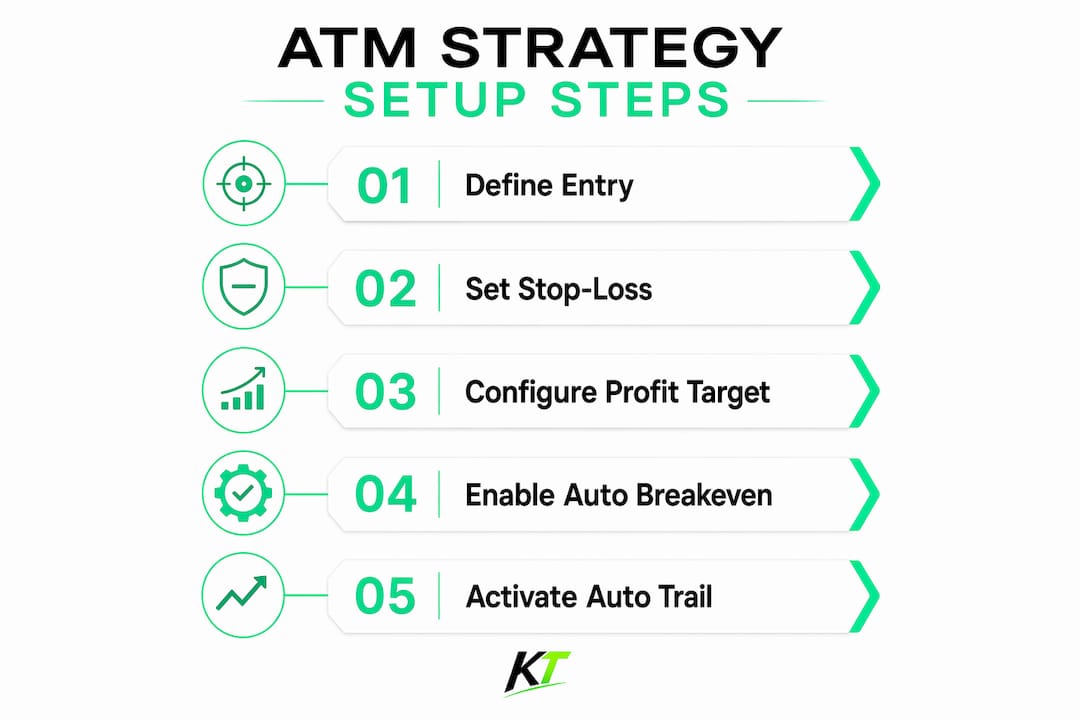
- Open the ATM Strategy Manager. Access it through the Control Center or directly from the Order Entry window. Click “New” to create a fresh template.
- Set your stop-loss parameters. Choose your stop order type (Stop Market is the safest default for most traders), then enter the stop distance in ticks. A 10-tick stop on the E-mini NQ, for example, represents $200 per contract.
- Set your profit target. Enter the target distance in ticks. A 2:1 reward-to-risk ratio means your target sits at twice the stop distance. NinjaTrader lets you add multiple profit targets at different levels for partial exits.
- Configure Auto Breakeven. Set the profit trigger (e.g., 8 ticks in profit) and the breakeven offset (e.g., 1 tick above entry). Once price hits the trigger, the stop moves automatically to entry plus the offset.
- Configure Auto Trail. Set the trail trigger (e.g., 12 ticks in profit) and the trail amount (e.g., 6 ticks). The stop will follow price at a 6-tick distance once the trigger is reached.
- Set the update frequency for trailing stops. Start with a moderate frequency and adjust based on market behavior. Avoid the minimum setting in volatile conditions.
- Name and save the template. Use descriptive names like “ES Scalp 6T” or “NQ Swing 20T” so you can identify the right template instantly at trade entry.
- Test in the NinjaTrader simulator. Run the template through at least several dozen simulated trades before going live.
For traders managing multiple accounts, Group Trade ATM applies one ATM template across accounts while maintaining independent OCO brackets for each. Each account gets its own exit management, which simplifies multi-account risk control significantly.
Partial close workflows integrate naturally with ATM strategies by letting you scale out of a position at multiple profit targets while the remaining contracts stay protected by the original stop.
What are the common misconceptions about NinjaTrader ATM strategy?
The most common mistake traders make is treating ATM as a full automated trading system. ATM strategies manage exits semi-automatically; they do not automate entries or run algorithmic logic. Full automation requires NinjaScript custom strategies. ATM handles what happens after you enter a trade, not whether or how you enter it.
“ATM strategies are powerful but require manual oversight, testing, and risk controls to avoid mechanical trading risks. Beginners often confuse ATM with full algorithmic trading, but ATM focuses on managing active positions, not replacing trader judgment at entry.”
A second misconception is that simulator testing fully validates an ATM template. Simulated fills execute at requested prices unlike real markets, where slippage, partial fills, and spread widening all affect outcomes. Reviewing a meaningful number of live fills is the only way to calibrate your ATM settings for real conditions. Treat simulator results as a starting point, not a final verdict.
Common pitfalls to avoid when using ATM strategies:
- Selecting Stop Limit in fast markets. Price can gap through your limit, leaving the position open with no protection.
- Setting trailing stop frequency too high. Excessive updates can cause exchange throttling, especially during high-volatility events.
- Ignoring connectivity risks. Simulated stops held locally by NinjaTrader go inactive if the platform loses connection. Confirm your broker’s handling of native exchange stops.
- Using the same ATM template for all market conditions. A template calibrated for a quiet morning session will underperform during a Fed announcement.
- Skipping live validation. Simulator performance and live performance diverge. Manual review of real fills is non-negotiable for serious traders.
Understanding fast execution requirements matters here too. ATM handles exits automatically, but your entry still depends on how fast you can act on a signal. Slow entry defeats the purpose of a well-configured exit bracket.
Key Takeaways
The NinjaTrader ATM strategy automates exit management through OCO-linked stop-loss and profit-target orders, but it requires correct stop type selection, live validation, and manual oversight to function reliably.
| Point | Details |
|---|---|
| ATM automates exits, not entries | ATM submits stop-loss and profit-target orders after fill; entries remain manual. |
| OCO prevents dual fills | Both exit orders link automatically; one fill cancels the other instantly. |
| Stop type selection is critical | Stop Market guarantees exit; Stop Limit controls price but risks no fill. |
| Simulator results need live validation | Simulated fills ignore slippage; review real fills before trusting any ATM template. |
| Connectivity affects simulated stops | Locally simulated stops can fail if the platform disconnects; verify broker stop handling. |
What I’ve learned from watching traders misuse ATM strategies
Most traders who struggle with ATM strategies are not making configuration errors. They are making conceptual ones. They set up the template correctly, test it in the simulator, and then go live expecting the system to handle everything. It does not. ATM handles exits. The trader still handles everything else.
The nuance that separates consistent ATM users from frustrated ones is understanding what the tool is actually doing. Auto Breakeven does not protect you from a fast gap through your entry price. Auto Trail does not guarantee you capture the full move. These features reduce manual workload and remove emotional interference, but they operate within the constraints of market structure and order type mechanics.
The stop order type decision deserves more attention than most guides give it. Choosing Stop Limit because you want price control in a futures market is a reasonable instinct. But futures markets gap. They spike. A Stop Limit that does not fill during a 15-tick gap against you is not risk management. It is an open wound. For most active futures traders, Stop Market is the correct default inside ATM, and the slippage cost is the price of certainty.
My strongest recommendation is to treat ATM template development as an ongoing process, not a one-time setup. Markets change. Volatility regimes shift. A template that worked well during a low-volatility quarter may need recalibration when conditions change. Review your live fills regularly, adjust your parameters, and keep multiple templates ready for different environments.
— Key-trade
Hardware that makes ATM strategies faster to deploy
ATM strategies remove the manual work of placing exit orders, but your entry still depends on how fast you can act. For traders using NinjaTrader on active futures markets, the gap between a signal and a filled entry order often comes down to physical execution speed.

Key-trade builds professional trading keyboards designed specifically for traders who need fast, reliable order execution. Each keypad features programmable buttons mapped to your most-used actions: submitting entries, switching ATM templates, triggering partial closes, and adjusting stops. Instead of navigating menus under pressure, you press one button and the action executes. Key-trade devices work directly with NinjaTrader and support live and prop trading accounts. Traders who use ATM strategies for exit automation and Key-trade hardware for entry speed get both sides of the execution equation covered.
FAQ
What is a NinjaTrader ATM strategy?
A NinjaTrader ATM strategy is a preset template that automatically submits linked stop-loss and profit-target orders immediately after an entry fill, using an OCO relationship to manage trade exits without manual input.
Does ATM strategy work as a fully automated trading system?
No. ATM strategies manage exits semi-automatically after a manual entry. Full automated trading, including automated entries, requires NinjaScript custom strategies built separately.
What is the difference between Auto Breakeven and Auto Trail in ATM?
Auto Breakeven moves your stop to entry price once a set profit trigger is reached. Auto Trail follows price at a fixed tick distance once a trigger is hit, locking in gains as the trade moves further in your favor.
Are NinjaTrader ATM stop orders held on the exchange?
Not always. NinjaTrader often simulates stop orders locally, which means they can fail if the platform loses connectivity. Traders should verify whether their broker supports exchange-native stops for more reliable protection.
How should I test an ATM strategy before going live?
Run the template through the NinjaTrader simulator first, then review a meaningful number of live fills to account for real-world slippage. Simulator fills execute at requested prices and do not reflect actual market conditions accurately.
Recommended
- NinjaTrader Chart Trader: A Complete Guide for Traders – Key-Trade Trading Keyboards
- NinjaTrader Partial Close Futures Guide for Traders – Key-Trade Trading Keyboards
- Why Futures Traders Use NinjaTrader: 2026 Guide – Key-Trade Trading Keyboards
- Why NinjaTrader Traders Need Fast Execution – Key-Trade Trading Keyboards