

Stream Deck Trading: Keypads Pay Off at 50+ Trades a Week
Los teclados de trading (trading keypads) son dispositivos de hardware diseñados específicamente con teclas programables para ejecutar, modificar y cerrar operaciones directamente dentro de plataformas como TradingView o MetaTrader. Los traders profesionales, las mesas de operaciones (prop desks) y los traders minoristas de alto volumen son quienes más se benefician de ellos. El inconveniente: un teclado acelera tus dedos, no tu red, así que mide la latencia de tu bróker y de tu servidor antes de asumir que el hardware por sí solo solucionará la lentitud en la ejecución de las órdenes.
Resumen:
- Un teclado de trading agiliza la entrada manual de órdenes, pero no reduce la latencia de red o del servidor, que son los factores principales en la velocidad de ejecución.
- El beneficio del dispositivo es mayor para traders de alto volumen, como scalpers y prop desks, quienes toman decisiones frecuentes que requieren una ejecución rápida.
- Una configuración adecuada, el uso de medidas de seguridad y el entrenamiento de la memoria muscular son esenciales para garantizar un uso seguro y eficaz del teclado en el trading real.
- Los costos del hardware son modestos en comparación con las actualizaciones de infraestructura; el valor clave reside en reducir la fricción y la fatiga mental durante la operativa.
- La compatibilidad con tu plataforma de trading y el énfasis en funciones esenciales, como cierres parciales y cambio de cuenta, deben guiar la selección del teclado.
Tabla de contenidos
- Qué diferencia a un teclado de trading de un Stream Deck
- ¿Quién obtiene realmente una ganancia de velocidad con un teclado de trading?
- Por qué un teclado por sí solo no garantiza ejecuciones más rápidas
- Configuración del teclado y desarrollo de memoria muscular confiable
- Mantener la ejecución táctil segura: medidas de protección importantes
- ¿Cuánto cuesta un teclado de trading y vale la pena?
- Cómo elegir el teclado de trading adecuado para tu configuración
- El enfoque de Key-Trade: diseñado según cómo los traders adoptan el hardware
- Consigue un teclado diseñado para las plataformas que ya utilizas
- Fuentes
- Preguntas frecuentes
Qué diferencia a un teclado de trading de un Stream Deck
Un teclado de trading diseñado a medida utiliza un firmware dedicado creado para un solo objetivo: enviar comandos de trading con el menor retraso y la menor cantidad de errores posible. Ese es un diseño diferente al de un pad de macros de uso general, construido para lanzar superposiciones de streaming o cambiar escenas en OBS. Los teclados de trading asignan teclas físicas a acciones específicas de la plataforma, a menudo a través de una conexión a nivel de controlador o un puente API directo, en lugar de ser un simple emulador de teclas genérico.
La diferencia funcional se nota en cuanto tocas una tecla:
- Entrada instantánea de órdenes a un tamaño de lote preestablecido, sin mover el ratón ni navegar por menús.
- Cierres parciales con una sola tecla, lo que permite salir de una posición sin recalcular el tamaño manualmente.
- Ajuste directo de Stop-Loss y Take-Profit, incluyendo cambios de punto de equilibrio (break-even).
- Cambio rápido de cuenta para traders que manejan múltiples cuentas financiadas o de prop firms.
- Funciones de reversión y escalado que invierten o aumentan una posición con una sola pulsación.
Los dispositivos de macros genéricos no fueron creados para esto. Carecen de la estabilidad del controlador, la lógica de confirmación por tecla y las integraciones específicas de plataforma que separan una herramienta de trabajo de un dispositivo curioso junto a tu monitor.
¿Quién obtiene realmente una ganancia de velocidad con un teclado de trading?
Los scalpers, traders intradía de futuros, traders de forex de alto volumen y mesas de operaciones que manejan varias cuentas a la vez son los perfiles en los que un teclado justifica su precio. Estos son traders que toman docenas o cientos de decisiones manuales por sesión, donde cada clic o menú extra añade fricción exactamente en el momento en que la concentración es más importante.
Las ganancias realistas son de flujo de trabajo, no de red:
- Menos segundos invertidos por acción de trading, lo que se acumula en un alto volumen de operaciones.
- Menos distracciones visuales y desplazamientos del ratón fuera del gráfico durante una configuración en vivo.
- Menor carga cognitiva durante periodos volátiles, ya que la mano ya sabe dónde está la tecla de "cerrar la mitad".
Un teclado reduce el tiempo de entrada humana, no el tiempo de red. La ubicación geográfica y la latencia del lado del servidor suelen dominar la velocidad de ejecución de órdenes para la gran mayoría de los traders minoristas e incluso para muchas estrategias profesionales. Un trader que hace clic con un ratón desde un lugar distante no superará a un algoritmo colocado cerca del servidor, sin importar lo rápidas que sean sus manos. El teclado acorta la parte de la cadena que controlas directamente: tu propia reacción y tiempo de entrada.
Por qué un teclado por sí solo no garantiza ejecuciones más rápidas
Cada orden que envías atraviesa una cadena de retrasos, y tu teclado solo afecta al primer eslabón. Entender esa cadena es la diferencia entre invertir dinero en la actualización correcta o desperdiciarlo en la incorrecta.
- Retraso de propagación. La distancia física entre tú y el mercado o proveedor de liquidez, regida por la velocidad de la luz a través de la fibra óptica.
- Procesamiento de NIC y kernel. El tiempo que tu tarjeta de red y tu sistema operativo pasan procesando el paquete antes de que llegue a tu aplicación de trading.
- Decodificación y lógica de estrategia. El tiempo que le toma a tu plataforma o algoritmo interpretar los datos del mercado y decidir una acción.
- Verificaciones de riesgo. Validación de riesgo pre-trade, ya sea del lado del bróker o de la plataforma, antes de que se permita el avance de la orden.
- Confirmación de la pasarela (gateway). El viaje de ida y vuelta que confirma que tu orden fue recibida y ejecutada.
Un teclado ahorra tiempo solo en el paso de "decisión humana a pulsación de tecla" que precede a estas cinco etapas. Si tu estrategia necesita ventajas de microsegundos o nanosegundos, la colocación (colocation) y la aceleración FPGA proporcionan las mayores ganancias estructurales de latencia, y esas inversiones importan mucho más que cualquier dispositivo de entrada. La mayoría de los traders discrecionales y de swing no necesitan ese nivel; un servidor dedicado o una mejor conexión con el bróker suele resolver más que cualquier teclado.
Antes de comprar hardware, ejecuta diagnósticos básicos: un ping y un rastreo MTR al servidor de tu bróker, una prueba manual de tiempo de confirmación de ida y vuelta de las órdenes, y una prueba de estrés durante una ventana de alta volatilidad para ver dónde se concentran realmente los retrasos. La latencia de trading tiene componentes identificables que puedes medir tú mismo en lugar de adivinar.
Consejo profesional: Mide tu propio tiempo de ida y vuelta de orden a confirmación durante una sesión normal y de nuevo durante un mercado rápido. Si la brecha entre ambas es enorme, tu cuello de botella es la infraestructura, no tus dedos, y un teclado no cerrará esa brecha.
Configuración del teclado y desarrollo de memoria muscular confiable
Incorporar un teclado de trading a tu flujo de trabajo de forma segura requiere más que solo conectarlo y asignar algunas teclas. Trata la implementación como tratarías una nueva estrategia: prueba poco a poco, verifica constantemente y escala solo cuando confíes en los resultados.
Lista de verificación de integración:
- Instala el firmware y los controladores directamente del fabricante y confirma que el dispositivo aparece correctamente en tu sistema operativo antes de tocar tu plataforma de trading.
- Conecta a través del puente nativo de tu plataforma o un conector API. Los puentes de código abierto como los conectores ZeroMQ son un patrón común para vincular hardware externo a las funciones de trading de MetaTrader.
- Asigna cada tecla de acceso rápido y pruébala exclusivamente en una cuenta demo primero, confirmando que cada acción ejecuta exactamente el comando que esperas.
Asignaciones iniciales recomendadas:
- Abrir, cerrar y cerrar parcial para el tamaño de instrumento que más operes.
- Ajuste de Stop-Loss y Take-Profit, incluyendo una tecla dedicada para break-even.
- Cambio de cuenta para traders que gestionan varias cuentas financiadas.
- Cancelar todas las órdenes pendientes.
- Un interruptor de pánico o de emergencia (nunca una tecla de liquidar todo de un solo toque sin protección).
Un periodo de entrenamiento dedicado ayuda a reconfigurar la memoria muscular lejos de los hábitos de teclado y ratón antes de arriesgar dinero real. Realiza sesiones de práctica hasta que las asignaciones se sientan automáticas, luego expande al trading en vivo en pequeños incrementos, revisando los registros de tu plataforma después de cada sesión para confirmar que el teclado envió exactamente lo que pretendías.
Mantener la ejecución táctil segura: medidas de protección importantes
La velocidad sin medidas de seguridad solo significa que cometes errores más rápido. Los traders que obtienen más valor de un teclado son los que tratan las acciones destructivas con la misma precaución que desearían de un segundo par de ojos.
Protecciones a nivel de hardware que vale la pena exigir:
- Teclas protegidas o hundidas para cualquier acción destructiva, como cerrar todas las posiciones.
- Combinaciones de doble acción que requieren dos pulsaciones en lugar de una para funciones de alto impacto.
- Mensajes de confirmación en el dispositivo antes de enviar una orden que no puede deshacerse.
La política operativa es tan importante como el hardware mismo. Mantén un perfil de asignación separado para las cuentas demo y las reales para que nunca confundas ambas bajo presión. Si una mesa de operaciones comparte dispositivos entre varios traders, los límites por cuenta y el acceso basado en roles evitan que el error de una persona afecte el libro de otro trader. Los foros de traders documentan modificaciones personalizadas de seguridad construidas específicamente después de que alguien disparara accidentalmente la orden equivocada, lo que demuestra que esto no es un riesgo teórico.
El registro (logging) cierra el círculo. Habilita una auditoría que registre cada orden enviada desde el dispositivo y revísalo regularmente, no solo después de que algo salga mal.
Consejo profesional: Revisa tus registros de órdenes semanalmente, incluso en una buena semana. Los patrones de casi-errores aparecen antes de que ocurra una equivocación costosa.
¿Cuánto cuesta un teclado de trading y vale la pena?
Los teclados de trading tienen un costo significativamente menor que las actualizaciones de infraestructura que realmente reducen la latencia, razón por la cual vale la pena evaluarlos en sus propios términos en lugar de como un sustituto de la colocación o un servidor dedicado. El valor no es "esto me hace más rápido que el mercado". Es "esto me hace más rápido y consistente de lo que soy con un ratón y una pila de menús de plataforma".
Piensa en el costo en términos de lo que realmente estás comprando: menos errores de clic durante un mercado rápido, menos segundos perdidos por operación multiplicados por cientos de operaciones al mes, y menos fatiga mental por la constante navegación en menús durante tus horas de mayor concentración. Para un trader que realiza 50 o más operaciones discrecionales a la semana, incluso una pequeña reducción en la fricción por operación se suma durante un año de trading de maneras que una hoja de cálculo no capturará completamente, porque el costo real de una interfaz lenta y torpe es a menudo una entrada perdida o una salida tardía, no solo el tiempo.
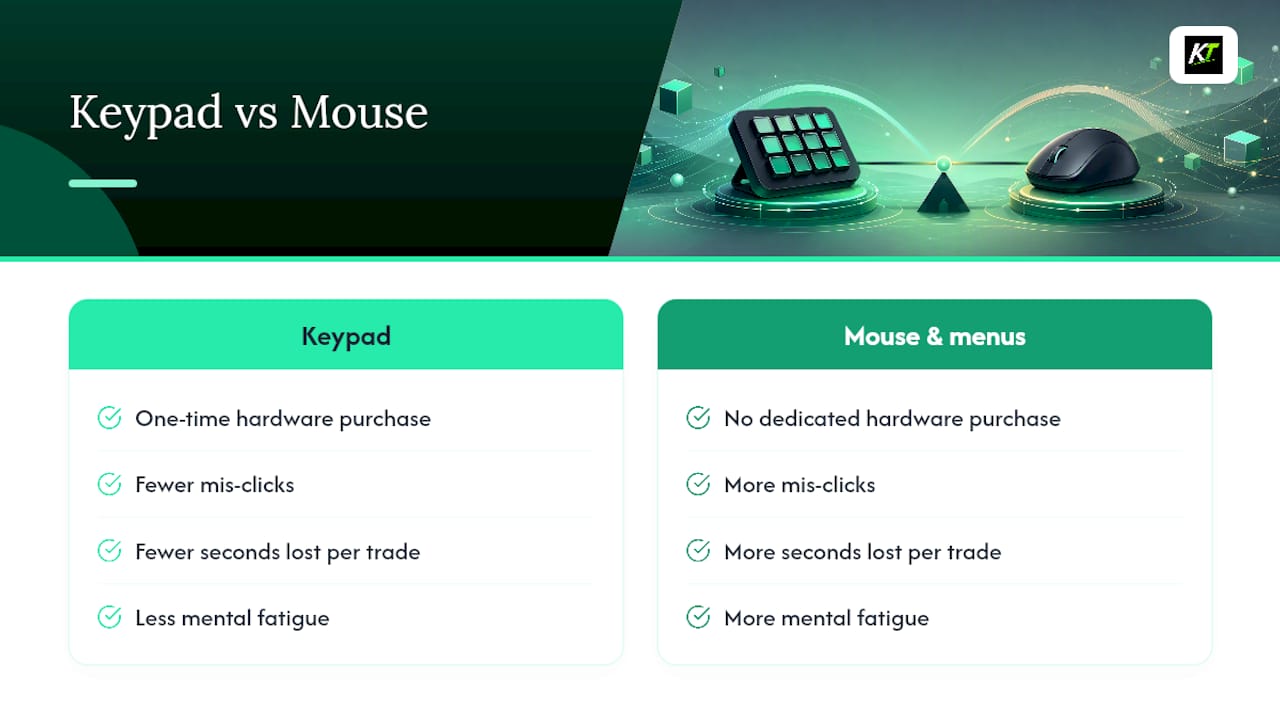
Es una compra única de hardware, no una suscripción, lo que cambia las matemáticas en comparación con la mayoría del software de trading. No hay cuotas recurrentes que afecten el rendimiento, y el dispositivo sigue funcionando de la misma manera años después de que lo compras, siempre que el firmware siga siendo compatible y las plataformas que utilizas sigan siendo funcionales. Compara eso con el costo de una sola mala entrada manual durante una sesión volátil, y el dispositivo tiende a pagarse solo rápidamente para cualquiera que opere de forma lo suficientemente activa como para necesitarlo.
Cómo elegir el teclado de trading adecuado para tu configuración
No todos los teclados se ajustan a cada estilo de trading, así que elige el dispositivo según cómo operas realmente, en lugar de elegir el que tenga más teclas.
Comienza con la compatibilidad de la plataforma. Confirma que el dispositivo se integre directamente con las plataformas que utilizas, ya sea TradingView, MetaTrader 4 o 5, cTrader, NinjaTrader, SierraChart, Thinkorswim o Tradovate. Un teclado que no admite de forma nativa tu plataforma significa que dependes de una emulación de teclas genérica, lo que reintroduce los problemas de confiabilidad que el hardware diseñado específicamente debería resolver.
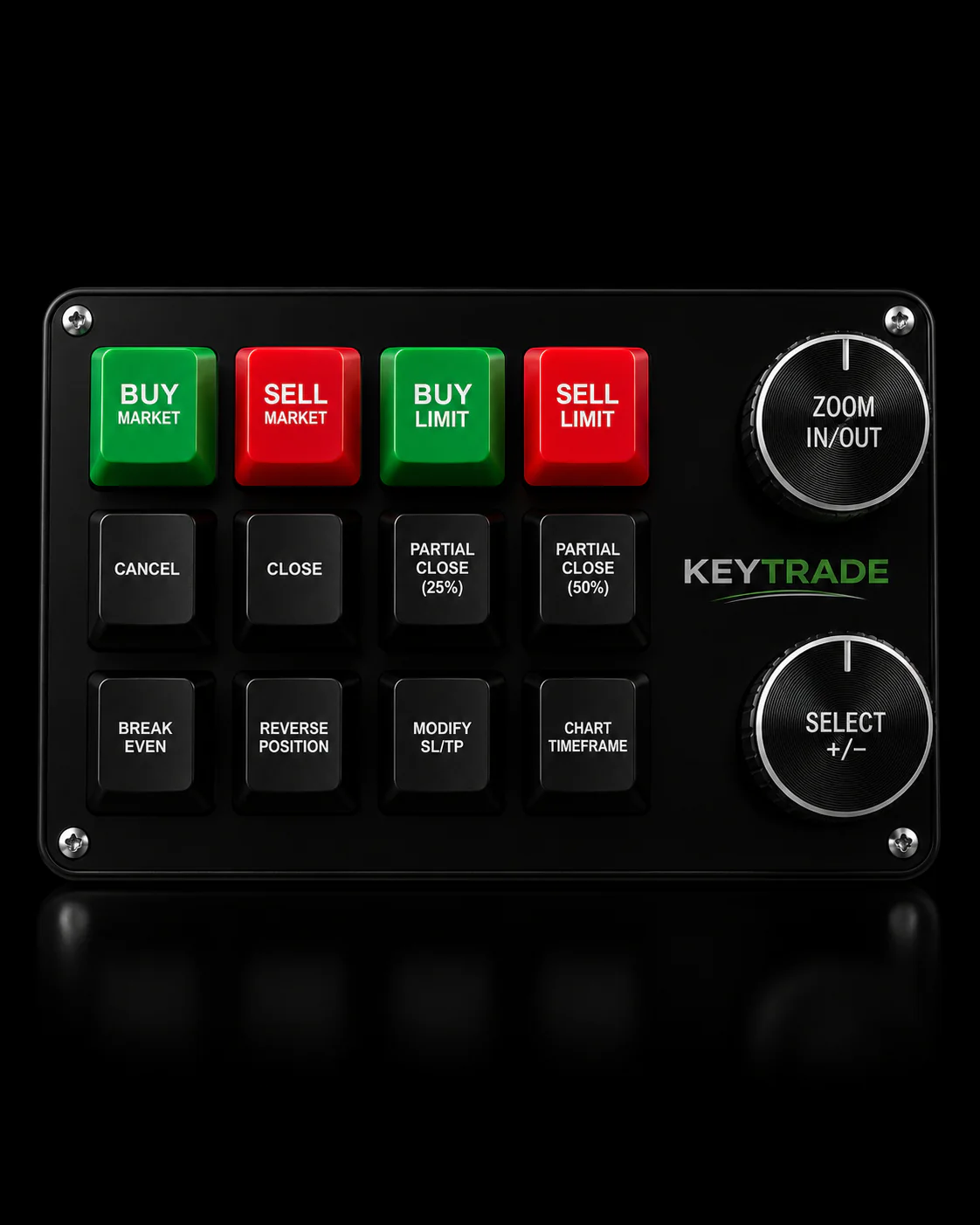
Verifica qué funciones de trading son realmente programables, no solo cuántas teclas tiene el dispositivo. Un teclado con 20 teclas pero sin función de cierre parcial o ajuste de SL/TP es menos útil que un dispositivo de 10 teclas que cubre tus acciones principales con limpieza. Busca específicamente atajos para break-even, funciones de escala de entrada y salida, y cambio de cuenta si gestionas múltiples cuentas.
Evalúa la construcción física para tu entorno de trading. Una mesa de operaciones que realiza sesiones largas necesita un dispositivo que resista un uso diario intenso; un trader minorista que trabaja desde un portátil necesita algo lo suficientemente compacto como para caber en una configuración pequeña sin abarrotarla.
Finalmente, considera el soporte de configuración. Un dispositivo con guías claras y soporte técnico receptivo es más importante que una fila extra de botones, especialmente durante la primera semana en la que estás reasignando hábitos construidos durante años de usar el ratón.
El enfoque de Key-Trade: diseñado según cómo los traders adoptan el hardware
Los teclados de Key-Trade se integran directamente con TradingView, MetaTrader 4 y 5, cTrader, NinjaTrader, SierraChart, Thinkorswim y Tradovate, agregando más plataformas con el tiempo. Los botones programables cubren las funciones que más importan en el trading en vivo: ejecución instantánea, cierres parciales, modificación de stop-loss y take-profit, y cambio de cuenta para traders que manejan más de un libro de operaciones.
El viaje típico del cliente sigue un arco predecible: probar las asignaciones, ajustar la disposición de los botones para que coincida con el flujo de trabajo personal, realizar una sesión de práctica en una cuenta demo y luego pasar al trading en vivo con límites estrictos antes de escalar. Esa secuencia coincide con lo que los profesionales recomiendan para reasignar la memoria muscular de forma segura, y es la misma precaución que este artículo ha defendido: construye confianza en el entorno de demo antes de que una sola pulsación de botón controle capital real.
Las mesas de operaciones y los traders minoristas de alto volumen siguen siendo el grupo que obtiene el valor más consistente, en gran parte porque su frecuencia de operación convierte los pequeños ahorros de tiempo por acción en un total semanal significativo.
— key-trade
Consigue un teclado diseñado para las plataformas que ya utilizas
Key-Trade construye teclados físicos específicamente para las plataformas cubiertas a lo largo de este artículo, por lo que no estás atrapado emulando pulsaciones de teclas a través de software nunca diseñado para el trading. Cada dispositivo se envía con botones programables para las acciones que más importan: entrada de orden instantánea, cierres parciales, ajuste de stop-loss y take-profit, y cambio de cuenta para traders que manejan múltiples libros.

Key-Trade realiza envíos a todo el mundo e incluye guías de configuración además de soporte técnico directo, por lo que el periodo de entrenamiento que este artículo describe no tiene que ser un proyecto en solitario. Ya sea que operes forex, futuros o dirijas una mesa de operaciones con varias cuentas, las asignaciones son personalizables para adaptarse a tu flujo de trabajo real en lugar de forzarte a un diseño genérico. Visita la línea de productos de Key-Trade para comparar modelos con las plataformas que ya utilizas, descargar una guía de configuración o contactar al soporte técnico con preguntas antes de comprar.
Fuentes
Las afirmaciones en este artículo se basan en una combinación de análisis de infraestructura e informes de profesionales, útiles si deseas profundizar en cualquier punto:
- Servidores de Trading Dedicados: Cuándo pasar de VPS a Bare Metal - NexusFi Academy
- Conector DWX ZeroMQ { Python 3 a MetaTrader 4 }
- Saxo lanza su primer dispositivo de hardware para FX - Euromoney
Preguntas frecuentes
¿Es un teclado de trading lo mismo que un Stream Deck para creadores de contenido?
No. Trading keypads run dedicated firmware built for order execution and risk management, while streamer macro pads are designed for launching overlays and switching scenes, and lack the driver stability trading demands.
Will a Trading Keypad Make My Order Fills Faster?
It reduces the time you personally spend clicking through menus, but network geography and server-side latency usually dominate fill speed for most strategies, so infrastructure matters more than input speed alone.
Which Platforms Work With Trading Keypads Like Key-Trade’s?
Key-Trade’s keypads integrate with TradingView, MetaTrader 4 and 5, cTrader, NinjaTrader, SierraChart, Thinkorswim, and Tradovate, with additional platform support added over time.
How Long Does It Take to Get Comfortable With a Trading Keypad?
Most traders need a dedicated training period of demo-account dry runs before going live, since remapping muscle memory away from keyboard and mouse takes deliberate repetition, not just a single setup session.
Do I Need Colocation Before Buying a Trading Keypad?
Only if your strategy needs microsecond-level advantages. Colocation and FPGA acceleration matter for high-frequency strategies, but most discretionary and swing traders get more practical value from a keypad’s workflow gains than from colocation costs.