

NinjaTrader Partial Close Futures Guide for Traders
A partial close in NinjaTrader is defined as exiting a portion of an open futures position while keeping the remaining contracts active. This technique, formally called “scaling out,” lets you lock in profits early while maintaining upside exposure on your runner contracts. Every serious NinjaTrader futures trader needs this skill. NinjaTrader supports both manual and automated methods for partial exits, and knowing which to use, and when, is what separates disciplined execution from reactive guesswork. This NinjaTrader partial close futures guide covers both paths in full.
What tools does NinjaTrader need for partial close futures positions?
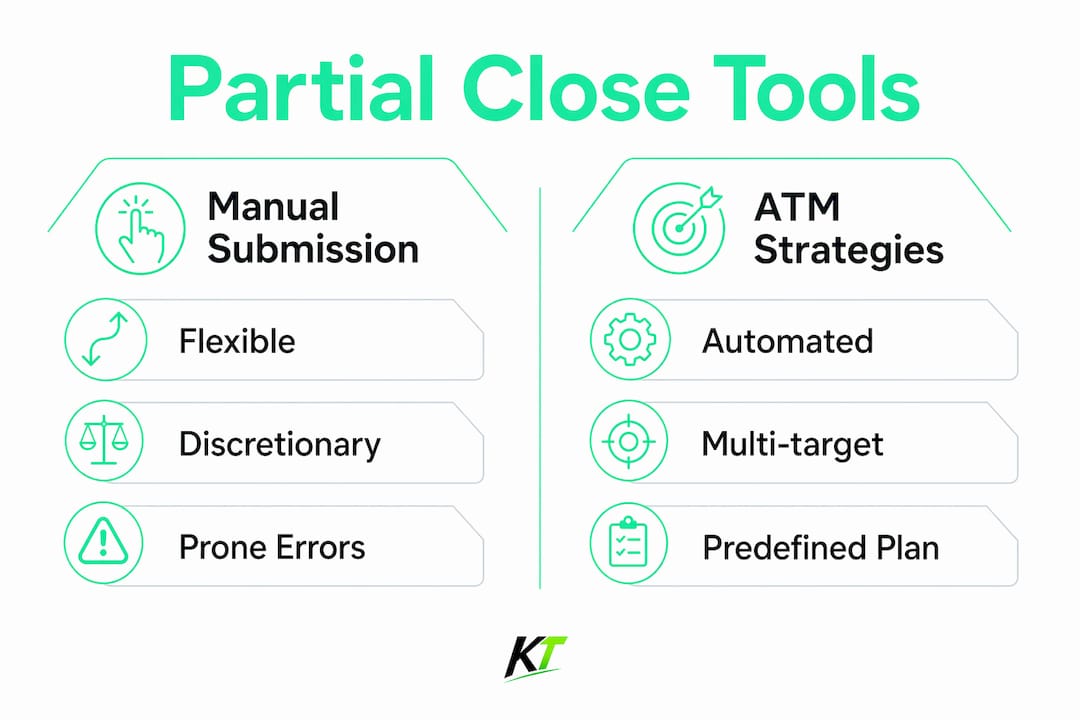
NinjaTrader gives you three distinct tools for partial closes: manual order submission, ATM (Advanced Trade Management) strategies, and custom coded strategies. Each serves a different trader profile and use case.
Manual partial close works by submitting an opposite direction market order matching the exact number of contracts you want to exit. If you are long 4 ES contracts and want to close 2, you submit a sell market order for 2 contracts. NinjaTrader nets the position automatically. This method gives you full control but requires fast, accurate input under pressure.

ATM strategies automate the exit process. You build a template before entry that defines multiple profit targets, each tied to a specific contract quantity. When the first target is hit, NinjaTrader closes that portion and cancels the corresponding stop via OCO (one-cancels-other) logic. The remaining contracts stay open with their own stop and target. ATM strategies must be attached at entry. You cannot apply them to a position that is already open.
Custom coded strategies give advanced traders full programmatic control. You define entry signals, exit quantities, and stop logic in NinjaScript. This approach is the most flexible but also the most technically demanding.
| Tool | Best for | Key limitation |
|---|---|---|
| Manual order submission | Active discretionary traders | Requires fast, accurate execution |
| ATM strategy templates | Systematic traders with fixed plans | Must be configured before entry |
| Custom NinjaScript strategies | Developers and algo traders | Requires coding knowledge |
| Third-party plugin templates | Traders needing tiered multi-target exits | Adds external dependency |
Tiered exit plugins let you customize the number and size of each partial close beyond what native ATM templates offer. They are worth evaluating if your strategy requires more than two or three exit layers.
How to manually partial close a NinjaTrader futures position
Manual partial closes are the fastest method to learn and the most flexible to execute. The process is straightforward once you know the exact steps.
- Identify your current position size. Check the Positions tab or the chart’s position indicator to confirm how many contracts you hold.
- Decide your exit quantity. Choose how many contracts to close at this price level. Common approaches scale out 50% at the first target and let the rest run.
- Submit an opposite direction market order. If you are long 4 contracts, right-click the chart or use the order entry panel to sell 2 contracts at market. NinjaTrader nets the position immediately.
- Confirm the position update. The Positions tab should reflect the reduced contract count. Your remaining stop and target orders stay active.
- Manage the runner. Adjust your stop to break-even or trail it manually as price moves in your favor.
Opposite direction market orders are the native NinjaTrader method for partial exits. They scale out cleanly without requiring any special configuration.
The most common mistake traders make is submitting the partial close without checking for orphaned working orders. If you have a full-size stop loss sitting at 4 contracts and you manually close 2, that stop still covers 4 contracts. You must manually reduce the stop quantity to match your new position size.
Pro Tip: After every manual partial close, immediately check your active orders panel and adjust any stop or target orders to reflect the reduced position size. Orphaned orders at the original quantity will over-exit your position if triggered.
Using flatten-first logic or the CLOSEPOSITION command in automated contexts prevents residual orders from conflicting with your position state. For pure manual trading, the discipline of checking your orders panel after each partial close achieves the same result.
Practice this sequence in NinjaTrader’s simulation mode before going live. The platform’s simulation environment replicates live execution closely enough to build real muscle memory without financial risk.
How to set up ATM strategies for automated partial closes
ATM strategies are the most reliable way to automate scaling out of futures positions in NinjaTrader. The key is building the template before you enter the trade.
- Open the ATM Strategy configuration panel. In the order entry window, click the ATM Strategy dropdown and select “Custom.”
- Set your first profit target. Enter the tick or price distance for your first exit and set the quantity to the number of contracts you want to close at that level. For example, 2 contracts at 8 ticks.
- Set your first stop loss. Assign a stop to cover the full position or just the first tranche, depending on your risk model.
- Add a second profit target. Click “Add Target” and configure the distance and quantity for your runner contracts. For example, 2 contracts at 20 ticks.
- Name and save the template. Give it a descriptive name so you can load it instantly at entry.
- Attach the ATM strategy at order entry. When you submit your entry order, select your saved template from the ATM dropdown. NinjaTrader attaches the exit orders automatically when the entry fills.
Once the first profit target fills, NinjaTrader cancels the corresponding stop via OCO logic and leaves the remaining contracts with their own stop and target active. This is the core power of ATM strategies. You define the plan once and the platform executes it without further input.
Tiered multi-target ATM templates let you secure capital with initial partial closes while letting remaining contracts run for larger gains. This structure removes the emotional pressure of deciding when to exit mid-trade.
Pro Tip: Always test new ATM templates in NinjaTrader’s Market Replay mode before using them live. Market Replay feeds real historical tick data through the platform, so your ATM exits trigger exactly as they would in a live session.
Testing in simulation modes minimizes hesitation and execution errors that are common when managing multiple exit targets manually. A template you have tested 20 times executes with confidence. One you have never tested creates doubt at the worst possible moment.
Advanced coding: custom NinjaTrader strategies for partial closes
Custom NinjaScript strategies give you the most control over partial close logic, but they introduce technical pitfalls that catch even experienced developers.
The most critical rule is assigning unique signal names to each entry order. Using the same signal name for multiple entry segments causes NinjaTrader to cancel all remaining exit orders after the first partial fill. Each entry tranche needs its own signal name so the platform tracks them independently. For example, “EntryLong_1” and “EntryLong_2” rather than “EntryLong” for both.
The second critical setting is StopTargetHandling. Setting it to ByStrategyPosition tells NinjaTrader to manage stops and targets relative to the current position size rather than the original entry size. Without this, a partial target hit can trigger a full position closure. This misconfiguration is the most common reason traders report unexpected full exits during strategy runs.
When submitting opposite direction orders via code, always include flatten-first flags or use the CLOSEPOSITION command where appropriate. Orphaned working orders from automation commands interfere with position state and produce inconsistent results between backtesting and live execution.
Pro Tip: Run your custom partial close strategy through NinjaTrader’s Strategy Analyzer with tick-level data before deploying live. Backtesting at bar-level data can mask partial fill sequencing issues that only appear with tick resolution.
| Approach | Pros | Cons |
|---|---|---|
| Manual order submission | Flexible, no setup required | Prone to orphaned order errors |
| ATM strategy templates | Automated, consistent, no coding | Must configure before entry |
| Custom NinjaScript strategy | Full control, fully automated | Requires coding, complex to debug |
The difference between backtesting and live execution behavior is real. NinjaTrader’s fill simulation in backtesting assumes instant fills. Live markets introduce slippage and partial fills that can shift the sequence of your exit orders. Test with realistic assumptions.
Key Takeaways
Scaling out of futures positions in NinjaTrader requires choosing the right method at entry, configuring it correctly, and testing it thoroughly before going live.
| Point | Details |
|---|---|
| Manual partial close method | Submit an opposite direction market order for the exact contract quantity you want to exit. |
| ATM strategy configuration | Build and attach ATM templates at entry; they cannot be applied to already open positions. |
| Unique signal names in code | Assign a different signal name to each entry tranche to prevent premature exit cancellations. |
| StopTargetHandling setting | Set it to ByStrategyPosition to avoid accidental full position closures on partial target hits. |
| Test before going live | Use simulation and Market Replay modes to validate every partial close setup before real capital is at risk. |
Partial closes work best when you plan them before the trade
The traders I see struggle most with partial closes are the ones deciding how many contracts to exit while the trade is already moving. That decision under pressure almost always produces inconsistent results. The contract quantity, the target level, and the stop adjustment after the first exit should all be defined before you enter the position.
ATM strategies enforce that discipline automatically. When you build the template before entry, you commit to the plan. The platform executes it. You watch. That separation between planning and execution is where consistency comes from.
The manual approach has its place, especially for discretionary traders who read order flow and adjust targets in real time. But even then, the partial close quantity should be predetermined. Decide “I will close half at the first target” before you enter, not after.
The orphaned order problem is more common than most traders admit. After a manual partial close, the original stop is still sitting at full size. Missing that adjustment has cost traders real money. Build the habit of checking your orders panel immediately after every partial exit. Make it automatic.
For anyone building custom NinjaScript strategies, the unique signal name rule and the StopTargetHandling setting are not optional details. They are the difference between a strategy that works and one that randomly closes your entire position at the first target. Get those two settings right before anything else.
— keytrades
Key-trade trading keyboards for faster NinjaTrader execution
Executing partial closes manually in NinjaTrader requires speed and accuracy. Every second between decision and execution matters when price is moving.

Key-trade builds physical trading keypads with programmable buttons designed for exactly this kind of active trade management. You can assign partial close commands, stop adjustments, and break-even moves to dedicated keys, cutting execution time to a single press. The Key-trade Professional Trading Keyboard integrates directly with NinjaTrader, so your most critical order actions are always one button away. For traders managing multiple contracts across fast markets, that speed advantage is real and measurable. Key-trade ships worldwide and requires no technical setup to get started.
FAQ
What is a partial close in NinjaTrader futures trading?
A partial close, also called scaling out, means exiting a portion of your open futures position while keeping the remaining contracts active. NinjaTrader supports this through manual opposite direction orders and ATM strategy templates.
Can I apply an ATM strategy to an already open position?
No. ATM strategies must be attached at entry when the order is submitted. They cannot be applied to a position that is already open.
Why does my strategy close the full position instead of a partial?
The most likely cause is an incorrect StopTargetHandling setting. Setting it to ByStrategyPosition prevents partial target hits from triggering a full position closure.
How do I avoid orphaned orders after a manual partial close?
After every manual partial exit, check your active orders panel and reduce any stop or target quantities to match your new position size. Orphaned working orders at the original size will over-exit your position if triggered.
What is the best way to test partial close setups in NinjaTrader?
Use NinjaTrader’s Market Replay or simulation mode to test ATM templates and custom strategies with real tick data before going live. Testing in simulation reduces execution errors and builds confidence in your setup.