

What Fat-Finger Trading Errors Are and How to Prevent Them
A fat-finger trading error happens when someone enters the wrong quantity, price, or ticker symbol into an order ticket, and the market executes it before anyone catches the mistake. The scale ranges from a canceled retail trade nobody remembers to a multibillion-dollar basket, which trips regulatory investigations. The fixes are well understood: better order validation, hard limits, and a habit of pausing before you hit send, which the rest of this article breaks down.
TL;DR:
- Hard order size limits tied to your typical trading volume significantly reduce the risk of a massive error, such as the $444 billion basket in the Citigroup case.
- Implementing two-step confirmation screens and pausing for two seconds before submitting orders helps traders catch mistakes like decimal misplacements or ticker swaps.
- Regulatory review of erroneous trades relies on strict thresholds and narrow windows, so quick post-trade audits can prevent mistakes from becoming unfixable after hours.
- Hardware controls, such as dedicated confirmation keys and preset size buttons on programmable keypads, provide tactile feedback that reduces accidental high-impact trades.
- Software safeguards paired with physical controls form the most effective defense, especially when traders develop a habit of double-checking orders and pausing before confirming.
Table of Contents
- What Causes Fat Finger Trading Errors?
- What Are Some Notable Fat-Finger Trades Examples?
- How Do Exchanges and Regulators Respond to Fat-Finger Trades?
- How Can You Avoid Fat Finger Errors?
- Can Trading Hardware Reduce Input Errors?
- What Traders Actually Need to Change
- Physical Controls That Complement Your Software Safeguards
- Sources
- FAQ
What Causes Fat Finger Trading Errors?
Most fat-finger trading errors start in the same handful of places on an order ticket. The quantity field is the usual suspect. Traders often type in shares when the system expects lots, or they forget to check whether an interface is asking for gross exposure or net exposure before submitting. Ticker confusion is another repeat offender: symbols that look nearly identical (think two similarly named ETFs) get swapped under time pressure. Copy-paste errors compound the problem when a trader reuses a template order and forgets to update the price or size.
The mechanics that turn a small slip into a large one usually involve automation. An order management system or algorithm can take one bad input and multiply it into dozens or hundreds of child orders in seconds, a phenomenon sometimes called a “wave notional” effect, where the error scales with the execution logic rather than staying contained.
Human factors make all of this worse:
- Fatigue and time pressure during high-volume trading windows
- Visual similarity between ticker symbols or contract codes
- Decimal misplacement (100,000 instead of 10,000, or $1.00 instead of $10.00)
- Switching between platforms with different field layouts and default units
- Overreliance on muscle memory when a broker updates its order screen
What Are Some Notable Fat-Finger Trades Examples?
Real incidents show the same pattern again and again: one input error, amplified by a system or lack of a control, followed by scrambling to contain the damage.
- The Citigroup basket order (2022). A trader entered a basket trade with an error in the “Quantity” field, and the order ballooned to a notional value that regulators later confirmed at roughly $444 billion. Missing basket-level hard blocks let the order proceed further than it should have before it was caught.
- European index dip triggered by the same event. The oversized Citigroup order sent a wave of sell orders into European equity markets, contributing to a sharp, brief drop across several indices before trading normalized.
- Historical algorithmic cascades. Older, widely cited incidents from the 2010s involved a single mistaken order or faulty algorithm generating a rapid sequence of trades that moved prices before circuit breakers or manual intervention stepped in, according to a general summary of past incidents.
The number that matters here: $444 billion. That’s the notional size of the basket in the Citigroup incident, a figure that came from a single quantity-field mistake, not a market event or strategy failure. It’s the clearest illustration of why hard limits, not just human vigilance, matter at scale.
The teachable fault in each case isn’t just “someone typed the wrong number.” It’s that the surrounding system had no ceiling that could catch the erroneous input once it was typed.
How Do Exchanges and Regulators Respond to Fat-Finger Trades?
Exchanges define a “clearly erroneous” trade as one that deviates so far from the prevailing market price that it’s obviously a mistake rather than a legitimate market move. Nasdaq’s clearly erroneous trade guidance lays out the review process, including specific price-deviation thresholds and time windows for filing a request to bust a trade.
That process has real limits worth knowing before you count on it as a safety net:
- Review requests typically must be filed within a narrow window after execution, often within 30 minutes to a few hours depending on the exchange and product.
- Not every trade that “feels wrong” qualifies. The deviation has to meet a defined percentage threshold tied to the reference price.
- Cancellation isn’t automatic. A committee or automated process reviews the request, and outcomes aren’t guaranteed even when the error is obvious to the trader who made it.
- Downstream trades executed by other parties reacting to the erroneous order may not get unwound at all.
Regulators also step in after the fact. The FCA’s final notice on Citigroup resulted in a $79 million fine, tied directly to control gaps rather than the input mistake itself. That distinction matters for anyone thinking cancellation windows are the main defense. The real fix happens before the order leaves your screen, not after.
How Can You Avoid Fat Finger Errors?
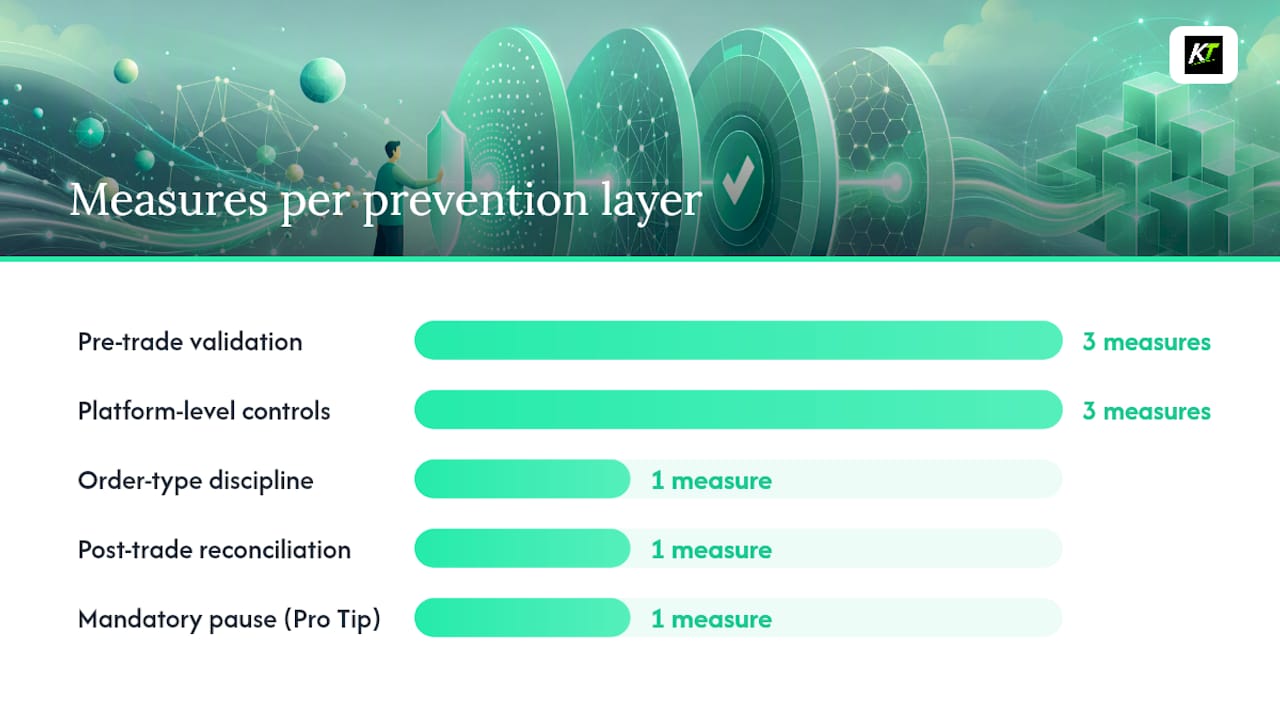
Prevention works best as layers, not a single fix. Software catches what people miss under pressure; people catch what software wasn’t configured to expect.
Pre-trade validation is the first layer:
- Two-step confirmation screens that summarize ticker, quantity, price, and order type before submission
- Numeric-keypad enforcement to prevent stray characters or misplaced decimals
- Visual highlighting when an order deviates significantly from the last traded price
Platform-level controls add a second layer:
- Hard blocks on order size tied to a dollar cap or a percentage of average daily volume (ADV)
- Soft blocks that trigger a warning (not a hard stop) for unusual but not extreme orders
- Authorization gates requiring a second approval for anything above a defined size threshold
Order-type discipline helps too. Limit orders reduce exposure to price slippage that a mistaken market order can cause, since a limit order won’t fill outside the price you set even if the quantity is wrong.
Post-trade reconciliation closes the loop. A structured 30-minute audit after any high-volume session, checking filled orders against intended orders, catches errors that controls missed and gives you a fast path to a bust request while you’re still inside the exchange’s reporting window.
Pro Tip: Build a mandatory two-second pause between entering an order and submitting it. That single habit, recommended by several brokerage education resources, gives your eyes time to catch a misplaced decimal or wrong ticker before it becomes a trade.
Can Trading Hardware Reduce Input Errors?
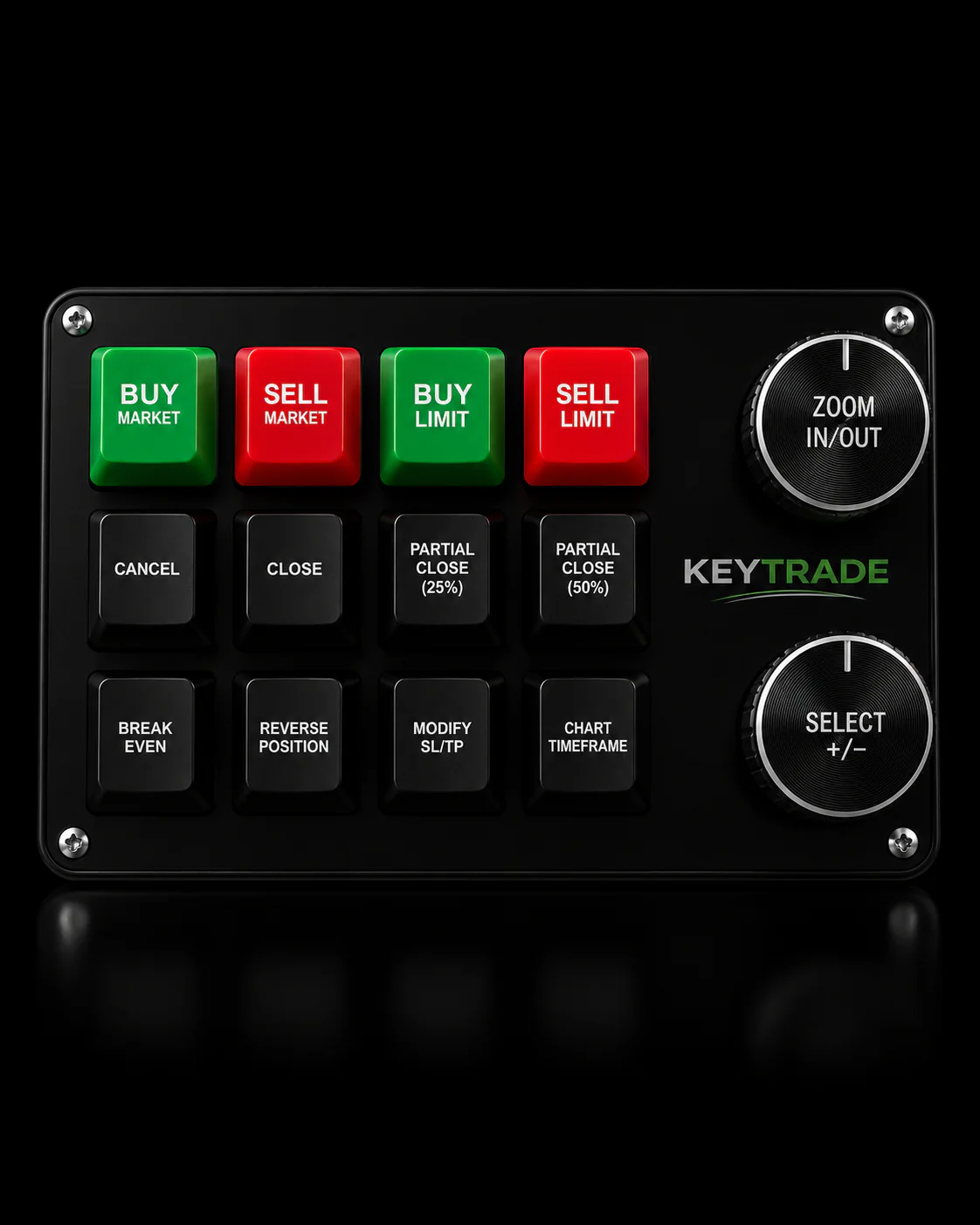
Software controls stop a lot of mistakes, but they can’t fix the underlying problem that a mouse click and a keyboard shortcut feel identical whether you’re canceling an order or doubling your position size. Tactile hardware, like a physical trading keypad, introduces a different kind of confirmation: a dedicated button for one action only, with resistance and feedback your hand notices before your brain finishes processing the click.
Practical mappings that traders use with programmable keypads include:
- A dedicated “confirm” key separate from the general submit action, so canceling and confirming physically feel different
- Preset size buttons (0.5 lot, 1 lot, 2 lots) instead of typing quantity from scratch every time
- A protected hotkey for closing positions or flattening exposure that requires deliberate pressure, not a stray click
Pairing this with software soft blocks creates a hybrid: the platform still enforces its dollar caps and ADV checks, while the hardware reduces the odds that a rushed hand ever generates the wrong input in the first place.
What Traders Actually Need to Change
Speed and safety aren’t opposites here. The traders who get hurt by fat-finger errors usually weren’t reckless. They were fast, confident, and missing one small check that would have taken two seconds.
If you do nothing else this week, do these three things: turn on order confirmation screens if your platform offers them, set a hard quantity cap tied to your typical position size, and force yourself to pause for two seconds before every submission. None of that slows down legitimate trading in any way that matters.
Pair those controls with a habit, not just a tool: run a quick post-trade check at the end of every session. Compare what you meant to trade against what actually filled. Firms that skip this step are the ones that discover their $444 million mistake three days later instead of thirty minutes later.
— key-trade
Physical Controls That Complement Your Software Safeguards
A programmable trading keypad from Key-trade gives you the tactile confirmation layer that pure software interfaces can’t replicate. Dedicated keys for order confirmation, position sizing, and emergency flattening mean your hand has to make a distinct physical choice, not just repeat the same click it uses for everything else.

Key-trade’s keypads integrate with TradingView, MetaTrader 4 and 5, cTrader, NinjaTrader, SierraChart, Thinkorswim, and Tradovate, so the confirmation habit you build doesn’t disappear when you switch platforms. Programmable buttons handle partial closures, break-even shifts, and stop-loss or take-profit adjustments without routing you back through a software menu where a misclick is easy. If the prevention checklist above made sense to you, pairing it with hardware that enforces a physical pause before high-impact actions is the next practical step. Check specs and platform compatibility on the Key-trade product page to see which keypad configuration fits your setup.
Sources
- What is a Fat-Finger Error? Definition and Real-World Examples — Investopedia
- Nasdaq Trader: Clearly Erroneous Trades
- Citi fined $79 mln by UK regulators over ‘fat-finger’ failures | Reuters
- Final Notice 2024: Citigroup Global Markets Ltd — FCA
FAQ
What is a fat-finger error in trading?
A fat-finger error is a mistaken order entry, typically a wrong quantity, price, or ticker symbol, that gets executed because no control caught it before submission. It ranges from a small, quickly canceled trade to an order large enough to move markets and trigger regulatory review.
What does the term “fat-finger” mean?
The term describes an input mistake made under speed or pressure, like a stray keystroke or misplaced decimal, that produces an order far different from what the trader intended. It originated as a nod to how easy it is to mistype on a small or crowded interface.
What does a “fat-finger issue” mean in a regulatory context?
In regulatory filings, a fat-finger issue usually refers to the underlying control failure that allowed an erroneous order to execute, not just the typo itself. The FCA’s Citigroup notice treated the missing hard block as the real issue, with the quantity-field mistake as the trigger.
Can a fat-finger trade be canceled after execution?
Sometimes, but not reliably. Exchanges review “clearly erroneous” trade requests against strict price-deviation thresholds and short filing windows, and cancellation is never guaranteed even when the mistake is obvious.
Can hardware reduce the risk of fat-finger trades?
Dedicated physical keys for confirming, canceling, or sizing orders create a distinct action for high-impact commands, which reduces the chance of a rushed click producing the wrong trade. Pairing that with platform-level size caps and confirmation screens builds a stronger layered defense than software alone.