

3 Portable Trading Setup Tiers for Traveling Traders, Dry Run Tested
A reliable portable trading setup comes down to four things: a high-performance ultraportable laptop, one or two external portable screens, a 100Wh airline-compliant power bank, and a backup cellular hotspot. Everything else is optimization. Pick your kit tier based on how often you travel and how much execution speed you’re willing to trade for a lighter bag, then run every piece through a dry-run at home before you trust it with real money.
TL;DR:
- Using a tiered setup tailored to travel frequency and risk tolerance can prevent connection failures during critical trades.
- A performance laptop with multiple ports, a 256GB SSD, and at least 8GB of RAM is sufficient; prioritize robust cooling and port accessibility over slimness.
- A single high-resolution portable monitor paired with a well-organized workspace can replace multiple screens, but testing compatibility before travel is essential.
- Reliable connectivity requires a multi-carrier failover router, a dedicated hotspot with sufficient data capacity, and pre-travel network tests to avoid dropped trades.
- Incorporating a portable trading keypad and optimizing software layouts enhance execution speed and reduce cognitive load during fast market conditions.
Table of Contents
- Which Portable Trading Setup Kit Tier Fits Your Style?
- What Laptop Specs Actually Matter for Trading on the Road?
- Do You Need a Second Screen When Trading Remotely?
- Which Peripherals Actually Speed Up Trade Execution?
- How Do You Keep a Trading Connection Alive While Traveling?
- What’s the Pre-Travel Testing Checklist Before You Leave Home?
- What’s the Best Way to Pack a Trading Setup for Travel?
- How Do You Replace Extra Monitors With Software?
- How Much Does a Portable Trading Setup Cost?
- What I’ve Learned Testing Portable Trading Kits on the Road
- Add a Trading Keypad to Your Travel Kit
- Primary Sources and Further Reading
- Sources
- FAQ
Which Portable Trading Setup Kit Tier Fits Your Style?
Not every trader needs the same gear, and buying the wrong tier is the most common mistake road traders make. Some overbuild a rig meant for a home office; others show up with a laptop and a prayer. Three tiers cover almost every case.
Essential suits swing traders and part-time traders checking positions once or twice a day. It’s light, cheap, and fast to set up in a hotel room or coffee shop.
Professional fits active day traders who need real screen space and execution speed but still travel often enough that bulk matters.
Resilience is built for traders who cannot afford a dropped connection or a dead battery mid-trade, including prop traders on evaluation accounts or anyone running live capital while on the move.
- Essential kit: ultraportable laptop, one 13 to 15 inch USB-C portable monitor, compact power bank, phone hotspot.
- Professional kit: performance laptop, two portable monitors or one larger portable monitor plus tablet, 100Wh power bank with pass-through charging, dedicated mobile hotspot device, compact mouse and keyboard.
- Resilience kit: everything in Professional, plus a multi-carrier failover router, a second power bank, a trading keypad for one-click execution, and a documented dry-run log.
If you’re deciding between tiers, weigh weight against consequence. A missed swing trade check-in is annoying. A dropped connection during an open scalp position is a different kind of problem, and that gap is exactly where the field reviews on execution kits focus their testing.
What Laptop Specs Actually Matter for Trading on the Road?
Skip the spec-sheet rabbit hole. The floor for a trading laptop is a 256GB or larger SSD, 8 to 16GB of RAM, and a modern Intel i5/i7 or Apple Silicon chip, which keeps chart rendering and platform responsiveness low-latency even when you’re running multiple charting windows and a browser full of tabs.
Here’s the part most buying guides skip: a thin, fanless ultraportable often throttles under sustained load. Charting platforms like TradingView or Thinkorswim aren’t heavy compared to video editing, but running them for six or eight hours straight, with an external monitor attached, generates real heat. A gaming laptop or a performance-tier ultraportable with active cooling handles that load without slowing down mid-session, which is why road traders often prefer a slightly heavier machine with real thermal headroom over the thinnest option on the shelf.
Ports matter more than most people plan for. Look for:
- At least one Thunderbolt or USB-C port that supports video output, for driving an external monitor
- A second USB-C or USB-A port free for a mouse, keyboard dongle, or trading keypad
- An HDMI port as a fallback, since hotel TVs and conference room displays rarely have USB-C input
- A charging port separate from your video-out port, so you’re not choosing between power and a second screen
Battery life is a real tradeoff, not a marketing number. A 16 hour rated battery under trading load with an external display attached often delivers 6 to 8 hours in practice, so plan your power bank around real usage, not the spec sheet.
Pro Tip: Buy a laptop with two USB-C ports on opposite sides of the chassis. Cramming a monitor cable, a charger, and a mouse dongle all onto one side of a thin laptop causes more physical port failures than any software issue you’ll encounter on the road.
Do You Need a Second Screen When Trading Remotely?
Your primary screen should do most of the work. A single high-resolution laptop display, paired with a well-organized workspace layout, replaces a surprising amount of the multi-monitor setup you have at home, and that’s the approach experienced road traders lean on instead of hauling two or three portable displays through airport security.
That doesn’t mean skip the second screen entirely. A USB-powered portable monitor adds real value for tracking a watchlist or a second timeframe, but it comes with a catch: driver behavior varies by laptop brand and USB-C implementation, and a monitor that worked fine at home can flicker or fail to power correctly over hotel Wi-Fi extenders and unfamiliar power outlets. Test the exact monitor, exact cable, and exact laptop combination before you leave, not after you land.
A few practical options beyond a dedicated portable monitor:
- Tablet as second screen: apps like Duet Display or Sidecar (Apple) turn an iPad into a functional secondary monitor with lower weight than a standalone panel.
- Hotel TV as a display: most modern hotel TVs accept HDMI input, giving you a large screen for free, though input lag on cheaper TVs can be noticeable.
- Orientation matters: a vertical portable monitor works well for a scrolling watchlist or level 2 data, while horizontal suits charting.
Traders consistently report that trimming down to one strong screen, plus tighter workspace layouts, cuts more friction than adding another display ever does.
Which Peripherals Actually Speed Up Trade Execution?
A trackpad is fine for browsing. It’s a liability for execution. Bring a compact wireless mouse with a reliable 2.4GHz connection rather than pure Bluetooth, since Bluetooth mice can lag or drop when a hotspot device and a laptop are both competing for radio bandwidth in a small room.
A compact mechanical or low-profile keyboard cuts down on typos in order tickets, and a set of over-ear headphones with active noise canceling does double duty: it blocks airport and café noise, and it signals to people around you that you’re not available for conversation while a position is open.
- Compact mouse: 2.4GHz wireless over Bluetooth for consistency
- Foldable or roll-up keyboard for typing comfort without added bulk
- Noise-canceling headset for focus in variable environments
- A small laptop stand or desk clamp for proper screen height in cramped hotel desks or airport lounges
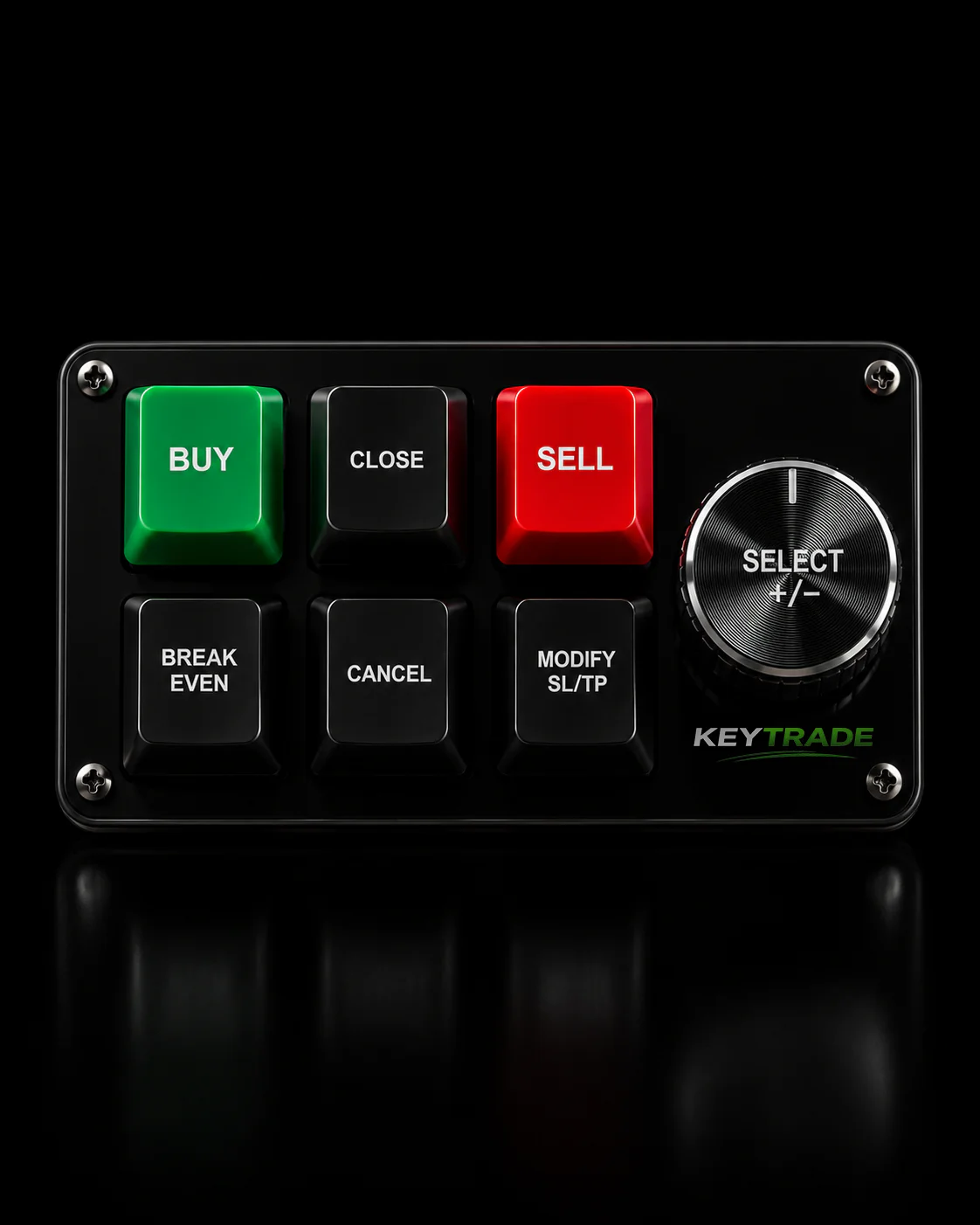
The piece most travel setups skip entirely is dedicated execution hardware. A trading keypad gives you physical one-click buttons for order entry, partial closures, and risk controls instead of routing every action through a mouse click on a software interface, which matters most when a fast market move means the half-second difference between a mouse click and a programmed button actually costs money. Key-Trade’s keypads are built small enough to fit in the Professional or Resilience kit without adding meaningful bulk, and they connect the same way whether you’re at a home desk or a hotel table.
Pro Tip: Pack your keypad and mouse in the same pouch as your charging cables. The single most common “forgot it” item on a trading trip isn’t the laptop. It’s the peripheral that makes execution fast.
How Do You Keep a Trading Connection Alive While Traveling?
Connectivity is where portable setups actually fail, not hardware. Your phone’s hotspot works fine for checking a position. It is not the tool for holding an open scalp trade through a hotel’s shared Wi-Fi network, which is why serious road traders carry a tiered connectivity plan instead of relying on one link.
- Phone tethering for casual checking and non-time-sensitive monitoring.
- A dedicated mobile hotspot with its own data plan or eSIM for day-to-day trading sessions, since it doesn’t compete with your phone’s battery or notifications.
- A multi-carrier failover router for resilience-tier setups, automatically switching between carriers or between Wi-Fi and cellular the instant one connection degrades.
Before you trust any of this with live capital, test the handoff. Open a demo account, disconnect your Wi-Fi mid-session, and time how long it takes your setup to reconnect and confirm order status. Dry-run audits like this catch the majority of problems that would otherwise surface for the first time during a live trade.
Power sizing has one hard number to know: 100Wh is the standard airline-compliant ceiling for carry-on battery packs, so shop for a power bank at or just under that threshold with pass-through charging, meaning it can charge your laptop while itself being charged from a wall outlet overnight. Round out the kit with a compact power strip and a set of short charging cables, since hotel outlets are rarely where you need them.
What’s the Pre-Travel Testing Checklist Before You Leave Home?
Every setup failure on the road traces back to something that could have been caught at home. Run this checklist before you pack, not after you arrive.
- Update every driver and OS patch on the laptop, especially display and USB-C drivers.
- Connect your exact portable monitor and confirm it powers on and displays correctly through the exact cable you’re packing.
- Log into every trading platform you use and confirm two-factor authentication works from the device you’re bringing, not just your usual desktop.
- Simulate a network drop: disconnect Wi-Fi, switch to your hotspot, and time the reconnection.
- Place a small test order on a demo account through your full mobile setup, including the keypad if you’re using one, and log the execution time.
Keep a short written log of these results, timestamped, so you have a reference if something behaves differently on the road. Traders who run this drill quarterly, not just before a single trip, catch software updates and driver regressions before they become a live-trading problem.
Pro Tip: Do the network-drop test at the exact time of day you plan to trade. Hotel and café Wi-Fi congestion varies wildly between 9am and 9pm, and a clean connection at midnight tells you nothing about market open.
What’s the Best Way to Pack a Trading Setup for Travel?
A padded backpack with a dedicated laptop compartment, paired with a small hard case for the monitor and cables, protects your gear better than a single bag stuffed full. The hard case matters most for the portable monitor, since a cracked panel is the single most common travel casualty in this kit.
- Coil and label every cable with a small tag or colored tape, since a tangled bag of identical USB-C cables at 6am is nobody’s idea of fun.
- Wrap the portable monitor in its own padded sleeve, separate from the laptop, and pack it flat against the rigid side of your bag.
- Keep power banks in your carry-on, never checked luggage, both for airline rules and because a lost battery pack means a dead kit.
- Leave the full-size mechanical keyboard and the second monitor at home if you’re on an Essential trip. Adding gear “just in case” is how a light bag becomes a heavy one.
How Do You Replace Extra Monitors With Software?
Hardware only gets you halfway. The rest comes from configuring your platform to work with less screen space than you’re used to. Set up hotkeys for your most common actions, order entry, position close, SL/TP adjustment, so you’re not hunting through menus on a smaller display.
Build two or three saved workspace layouts: one for active trading with your primary chart and order ticket front and center, one for monitoring with a condensed watchlist, and one for research. Switching between them with a single click does more to reduce cognitive load than a second monitor ever will, echoing what simplified travel setups consistently recommend.
- Stage orders in advance when you know a network drop is likely, rather than reacting live.
- Use platform-native two-factor authentication and keep session logs encrypted or stored in a password manager, not a plain text file.
- Capture screenshots of key trades for a short daily journal. Reviewing a week of travel trades against your journal reveals patterns a busy road schedule would otherwise hide.
How Much Does a Portable Trading Setup Cost?
Budget is where kit tier decisions get real. Here’s a rough breakdown by tier, using ballpark USD pricing for new or lightly used gear.
The place to save money safely is the laptop itself. A certified refurbished business laptop with the right specs performs identically to new for trading purposes, and the savings can fund a better power bank or router. The place not to skimp is connectivity and power. A cheap power bank that can’t sustain pass-through charging, or a hotspot with a throttled data cap, will cost you far more in a missed trade than the money you saved buying it.
What I’ve Learned Testing Portable Trading Kits on the Road
The mistake I see most often isn’t a missing gadget. It’s a trader who tested every piece of hardware separately at home, then discovered for the first time in a hotel room that the portable monitor draws more power than the laptop’s USB-C port can supply on battery alone, dimming both screens mid-session. That kind of failure never shows up when you test components one at a time.
Two lessons matter more than any single piece of gear. First, run the full dry-run: laptop, monitor, hotspot, and keypad, connected together, exactly as you’ll use them, before you ever leave your house. Second, treat connectivity as the priority spend, not the laptop. A traveling desk setup with a top-tier laptop and a weak hotspot is still a fragile setup.
Test at home. Trust nothing you haven’t already broken and fixed once.
— key-trade
Add a Trading Keypad to Your Travel Kit
A portable setup gets you back online. A trading keypad gets you back to trading at full speed. Key-trade’s keypads give you dedicated, programmable buttons for one-click order execution, partial closures, and risk controls like break-even and SL/TP adjustment, so you’re not relying on a trackpad and a cramped hotel desk to manage a live position.

The devices are built to travel: compact, durable, and small enough to slide into the same pouch as your charging cables. They integrate with the platforms most road traders already run, including TradingView, MetaTrader 4 and 5, cTrader, NinjaTrader, SierraChart, Thinkorswim, and Tradovate, with more platforms added over time. Setup takes minutes, not an afternoon, and the same keypad works identically whether you’re at your home desk or a hotel table in a different time zone. If execution speed is the piece of your travel kit you haven’t solved yet, check out the Key-trade lineup and pick the model that matches your platform.
Primary Sources and Further Reading
For deeper setup routines, see the traveling trading station guide and The Road Warrior’s gear guide. For testing discipline before going live, read how to test trading strategies for reliable results.
Sources
- How To Set Up A Traveling Trading Station
- Portable Trade Execution Kits for Travelers, 2026
- Field Review 2026: Portable Trading Terminals, Power
FAQ
Can I make $1,000 a day trading from a portable setup?
Daily income from trading depends on account size, strategy, and market conditions, not the hardware you use. A well-tested portable setup removes execution friction, but it doesn’t change the underlying risk of the strategy you’re running.
What is the best setup for trading at home?
A home setup can support more monitors and a fixed power supply, but the same core principles apply: a capable laptop or desktop, reliable internet, and tested hotkeys. A portable rig is a scaled-down version built for resilience rather than maximum screen real estate.
What is the 3-5-7 rule for day trading?
The 3-5-7 rule is a risk management guideline suggesting no single trade risk more than 3% of your account, total exposure across open trades stay under 5%, and winning trades target roughly 7% more profit than losing trades lose. It’s a position-sizing discipline, not a hardware consideration.
What is the best portable monitor for trading?
The best portable monitor is a USB-C powered panel with a native resolution your laptop can drive without an adapter, tested at home with your exact laptop and cable before travel. Driver compatibility varies enough between brands that the “best” one is really whichever one you’ve personally verified works with your machine.
Does a trading keypad actually help on a portable setup?
Yes. A physical keypad removes the extra steps of mousing through a software interface for order entry and risk controls, which matters most during fast market moves when every half-second counts.